How to Set Reverse DNS (rDNS/PTR) on Your VPS
Set the reverse DNS (PTR) of your VPS IP from the panel to improve email delivery. What you need, how to request it and how to check that it works.
To set reverse DNS (rDNS or PTR) on your VPS, first create an A record that points a name such as mail.yourdomain.com to your server's IP. Then open the Network & domain tab in the panel, click Set next to that IP and enter the same name. We check that the name really resolves to the IP before the request is registered, and our team applies it.
Reverse DNS is the name an IP answers with when someone looks it up backwards. It matters mostly for sending email: many providers reject or flag mail from IPs without a matching PTR.
The reverse DNS option is not enabled on every account. If you don't see a Reverse DNS column in the IP addresses card, your service doesn't offer it from the panel yet. Open a ticket and tell us the IP and the name you want.
Before you start
- You need a domain whose DNS you control. If your domain uses SolumeCore DNS, see how to edit DNS records.
- Pick the name you want the IP to answer with, for example
mail.yourdomain.com. It must be a full name with at least one dot. - Create an
Arecord for that name that points to your server's IP. Wait until it resolves (see how to check DNS propagation). If your DNS provider offers a proxy, the record must be DNS only so it shows your real IP. - If the server sends email, make sure its hostname and mail software use the same name. See change the hostname of your VPS.
Check that the record works before you ask for the PTR:
dig +short mail.yourdomain.comIt should print your server's IP.
Request the reverse DNS
- Sign in to the panel and open your VPS.
- Go to the Network & domain tab. The IP addresses card lists the primary IP and any additional ones.
- In the Reverse DNS column, click Set on the IP you want. If it already has a name, the button reads Change.
- In the Reverse DNS for your IP window, type the full name in Name. The panel shows the name must already point to that IP with an
Arecord. - Click Request.
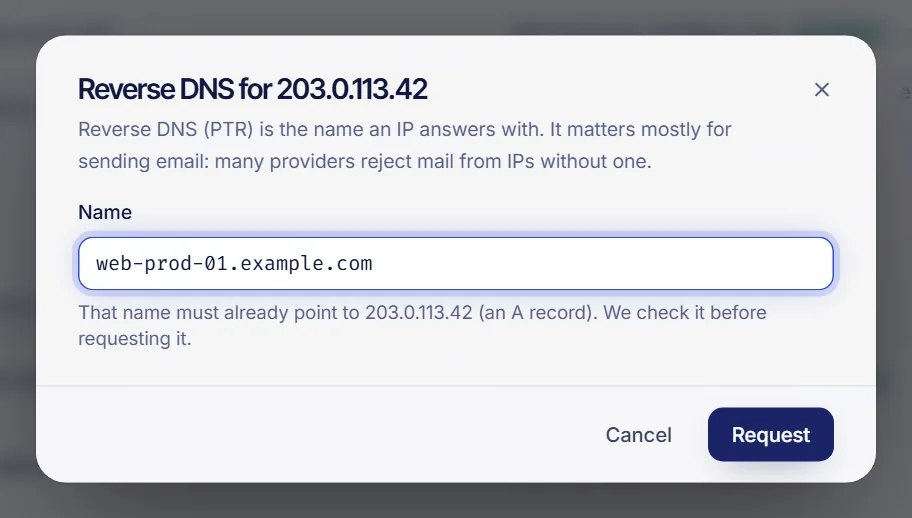
If the name doesn't resolve to that IP yet, the panel refuses the request and tells you so. Fix the A record, wait for it to propagate and try again.
What the status means
| Status | Meaning |
|---|---|
| Pending | Registered and waiting for our team to apply it. You'll be notified once it is applied. |
| Applied | The PTR is active. |
| Rejected | The request was refused. Check that the name points to this IP and request it again. |
A pending request can be withdrawn with Remove request inside the same window. Every IP of the server has its own reverse DNS, so repeat the process for each extra IP. Requests are logged in the Activity tab as "Reverse DNS requested".
Check that it works
Once the status says Applied, test it from your own computer or from the server:
dig -x YOUR_SERVER_IP +shortIt should print your name, for example mail.yourdomain.com.. On Windows you can use nslookup YOUR_SERVER_IP. If the old answer still shows up, wait a little: DNS caches can keep it for a while.
Troubleshooting
- The panel refuses the request because the name doesn't resolve to that IP yet. The
Arecord doesn't exist yet, has a typo, points to another IP or hasn't propagated. Check it withdig +shortand try again later. - I see the status Rejected. Make sure the name resolves to this exact IP and that it is a valid full name, then request it again.
- It stays Pending. Applying is handled by our team and has no fixed time. If it takes unusually long, open a ticket mentioning the IP and the name.
- I can't see the Set button. On a shared server you need the permission to change reverse DNS. The Technician role has it; see sharing VPS access.
- Email is still marked as spam. The PTR is one piece. Also configure SPF, DKIM and DMARC, and make sure your IP has no bad reputation.
FAQ
What is reverse DNS used for?
It lets other servers turn your IP back into a name. Mail servers use it as a trust signal, and some tools show it in logs.
Does reverse DNS affect my website?
No. It only affects what the IP answers when someone looks it up backwards. Visitors never see it.
Can I set different reverse DNS names on each IP?
Yes. Each IP has its own entry in the IP addresses card, and each name needs its own A record.
Why does the panel need the A record first?
Because a PTR that doesn't match a real A record isn't useful for email, and it would let anyone claim a domain they don't control. The panel checks it for you.
Related articles
- Change the hostname of your VPS
- Add an extra IP or more disk to your VPS
- Edit DNS records
- Check DNS propagation
Need a dedicated IP for your mail or app? Explore our VPS plans.