How to Change the Hostname of Your VPS
Change the real hostname of your VPS from the panel without logging in over SSH, and learn how it differs from the name in the panel. Linux and Windows.
To change the hostname of your VPS, open the server in the panel, go to the Operating system tab, type the new name in the System name (hostname) card and click Apply. On Linux the change applies right away and survives restarts. On Windows it is the computer name and applies after the next restart. The server must be on.
The hostname is the name your server uses for itself. It shows in the terminal prompt, in the logs and in the emails the server sends. It is not the same as the name you see for the server in your panel.
Hostname or name in the panel?
| Hostname (system name) | Name in the panel | |
|---|---|---|
| Where you change it | Operating system tab | Settings tab, or Rename in the server menu |
| What it changes | The real name inside the server | Only how the server shows in your panel |
| Needs the server on | Yes | No |
| Allowed characters | Linux: lowercase letters, numbers, dots and hyphens. Windows: up to 15 letters, numbers or hyphens | 3 to 63 lowercase letters, numbers or hyphens |
When you change the hostname, the panel name follows the first part of it (the text before the first dot) as long as that part is a valid panel name. For example, web1.example.com renames the server in the panel to web1.
Change the hostname from the panel
- Sign in to the panel and open your VPS.
- Make sure the server is Online. If it is off, click Start first, because the change is made from inside the system.
- Go to the Operating system tab.
- In the System name (hostname) card, type the new name in Hostname. Letters are lowercased automatically and invalid characters are removed.
- Click Apply.
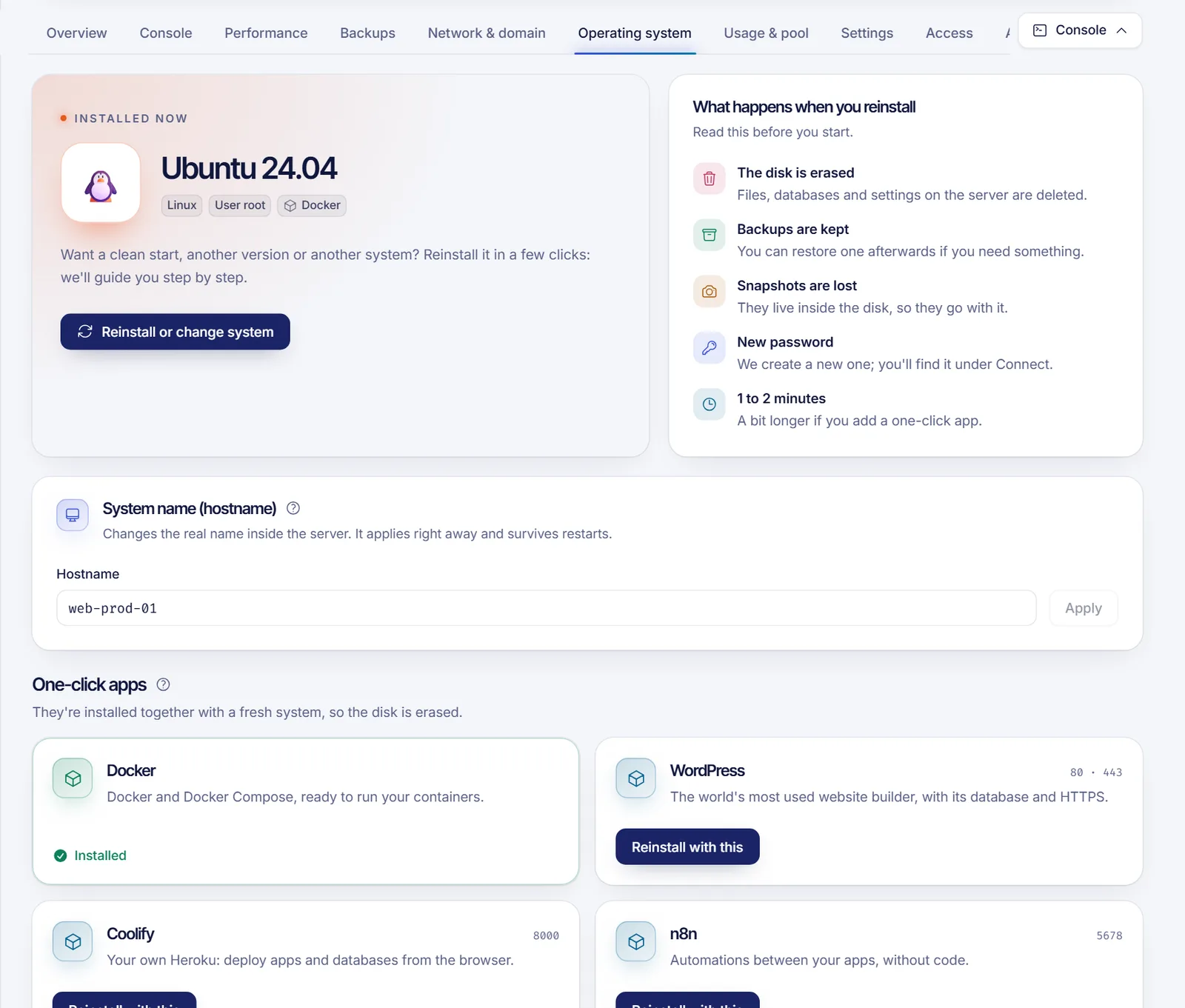
On Linux the panel answers "Done, the system now uses the new name." On Windows it says that Windows picks it up on the next restart, so restart the server when it suits you.
Check the new hostname
Log in over SSH (connect to your VPS) and run:
hostnamectl
hostname -f
If you had an open SSH session, log out and back in to see the new name in your prompt.
On Windows, open PowerShell after the restart and run:
$env:COMPUTERNAMEChange it manually (Linux)
You can also do it yourself over SSH. Replace server1.example.com with your name:
sudo hostnamectl set-hostname server1.example.comThen make sure /etc/hosts maps the name to the machine so tools that look it up don't hang:
127.0.1.1 server1.example.com server1Troubleshooting
- The Apply button is disabled. The name is empty, invalid or equal to the current one, or the server isn't active. Linux names can use letters, numbers, dots and hyphens; Windows names are limited to 15 characters with no dots.
- "Your server must be on to change it." Start the server and try again.
- The panel says the guest agent isn't answering. The change is made through the guest agent that runs inside the server. Check that the server is fully started, that the agent is installed and running, and try again. If you removed it, restore it or ask support.
- The panel says the system rejected the name change. Try a simpler name. If it keeps failing, open a ticket.
- The old name comes back after a reboot. Changes made with the panel survive restarts. If you edit the name manually, use
hostnamectl set-hostnameinstead of editing only/etc/hostname. - I can't find the card. On a shared server you need the permission to rename the service. See sharing VPS access.
FAQ
Does changing the hostname restart my VPS?
No. On Linux it applies immediately with no restart. On Windows it needs one restart to take effect.
Does the hostname affect my domain or DNS?
No. The hostname is local to the server. Your domain's DNS records are managed separately. For email, make sure your mail name, your A record and your reverse DNS all agree.
Can I use an FQDN like server1.example.com on Linux?
Yes. Linux accepts a full name with dots. On Windows the name is limited to 15 characters and cannot contain dots.
Why did the name in the panel change too?
Because the panel follows the first part of the hostname when it is a valid panel name. You can still change the panel name on its own from Settings.
Does reinstalling reset the hostname?
A reinstall keeps the server's name in the panel and creates the system again with it. Set a custom hostname again afterwards if you need a different one.
Related articles
- Set reverse DNS on your VPS
- Reinstall your VPS operating system
- Connect to your VPS over SSH
- Secure your new VPS
Setting up a new server? Browse our VPS plans and name it the way you like.