How to Check DNS Propagation for Your Domain
Check whether your domain already points to your service worldwide, using the four-DNS check in the dashboard and a few commands you can run yourself.
To check DNS propagation in SolumeCore, open Domains in the dashboard, click your domain and look at the Propagation and certificate section. The dashboard asks four public DNS servers which address they see for your domain and tells you how many of them already see the new one. If all four agree, your change has reached the world.
What "propagation" means
When you change a DNS record, the change is saved at your DNS provider right away, but every other network keeps a cached copy of the old answer until it expires. That cached copy is why one person can already see your new server while another still sees the old one. The time a copy is kept is the record's TTL (time to live).
In practice, nameserver changes usually show up in under an hour and can take up to 24 hours. Record changes inside a zone are normally faster, especially with a short TTL.
Check propagation from the dashboard
- Sign in to the SolumeCore dashboard and open Domains in the left menu.
- Click the row of the domain you want to check. A side panel opens.
- Scroll to Propagation and certificate. The check starts on its own; click Check again to repeat it any time.
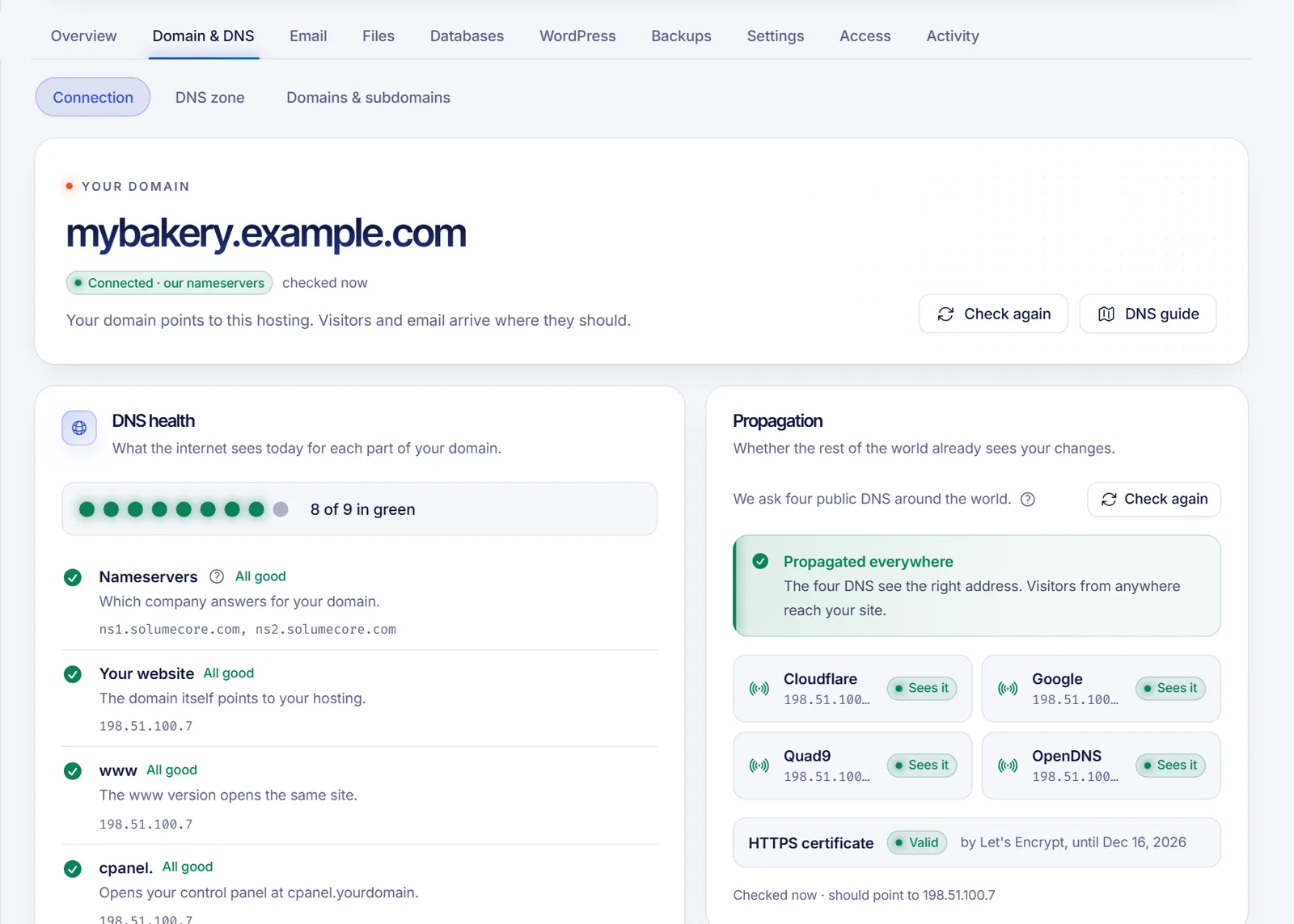
If the domain belongs to a web hosting, you can also open the hosting, go to Domain & DNS and use the Propagation card in the Connection section. It is available once you have connected your own domain, not for the temporary address.
How to read the result
The banner at the top summarizes it:
| Banner | What it means |
|---|---|
| Propagated everywhere | The four DNS servers see the right address. Visitors from anywhere reach your service. |
| N of 4 DNS see it | It is on its way. Some people already reach the new address and others still get the old one. Wait and check again. |
| Nobody sees it yet | No public DNS answers for this domain yet. If you just changed it, give it time (up to 24 hours). |
Below the banner there is one row per DNS server (Cloudflare, Google, Quad9 and OpenDNS) with the address it returned, and a label:
- Sees it: it returns the address your service should have. The panel shows that address at the bottom, after should point to.
- Other address: it still returns a different address, usually the old one from the cache.
- Nothing: it returned no address. The row explains whether there is No record or it Didn't answer.
For websites and apps there is also an HTTPS certificate row: Valid (with the issuer and the expiry date), Not valid, No HTTPS or Not checked. A certificate is normally issued after the domain points correctly, so give it a few minutes.
The dashboard only checks domains that belong to your account, and it looks at the domain's address (the IPv4 A record). It does not show MX, TXT or SRV records, so use the commands below for those.
Check it yourself with commands
Querying a specific public DNS server skips your own cache, which is the quickest way to know what the rest of the world sees. Replace example.com with your domain.
# Address (A record) as seen by Cloudflare and Google
dig +short example.com A @1.1.1.1
dig +short example.com A @8.8.8.8

# Other record types
dig +short example.com NS
dig +short example.com MX
dig +short example.com TXT
dig +short _minecraft._tcp.play.example.com SRV# Address (A record) as seen by Cloudflare and Google
Resolve-DnsName example.com -Type A -Server 1.1.1.1
Resolve-DnsName example.com -Type A -Server 8.8.8.8
# Other record types
Resolve-DnsName example.com -Type NS
Resolve-DnsName example.com -Type MX
nslookup -type=SRV _minecraft._tcp.play.example.com 8.8.8.8If the public servers show the new value but your browser still opens the old site, the old answer is cached on your own computer or network.
Clear your local DNS cache
ipconfig /flushdnssudo dscacheutil -flushcache; sudo killall -HUP mDNSResponderresolvectl flush-cachesAlso close and reopen the browser, or try a private window or another device on mobile data.
Troubleshooting
Nobody sees the new address after several hours
Open the DNS settings where the domain is managed and confirm the change was saved. If you changed nameservers, make sure only the ones shown in the dashboard are listed. If the records live at a provider such as Cloudflare, check them against the values in the dashboard.
Some DNS servers see another address
That is normal while the change spreads. Wait for the old TTL to expire and press Check again. If one server never updates, the record may have been entered twice with different values: delete the extra one.
It shows an orange cloud warning
The domain goes through Cloudflare's proxy. Switch the record to DNS only (grey cloud) so the dashboard can verify it and issue the certificate.
The address is right but the certificate is not valid
The certificate is requested after the DNS points to your service. Wait a few minutes and check again. If it persists, open the service with Manage in the domain panel and review its domain settings.
FAQ
How long does DNS propagation take?
Usually less than an hour, and up to 24 hours in the worst case. It depends on the TTL of the old record and on how long each network caches answers.
Can I speed up DNS propagation?
Not on other people's networks. Before a planned change you can lower the TTL of the record a day in advance, and after the change you can clear your own cache to see it sooner.
Why does the dashboard say it is propagated but my browser shows the old site?
The dashboard asks public DNS servers directly, so your browser or router is probably holding a cached copy. Clear your DNS cache, restart the browser or try another device.
Can I check a domain that is not in my account?
Not from the dashboard. For any other domain, use the commands above or a public DNS lookup tool.
Related articles
- What the Domains page shows and what it does not
- Edit DNS records from the dashboard
- Connect a domain to a SolumeCore service
- Point a domain to your web hosting
Running a website or an app on your own domain? Take a look at SolumeCore web hosting.