How to Change the SSH Port on Your VPS Without Lockout
Change your VPS SSH port step by step without losing access: open the new port, edit sshd, then update the panel firewall and the web console.
To change the SSH port of your VPS, first allow the new port in every firewall, then make SSH listen on both the old and the new port, test the new one from a second terminal, and only then remove port 22. After that, update the panel so its Firewall and its web console know the new port. Done in this order, you never lose access.
Before you start
- Pick a port between 1024 and 65535 that nothing else uses, such as
2222or49222. The examples below use2222. - Be connected over SSH and keep that session open until the end.
- Know how to open the Screen console from the panel, in case something goes wrong (VPS VNC console).
- Changing the port reduces noise from bots in your logs. It is not a replacement for keys and fail2ban; see Secure your new VPS.
Step 1: Allow the new port in the firewalls
Inside the server
sudo ufw allow 2222/tcpsudo firewall-cmd --permanent --add-port=2222/tcp
sudo firewall-cmd --reloadIn the panel: if your protection level is Strict, open the port: Firewall, Create rule, Open a port, type 2222, protocol TCP. In the other levels the port already answers, but listing it improves inspection. See How to open a port in your VPS firewall.
Step 2: Make SSH listen on both ports
Create a configuration file that keeps 22 and adds 2222:
sudo tee /etc/ssh/sshd_config.d/00-port.conf <<'EOF'
Port 22
Port 2222
EOF
sudo sshd -t
If sshd -t prints nothing, the syntax is valid. Then apply the change for your system:
sudo systemctl restart sshsudo systemctl daemon-reload
sudo systemctl restart ssh.socket
sudo systemctl restart sshsudo dnf install policycoreutils-python-utils -y
sudo semanage port -a -t ssh_port_t -p tcp 2222
sudo systemctl restart sshdOn Ubuntu versions without ssh.socket (such as 20.04), just run sudo systemctl restart ssh. On AlmaLinux and Rocky, SELinux must be told that SSH may use the new port, which is what semanage does.
Check that the server listens on both ports:
sudo ss -tlnp | grep -E ":22 |:2222 "On Ubuntu, newer versions start SSH on demand through ssh.socket. If the output shows only port 22, run sudo systemctl disable --now ssh.socket and then sudo systemctl enable --now ssh, and check again.
Step 3: Test the new port
Open a new terminal (do not close the old one) and connect with -p:
ssh -p 2222 [email protected]In PuTTY, change Port to 2222. If it connects, continue. If it does not, go back to the old session, review steps 1 and 2 and read What to do if you can't connect to your VPS.
Step 4: Update the panel
- Firewall: open the Firewall page, choose your server, go to the Rules tab and find Where your services listen. Click Change next to SSH, enter
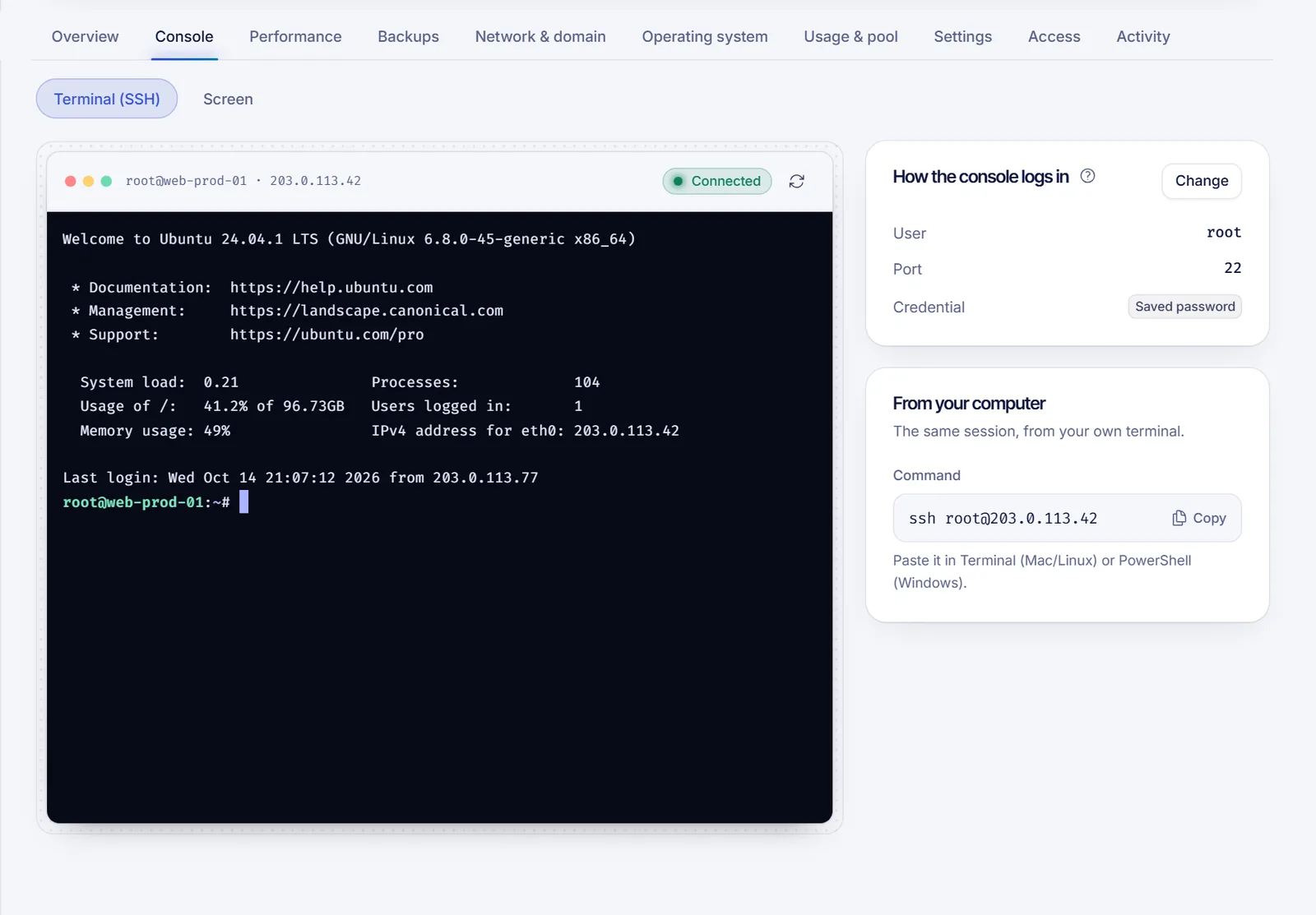
2222and Save. This only tells the firewall; it does not move SSH. Without this, the SSH guard keeps watching the old port. - Web console: open your server, Console tab. In How the console logs in, click Change, set Port to
2222and click Save. Without this the web terminal tries port 22 and fails. - The From your computer card now shows the command with
-p 2222.
Step 5: Remove port 22
When everything works on 2222, edit /etc/ssh/sshd_config.d/00-port.conf and leave only:
Port 2222Apply it with the same restart commands as before (on Ubuntu, daemon-reload and then restart ssh.socket). Test again with ssh -p 2222 .... Finally, close the old port in the firewall inside the server (sudo ufw delete allow 22/tcp).
Only remove port 22 after you have logged in on 2222 from a separate session. If you get locked out, use the Screen console to log in and restore Port 22 in the file.
Troubleshooting
- Connection refused on 2222: SSH is not listening there yet. Check with
ss -tlnpand review the restart step for your system. - Connection timed out on 2222: a firewall blocks it. Review step 1, including the Strict mode of the panel.
- The web console fails after the change: the Port in How the console logs in still says 22.
- On AlmaLinux or Rocky, SSH fails to restart: you probably skipped the
semanagecommand.
FAQ
Is it safe to change the SSH port?
Yes, if you keep your current session open and test the new port before removing the old one.
Does changing the SSH port make my VPS more secure?
Only a little: it avoids most automated scans. Use SSH keys, disable password login and add fail2ban for real protection.
Which SSH port should I use?
Any free port between 1024 and 65535. Avoid well-known ports used by other services.
Do I need to tell the panel the new port?
Yes. Update the SSH port in the Firewall rules and in the web console settings, or they will keep using 22.
How do I connect on a custom port?
Add -p to the command, as in ssh -p 2222 root@IP, or change the Port field in PuTTY.
Related articles
- How to connect to your VPS via SSH
- Secure your new VPS
- How to open a port in your VPS firewall
- VPS web SSH console
Looking for a server you can configure freely? See our VPS plans.