Server Locations: Where Is My SolumeCore Service?
Find out how to see where your server is located, how to pick the best location using the ping measured in your browser, and what to do to change it later.
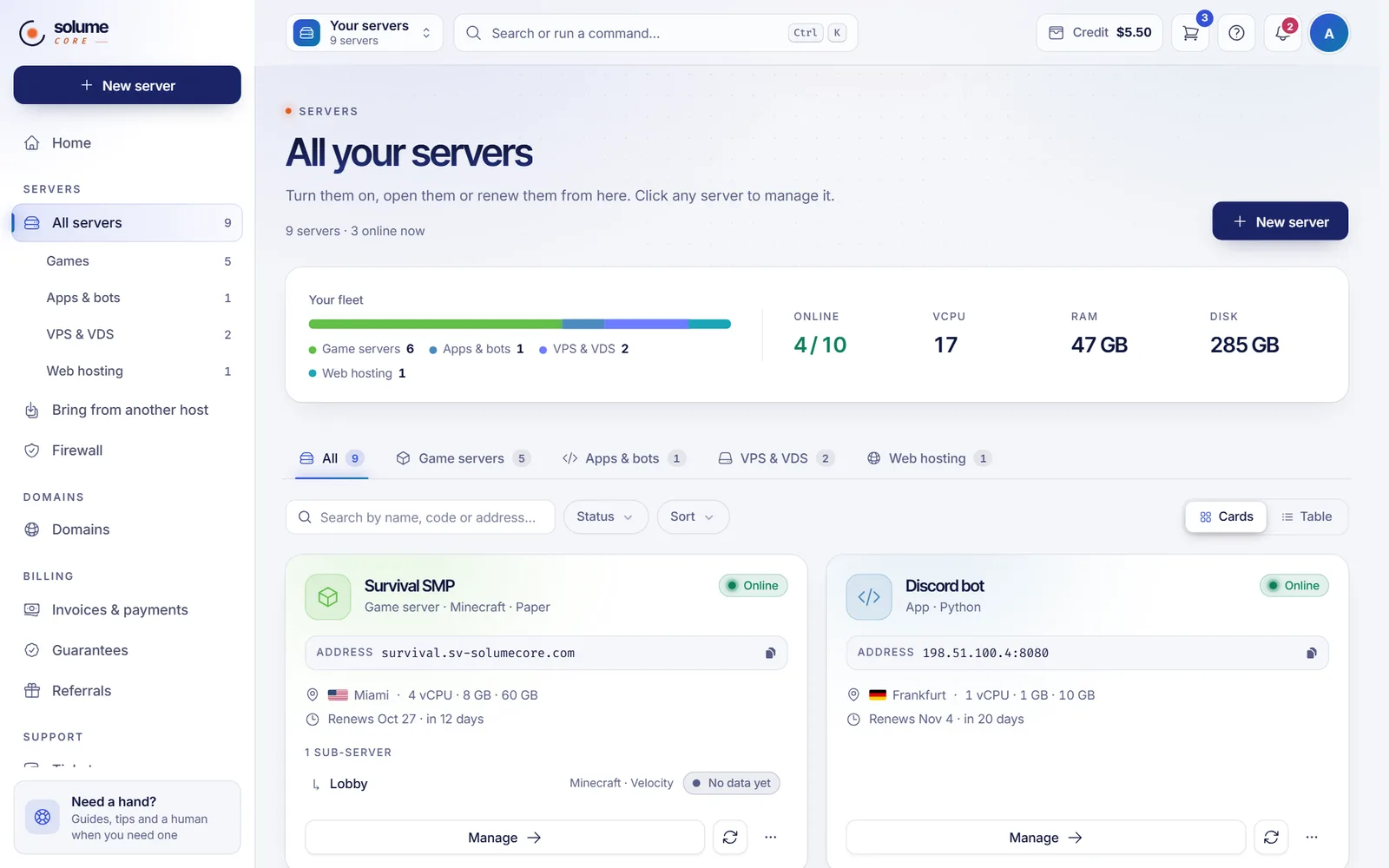
Every SolumeCore service runs in one location, shown in the dashboard as a country flag and a city name, and you choose it when you order. To see where a service is, look at its card in your server list or at the Location line of its summary. To pick a better one, use the location selector in the plans catalog, which measures the ping from your own browser and recommends the closest option.
Why the location matters
The closer a server is to the people who use it, the lower the latency:
- Game servers: players near the server get less lag. Choose the location closest to most of your players.
- Websites and apps: visitors load pages faster when the server is near them.
- VPS and VDS: pick the location that suits your users, your other services or the regulations that apply to you.
The locations on offer, and which plan types are sold in each one, are decided by SolumeCore and change over time. That is why this guide does not list them: the catalog always shows the current ones.
See the available locations and choose one
- Open the plans page of the site, or the page of the product you want, such as VPS, web hosting or game hosting.
- Use the location selector. It shows a flag, the city name and the ping next to each location.
- Look for the recommendation. The catalog highlights the location with the lowest ping for you and marks it as Best for you, or best next to its name. The measurement is made in your browser and refreshes on its own every few minutes. A location without a measurement simply shows no ping.
- Choose the location and then the plan. The price shown is always the final price for the location you picked.
The Locations section of the site also shows every location on a map, sorted by latency, with a Measure again button if you want a new measurement and a link to see the live network status.
The ping is an estimate measured from your browser to a test address of each location. It is a good guide to compare locations, but it is not exactly the number a game or a ping command in a terminal would give.
Locations marked "Coming soon"
A location can appear as Coming soon, sometimes with an estimated number of days. If pre-sale is open for it, the button says Reserve instead of Choose: you pay now and the service activates automatically, with a notice, as soon as the location is ready.
Find where your service is located
- Sign in to the dashboard and open All servers.
- In the list, every server shows a flag and the name of its location, both in the cards and in the table view.
- Open the server. The location also appears in its header and, for a VPS, in the Location line of the plan summary.
Can I change the location of a service?
The dashboard does not have a button to move an existing service to another location. What you can do:
- Change plan within the same location. Upgrades and downgrades keep the server where it is. A plan from another location is not offered as a downgrade (the reason shown is Different location).
- Order a new service in the location you want and move your data. Download your files or a backup from the old one and upload them to the new one. See Back up and restore your web hosting, Create, restore and download game server backups and Back up a VPS.
- Ask us. Open a ticket and tell us what you need; we will tell you the options for your case.
Troubleshooting
The ping of a location does not show
That location does not publish a test address, or your browser could not reach it. Try Measure again. Ad blockers and strict privacy settings can also block the measurement.
The best location according to the catalog is not the one my players use
The ping is measured from your own connection. If your players are in another region, choose the location by where they are, not by your ping.
The location I want is not available
It may be out of stock for that plan type or not open yet. Write to us through a ticket and we will let you know when it opens.
FAQ
Where are SolumeCore servers located?
In the locations listed in the plans catalog of the site. They are managed by SolumeCore and the list can change, so check the catalog for the current ones.
Does the price change by location?
It can: each location has its own network and power cost. The catalog always shows the final price of the location you selected.
How do I know the best location for a game server?
Choose the one closest to most of your players. If you are unsure, compare the pings in the catalog from different places or ask your community to test.
Is DDoS protection available in every location?
The dashboard states that every SolumeCore server comes with DDoS protection included. Which firewall panel you see can depend on where your server runs. See Firewall and DDoS protection for how to manage it.
Related articles
- Firewall and DDoS protection
- Service status page
- Upgrade your VPS plan
- Upgrade your game server plan
Ready to choose where to host? Compare locations and plans on the SolumeCore plans page.