Support Ticket Statuses Explained: Solved vs Closed
What each ticket status means (received, waiting on you, waiting on us, solved, closed), when a ticket closes by itself and how to reopen it.
Every SolumeCore ticket has one of five statuses: Received, Waiting on us, Waiting on you, Solved or Closed. The status tells you whose turn it is. Only Waiting on you needs something from you, and a ticket that sits there for too long is closed automatically.
You see the status as a colored badge next to the ticket subject, both in the list and at the top of the conversation. Open your tickets from Tickets in the dashboard menu.
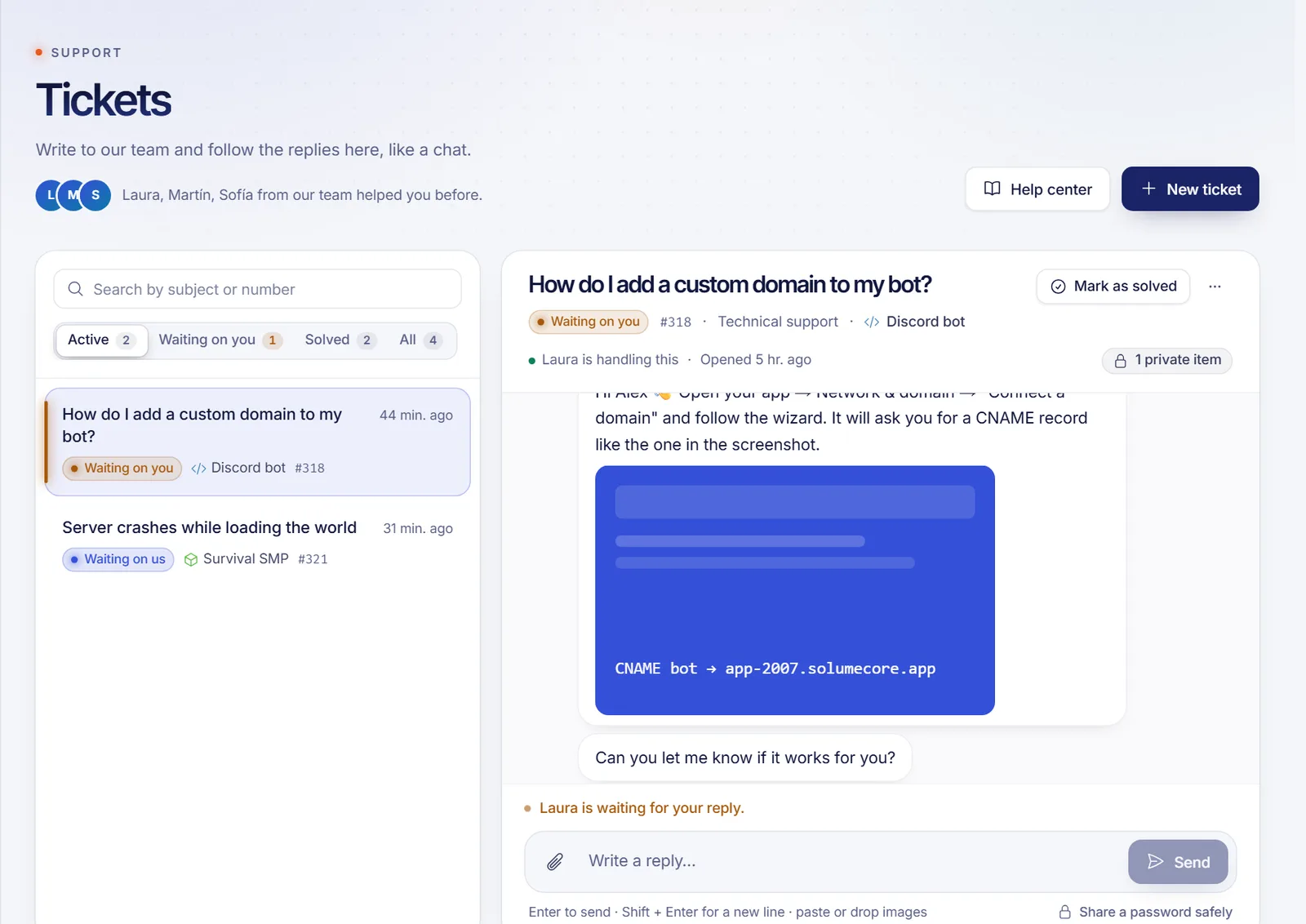
The five statuses
| Status | What it means | What to do |
|---|---|---|
| Received | Your ticket arrived and is in line for someone on the team. | Nothing. You can add more details by replying. |
| Waiting on us | You wrote last. The team has to answer. | Nothing; we will reply here. |
| Waiting on you | The team replied and needs something from you: an answer, a detail, a test. | Reply in the ticket. |
| Solved | The ticket was marked as solved, by you or by our team. | If it is really fixed, nothing. If not, reply or click Reopen. |
| Closed | The ticket was closed. This usually happens when it waited on you for too long. | Reply to open it again if you still need help. |
At the top of the conversation you also see who is handling the ticket, or a note that it is in line for the next person on the team.
How a ticket moves between statuses
- You send the ticket and it starts as Received.
- Our team replies, and it changes to Waiting on you.
- You reply, and it changes to Waiting on us.
- This goes back and forth until the problem is fixed and the ticket is marked Solved.
When our team marks a ticket as solved, we also send you an email telling you so.
When does a ticket close by itself?
If a ticket stays in Waiting on you and you do not answer, it is closed automatically after 5 days by default. A daily check does this, so the ticket may close a few hours after the fifth day. A reply from you before that keeps it open.
You are not locked out when that happens. A closed ticket can be reopened any time, as explained next.
How to reopen a ticket
You have two ways, and both work for Solved and Closed tickets:
- Reply. Write a message in the conversation and send it. A solved ticket goes to Waiting on us, and a closed one goes back to Received.
- Reopen. Click Reopen at the top of the ticket (on a phone, open the More actions menu). The ticket goes back to Received.
If the problem comes back a week later, replying in the old ticket keeps the whole history in one place, so we do not start from zero.
Mark a ticket as solved yourself
If you fixed the problem on your own, or our answer worked, click Mark as solved at the top of the ticket. It lets us know you are done, and you can still reopen it later.
Find tickets quickly
The list on the Tickets page has four filters:
- Active. Received, waiting on us and waiting on you. Opens by default when you have any.
- Waiting on you. Only the tickets that need your reply. These also appear first in the list, and on Home they are flagged so you do not miss them.
- Solved. Solved and closed tickets.
- All.
You can search by subject or by ticket number. Use Copy link in the More actions menu to share a ticket's address with yourself or a colleague on your account.
FAQ
What is the difference between solved and closed?
Solved means the problem was marked as fixed, by you or by us. Closed means the ticket was shut, usually because it was waiting on you for too long. Both can be reopened by replying.
Why did my ticket close without me doing anything?
It was in Waiting on you for 5 days (the default) without a reply from you. Reply to it and it opens again.
Can I reopen a closed ticket?
Yes. Reply in the ticket or click Reopen. You do not need to create a new one.
Does "Waiting on us" mean nobody is working on it?
It means you wrote last and the next move is ours. A person on the team will read it and reply in the same conversation. The urgency you chose helps us decide what to look at first.
Related articles
- How to open a support ticket
- How to share a password with support safely
- Notifications and alert sounds
If you are still choosing a service, take a look at our plans and write to us if anything is unclear.