Install Plugins and Mods on Your Minecraft Server
Install plugins and mods on your Minecraft server from the panel in one click, or upload them by hand to the right folder. Includes updates and fixes.
To install plugins or mods on your Minecraft server, open the Plugins & mods tab in the panel, search for what you want, click Install and restart the server. The panel already filters the catalog for your Minecraft version and puts each file in the right folder. If you have a .jar file from somewhere else, you can upload it by hand.
Plugins or mods: which one does your server load?
It depends on the server software you run:
| You run | It loads | Folder |
|---|---|---|
| Paper, Spigot, Purpur, Pufferfish, Folia | Plugins | plugins |
| Fabric, Forge, NeoForge, Quilt | Mods | mods |
| Vanilla | Datapacks only | the world's datapacks folder |
Proxies such as Velocity and BungeeCord have no world of their own, so install your gameplay plugins on the servers behind them.
Plugins add commands and features only on the server, so players join with a normal Minecraft. Mods can change the game itself, and usually every player needs the same mods installed too.
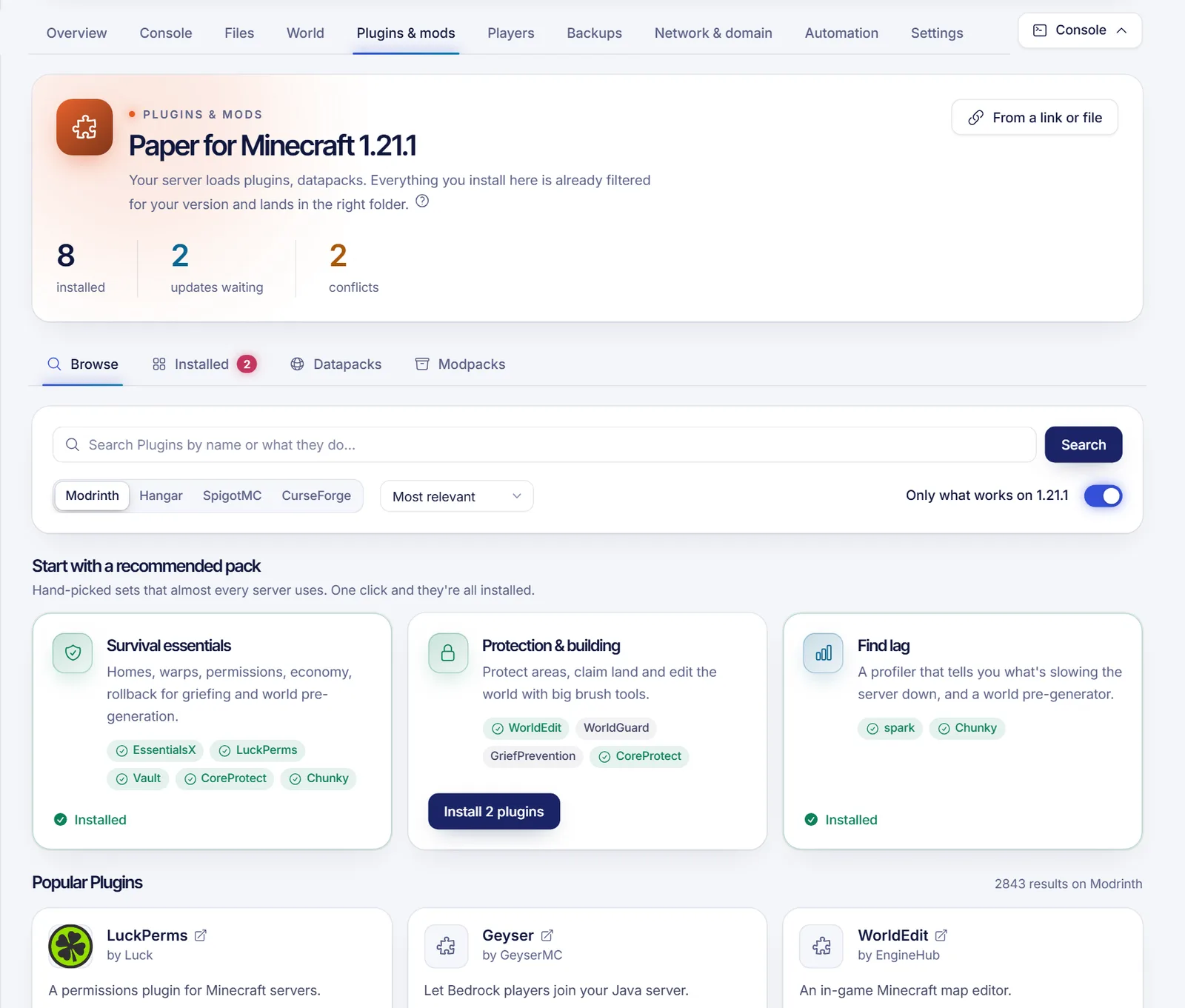
The header of the Plugins & mods tab tells you what your server loads, for example "Paper for Minecraft 1.21". If you chose the wrong software, read how to change your server version or type.
Install from the panel
- Sign in to the SolumeCore panel, open your server and go to Plugins & mods.
- Stay in the Browse tab. The popular items are listed first, and a few recommended packs (for example survival essentials or protection tools) install several plugins in one click.
- Type a name in the search box, such as
EssentialsXorLithium, and press Search. Use Sort by to order by most downloaded or recently updated. - If more than one catalog is available, switch between them with the buttons above the results. Modrinth is always the first one. Hangar, SpigotMC and CurseForge can appear when they are enabled for your server.
- Leave the switch Only what works on (followed by your Minecraft version) turned on, so you only see files that match your version.
- Click Install on the one you want. Pick the version if you do not want the recommended one.
- If the plugin needs other plugins to work, the panel lists them under It needs these to work. Tick Also install the missing ones.
- Restart the server so it loads the new files.
Some CurseForge authors do not allow downloads from third parties. Those versions appear as unavailable. Download them from the author's page and upload the file by hand instead.
Install a file you already have
If the plugin or mod is not in the catalogs (a private plugin, a beta, something a friend sent you), click From a link or file at the top of the tab.
- Choose Link and paste a direct link that ends in
.jaror.zip. The server downloads it, not your browser. - Or choose File and drop a
.jaror.zipof up to 100 MB. For bigger files, use SFTP.
The dialog tells you which folder it goes to, and then you restart.
Upload it manually
You can also do it yourself in the Files tab:
- Open the
pluginsfolder (ormodsfor a mod loader). If it does not exist yet, start the server once so it is created. - Click Upload and choose the
.jarfile. Do not unzip a plugin's.jar. - Restart the server.
Always download from the author's official page. A plugin has full control over your server.
Check that it loaded
- Open the Console tab and look at the startup lines. A working plugin usually prints a line saying it is enabling.
- On Paper, Spigot and Purpur, type
pluginsin the console. Working plugins show in green, and failed ones in red. - For mods, join the server with the same mods installed on your client.
Keep everything updated
The Installed tab lists what you installed from the panel, with its version and source. When newer versions exist for your Minecraft version, the tab shows how many updates are ready. You can Update all, and tick Back up first so you can go back with one click if something breaks. To remove a plugin or mod, click Uninstall. That deletes the file but keeps its configuration folder, in case you install it again.
The tab also warns you about conflicts: a missing requirement, two incompatible items, two that do the same job, or a client-only mod that can stop the server from starting.
Datapacks and modpacks
- Datapacks change the world without mods and live in each world's
datapacksfolder. Add one from Modrinth or upload a.zipin the Datapacks tab. Reload them with/reloador restart. - Modpacks are ready-made bundles of mods. The Modpacks tab can install one, but it switches the server to the pack's loader and reinstalls it. Your world is kept, but make a backup first.
Troubleshooting
- The plugin does not load. Check the version. A plugin made for another Minecraft version often fails. Look at the console for the error and for missing dependencies.
- The server does not start after installing a mod. A client-only mod is the usual cause. Uninstall it from the Installed tab, or remove its
.jarin Files. - Nothing appears in the Browse tab. Your software may be a proxy or a limbo server, which do not take plugins. See the note in the tab.
- A mod installed but players cannot join. On Forge, Fabric and NeoForge servers, players need the same mods. Share the list or build a player pack.
- You reached the limit. The panel tracks up to 300 items installed from it. Remove what you do not use.
FAQ
Where do I put plugins on a Minecraft server?
In the plugins folder. If you use the panel, it does it for you. Mods go in mods.
Do I have to restart the server after installing a plugin?
Yes. Most plugins load at startup. Restart from the power buttons at the top of the server page.
Can I use Forge mods on a Paper server?
No. Paper loads plugins and Forge loads mods. To switch, change the server software in Settings > Version & installer, but your existing plugins or mods will stop working.
Do players need to install the plugins?
No, plugins run only on the server. Mods, on the other hand, usually have to be installed by players as well.
Related articles
- Change your Minecraft server version or type
- Use the game server file manager
- Fix lag and low TPS on your Minecraft server
- Back up and restore your game server
Want a server with enough RAM for a big modpack? See our Minecraft server plans.