How to Join Your Game Server (Minecraft Java & Bedrock)
Copy your server address from the panel and join your Minecraft Java, Bedrock or other game server in minutes. Steps, ports and fixes for common errors.
To join your game server, copy its address from your SolumeCore panel and paste it into your game's server list or direct-connect screen. For Minecraft Java that is Multiplayer → Add Server; most other games ask for the same address with its port. Your server must be on for anyone to connect.
Before you start
- Sign in at dashboard.solumecore.com and open Game servers, then your server.
- Make sure it is running. If the status next to its name says Offline, press Start in the power bar.
- Players do not need a SolumeCore account: they only need the address you give them.
Find your server address
You can copy the address from two places:
- On your server's page, the address appears under the server name. Press Copy address.
- Press Connect in the header. The How to connect panel opens with everything you need to play: look under To play for Server address and copy it with one click.
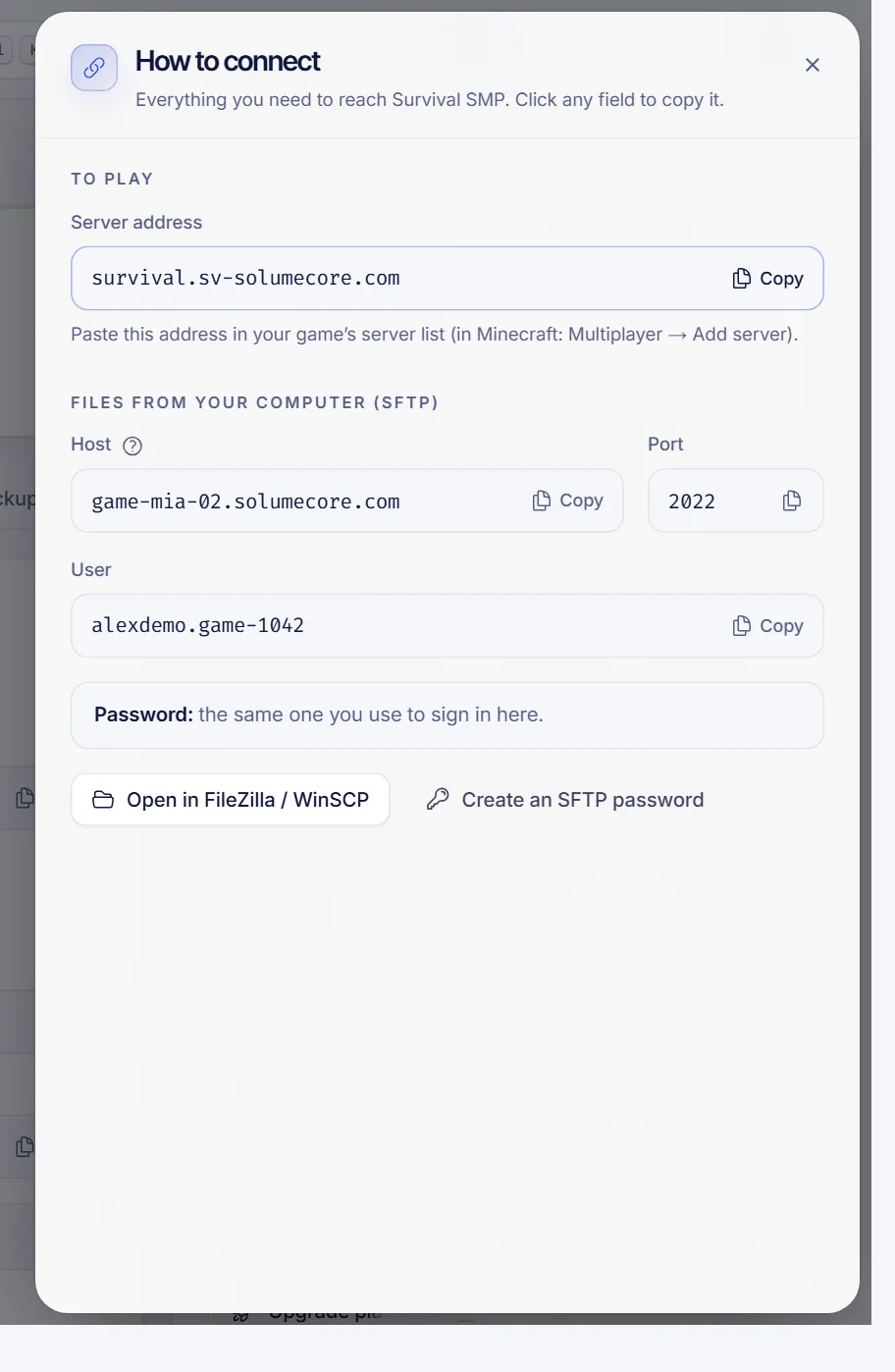
The address comes in one of two shapes:
| What you see | What it means |
|---|---|
A name, such as my-server.example.com |
Players type only the name. No port is needed for Minecraft Java. |
Numbers with a colon, such as 203.0.113.10:25565 |
An IP address and the port. Type both exactly as shown. |
If your server has a name address and it is not working yet, the Network & domain tab (section Ports & domain) shows its status (Published, Publishing the name or Name not published yet). Under Numeric address you always have the IP and port version, which works at any time. Name addresses are only available when they are enabled for your service.
Join a Minecraft Java server
- Open Minecraft Java Edition and pick a version that matches your server.
- Go to Multiplayer and press Add Server.
- Give it any name in Server Name.
- Paste the address in Server Address.
- Press Done, select the server and press Join Server.
If the address is a name, paste only the name. If it has a port (:25565 or any other number), paste it complete, port included. The default Minecraft port is 25565, but your server may use another one, so always trust the panel.
To check which Minecraft version your server runs, open the Settings tab and go to Version & installer. Players on a much older or newer client will see a version mismatch message.
Join from phones, consoles and Windows (Bedrock)
Minecraft Bedrock does not read the records that let Java players skip the port, so Bedrock players type the address and the port in separate boxes.
If your server runs Minecraft Java, you can open it to Bedrock players with one click:
- Open the Network & domain tab and go to Add-ons.
- In Phones and consoles, press Install and choose Geyser + Floodgate.
- Restart the server. The panel can ask for a second restart before it shows Configured.
- The card then shows Address for Bedrock players and a port. An extra port is reserved for this and it does not count against your plan's ports.
In Bedrock, go to Play → Servers → Add server, enter the address in the address box and the port in the port box. This needs a server that can load plugins or mods, such as Paper or Fabric.
Join other games
Servers for games such as Rust, Palworld, Terraria or Valheim do not use the Minecraft name system, so you always join with the address and the port.
- Open your server's Overview (the same card is also in the Network & domain tab). The How players connect card shows the Address, the Game port and, when the game uses one, the Query port.
- Use the address with the game port in the game's direct connect or "join by IP" option. For example, in Rust you can open the console and type
client.connect 203.0.113.10:28015, replacing the example with your own address. - If a ports list is shown under Extra ports, check that none says not open. If one does, press Set up ports and restart the server. Your plan must have room for the extra ports.
The Query port is the one server browsers use to list a server, while the game port is the one players actually play on. Some games require both to be open.
Troubleshooting
- "Can't connect to server" or timeout. Check that the server is running and that you copied the address with its port. Try the numeric version of the address from Ports & domain.
- The server is Sleeping. If hibernation is on, a server with nobody online sleeps and wakes up by itself when a player joins, usually in under a minute. The first attempt may fail: try again after a few seconds. See how hibernation works.
- The server turns on and off by itself. Minecraft does not start until the EULA is accepted. See Minecraft server won't start.
- "You are not whitelisted on this server". The whitelist is on and your name is not on it. See whitelist and operators.
- Version mismatch. Join with a client version that matches the server, or ask the owner to change the version.
- Works at home but not at school or work. Some networks block game ports. Try another connection, such as a mobile hotspot.
FAQ
What is the IP address of my Minecraft server?
It is on your server's page: press Connect and copy Server address. It may show as a name or as an IP with a port, such as 203.0.113.10:25565. Both work.
Do I need to type the port to join?
Not if the address is a name and you play Minecraft Java. In every other case, type the port after a colon exactly as the panel shows it.
Why can't my friend join but I can?
Usually it is the version, the whitelist or a typo in the address. Ask them to copy the address straight from you, check that they use a compatible client and see whether the whitelist is on.
Can I use my own domain instead of the IP?
Yes, if your service offers it. See use a custom domain for your game server.
Related articles
- Minecraft server won't start
- Use a custom domain for your game server
- Minecraft whitelist and operators
- Game server hibernation
Want a server your friends can join in minutes? Take a look at Minecraft server hosting at SolumeCore.