Game Server Hibernation: What It Is and How to Use It
Learn how hibernation works on your Minecraft or other game server: it sleeps when empty and wakes up when someone joins. Set it up from the panel.
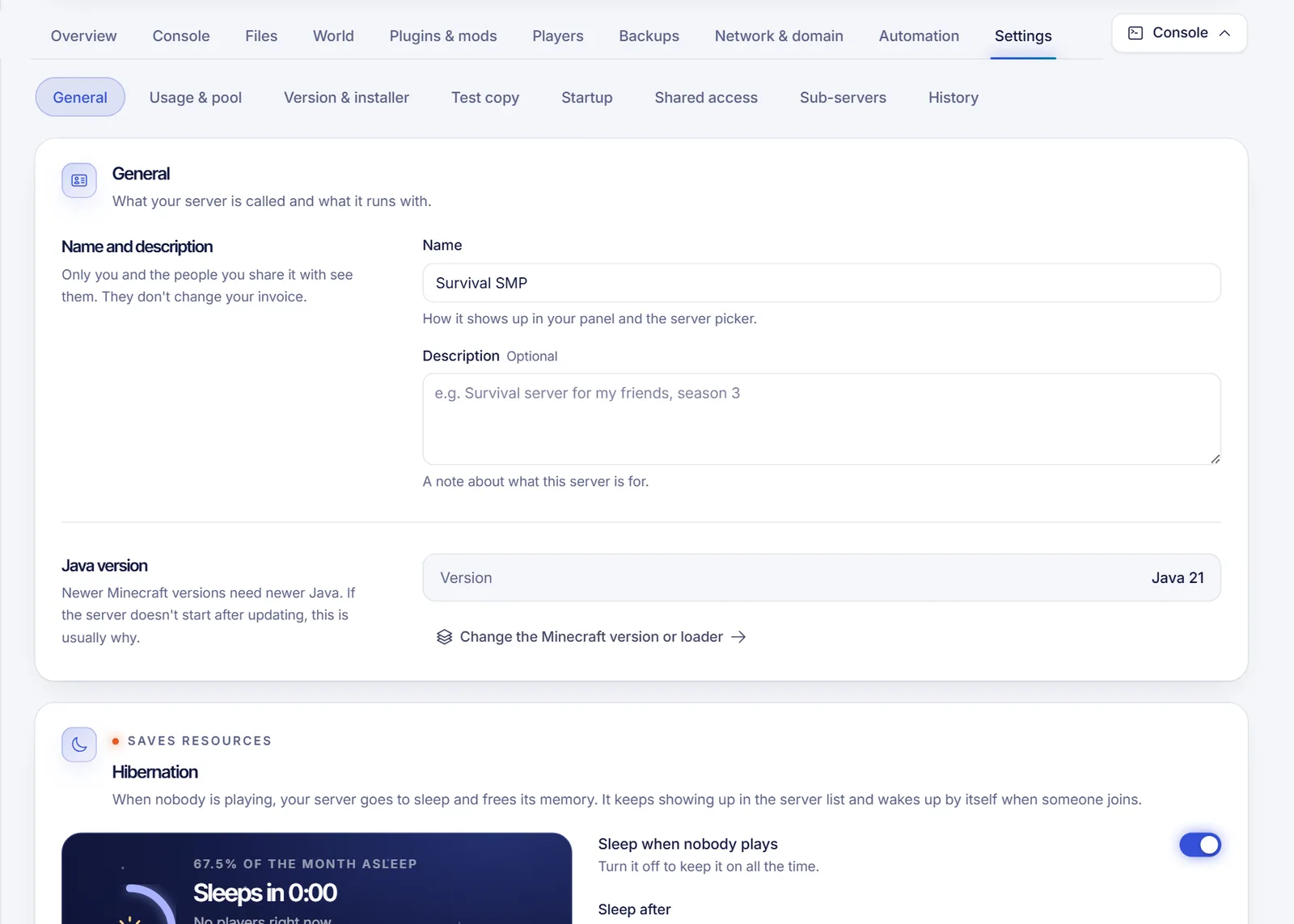
Hibernation puts your game server to sleep when nobody is playing and wakes it up automatically when someone joins. While it sleeps, the server saves the world and frees its memory, but it still shows up in the server list, so your players can find it and join as usual. You manage it from Settings → General → Hibernation in your SolumeCore panel, if your plan includes it.
What happens when a server hibernates
- Nobody has played for the number of minutes you chose. The server saves the world and goes to sleep.
- In the Minecraft Java server list, the server keeps appearing with a message such as "Sleeping, join to wake it up", so players know what is happening.
- When someone joins, the server wakes up. It usually takes a few seconds, and the panel estimates it from the last wake-up. The player may need to try joining again after a moment.
For Minecraft Bedrock, other games and apps, the first connection wakes the server up the same way.
Is hibernation available on your plan?
It depends on your plan. The card Hibernation tells you which case applies:
| What the card says | What it means |
|---|---|
| Sleep when nobody plays with a switch | Hibernation is optional. Turn it on or off whenever you want. |
| Your plan includes hibernation: it's always on | It is always on. You can still choose how long the server waits before sleeping. |
| Your plan doesn't include hibernation | The server stays on until you stop it. |
| Hibernation isn't available on this server's machine right now | Your settings are saved and apply when it is available again. |
Some plans also have an hour limit: the server goes to sleep after a number of hours on, even with players, and warns players on the console 5 minutes before. The panel shows when that happens in Your plan's limit puts it to sleep ….
Set up hibernation
- Sign in at dashboard.solumecore.com, open Game servers and select your server.
- Open the Settings tab and the General section. Scroll to the Hibernation card.
- If the switch is available, turn on Sleep when nobody plays.
- In Sleep after, pick the minutes without players: 5, 10, 15, 30, 60 or Other for a custom value. The minimum depends on your plan, and the card shows it. A server that has never touched this setting starts with 15 minutes by default.
- Decide Wake up when someone joins. If you turn it off, the server only wakes up from the panel, the API or your AI, and joining does not wake it.
- On Minecraft Java, you can write your own Message in the server list. It is what players see while it sleeps. Leave it empty to use the default message. You can use
§color codes and a second line with Enter, and a preview shows how it looks. - Press Save. If the server is already asleep, the message and wake-up rules apply the next time it goes to sleep.
Only the server's owner can change these settings.
Advanced: how it answers while asleep
Under Advanced you can pick How it answers while asleep: Automatic, Minecraft Java (server list), Minecraft Bedrock or Any game or app (first connection). Automatic works for almost everything. Change it only if your game is not detected correctly.
Put it to sleep or wake it up by hand
- Press Sleep now on the card to save the world, stop the server and free its memory immediately. Anyone who joins wakes it again.
- When the server is asleep, a banner says Sleeping to save resources. Press Wake up now (or Wake up in the power bar) to bring it back without waiting for a player.
The card also shows when the server will sleep (Sleeps in …), when it went to sleep, how long the last wake-up took and a Sleep history with who woke it up and why. Savings for the last 30 days (hours asleep, memory freed and wake-ups) are shown too, with estimates of energy and CO2.
Troubleshooting
- My server went to sleep and I do not want that. Turn off Sleep when nobody plays, or raise Sleep after. If it is always on in your plan, you can only raise the minutes.
- Players cannot join while it is asleep. Check that Wake up when someone joins is on. They may need to retry after a few seconds.
- The server does not look right in the server list while asleep. Open Advanced and check How it answers while asleep. Automatic should work; if your game is not detected, choose the right protocol.
- It did not sleep even though nobody is playing. The card shows the countdown (Sleeps in …). While someone is playing it shows Stays awake while someone plays, and a server that is off shows The server is off.
FAQ
What is hibernation on a game server?
It is an automatic sleep mode for servers with no players. The world is saved, memory is freed and the server wakes up when someone joins or when you wake it up.
Will I lose my world if the server hibernates?
No. The server saves the world before it goes to sleep. It is still a good idea to keep regular backups.
How long does it take to wake up?
Usually a few seconds. The panel shows an estimate based on the last wake-up, and the card shows how long the last one took.
Can I turn hibernation off?
Yes, if your plan makes it optional: turn off Sleep when nobody plays. If your plan does not include it, the server never sleeps. If it is always on, you can only change the wait time.
Related articles
- How to join your game server
- Schedule tasks on your game server
- Fix Minecraft lag and low TPS
- Upgrade your game server plan
Want a server that fits your community? Compare our plans.