Temporary Boost: More RAM or CPU for Hours or Days
When available, add RAM or CPU to your server for just a few hours or days, such as an event or a launch. It returns to normal on its own.
A temporary boost gives your server more RAM or CPU for a few hours or days, for example for an event, a weekend or a launch. You pay only for the time you pick, and the extra resources go away on their own when the boost ends. You buy it from your server's Settings page.
Boosts are optional. The Temporary boost card appears only if boosts are available on your account and your plan offers at least one option.
What a boost is (and is not)
- It adds more RAM or vCPU on top of your plan for the chosen time. For example, "+4 GB RAM" for 48 hours.
- It is charged for those hours only, in proportion, and starts as soon as it is paid.
- It is not a permanent upgrade. For a lasting change see upgrade your game server plan or upgrade your VPS plan.
Which boosts you can buy, and at what price per hour, depends on your plan. The card shows each option with its price before you buy.
Buy a boost
- Sign in at dashboard.solumecore.com and open your server.
- Go to Settings. For a game server or an app, look in General. For a VPS, it is on its Settings page.
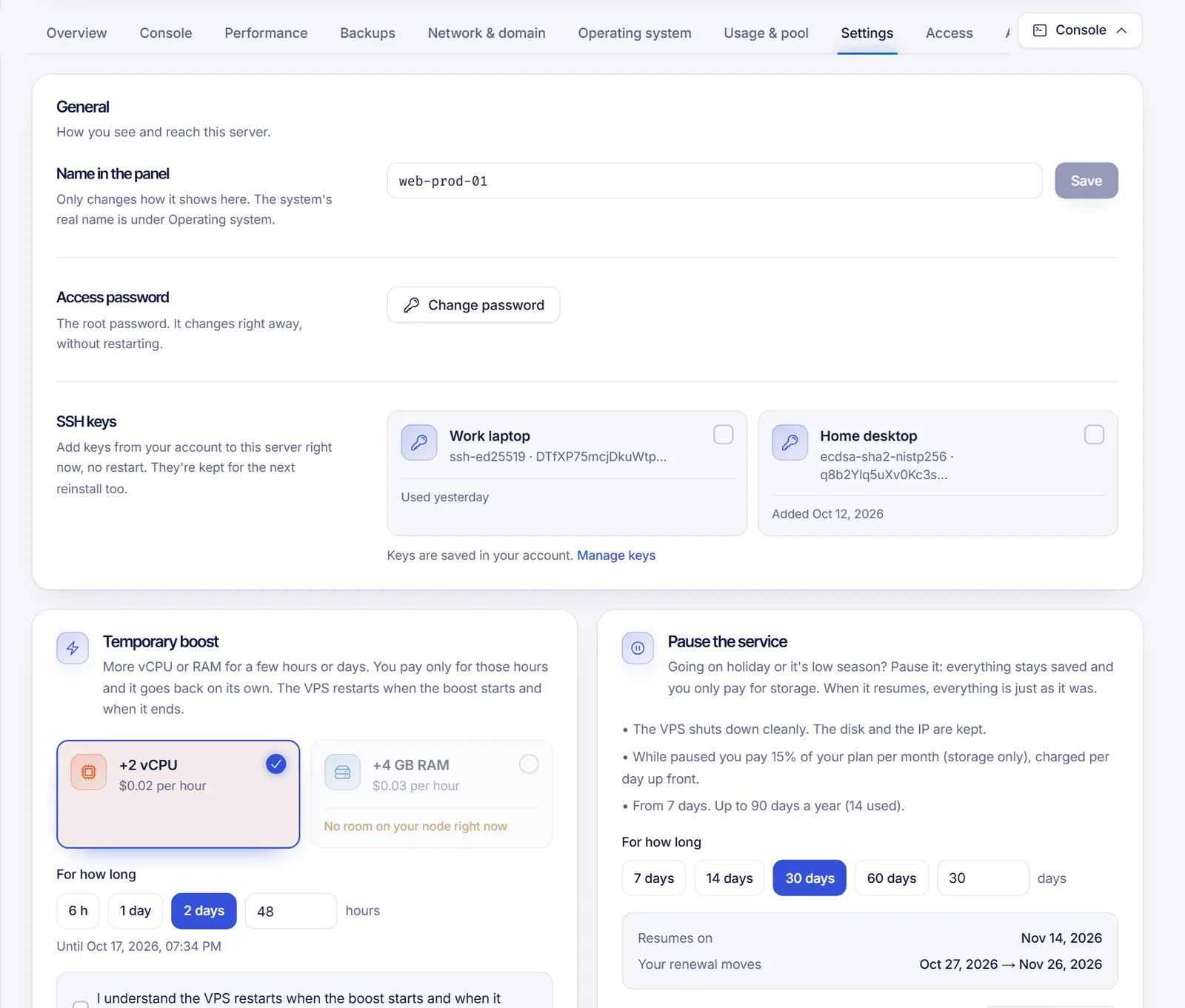
- In the Temporary boost card, choose which one under Which boost: extra RAM or extra CPU. Options that cannot be bought show why, for example "You already have one of these running" or "No room on your node right now".
- Under For how long, pick the duration: a number of Hours or days. The card shows Until and the exact end date.
- Choose how to pay:
- Balance: charged right now from your account credit.
- Invoice: we create an invoice that you pay with card, PayPal or crypto. The boost starts as soon as it is paid.
- Review the total on the button and click Buy boost.
If your balance is not enough, the card automatically offers the invoice option.
Some servers restart when a boost starts and when it ends. Choose a time that does not disturb your players.
Restarts
- Minecraft and other Java game servers only use the new RAM after a restart. The card has a Restart the server now switch. When the boost ends, the server restarts again.
- VPS can only apply the change after a reboot, so the card asks you to accept the restart first: I understand the VPS restarts when the boost starts and when it ends. Boosts on VPS are not offered everywhere, so you may not see them.
While the boost runs
The card shows Boost active and when it ends. You also get a warning shortly before the end (2 hours before by default). When it ends, the server returns to its normal resources on its own.
If the invoice is not paid
If you chose Invoice and do not pay within the time limit (60 minutes by default), the request cancels itself and the reserved capacity is released. You can also click Cancel request while it is waiting for payment. A boost that has already been paid cannot be cancelled: it simply runs until it ends.
When you can't buy a boost
The card explains the reason. The usual ones are:
- Boosts are not available right now.
- The service is a sub-server: buy the boost from the main server.
- The service must be active.
- The service has a cancellation scheduled.
- The game server is asleep: wake it up first, so the boost hours do not run while nobody plays.
- There is not enough room on your node at the moment. Try a smaller boost or try later.
- You already have a boost of that kind running.
FAQ
Can I use a boost on web hosting?
No. Boosts are for game servers, apps and, where offered, VPS.
Will the boost change my renewal price?
No. A boost is a one-time charge for the hours you choose. Your plan renews at its normal price.
What happens to my data when the boost ends?
Nothing. Only the extra RAM or CPU is removed. Your files and settings are untouched.
Can I extend a boost?
Wait for it to end and buy a new one, or buy a longer one next time.
What if the boost can't be applied?
If it cannot be applied after payment, the money is returned to your balance and the card says so.
Related articles
- Pause a service
- Account balance and credits
- Fix Minecraft lag and TPS
- Set Minecraft RAM and Java flags
Need more power all the time instead? Compare our game hosting and VPS plans.