Volume Discounts, Cart and Paying Several Invoices
Bundle several services into one order, benefit from volume discounts and pay several pending invoices at once, when they are available.
If several services are on your list, SolumeCore can help you save and simplify. Where the features are enabled, you can add services to a cart and pay them in one order and one invoice, get a volume discount when you buy together, pay several pending invoices in a single payment and move all your renewals to one billing day.
These are optional features that SolumeCore switches on or off. If you do not see Add to cart next to Buy now, or a cart in your panel, the cart is not available on your account at the moment.
Buy several services in one order with the cart
- On a plan page or in the checkout configurator, set up the service you want and click Add to cart instead of buying right away. The button turns into Added · view cart.
- Repeat with every other service you want. A cart has a maximum number of services (10 by default).
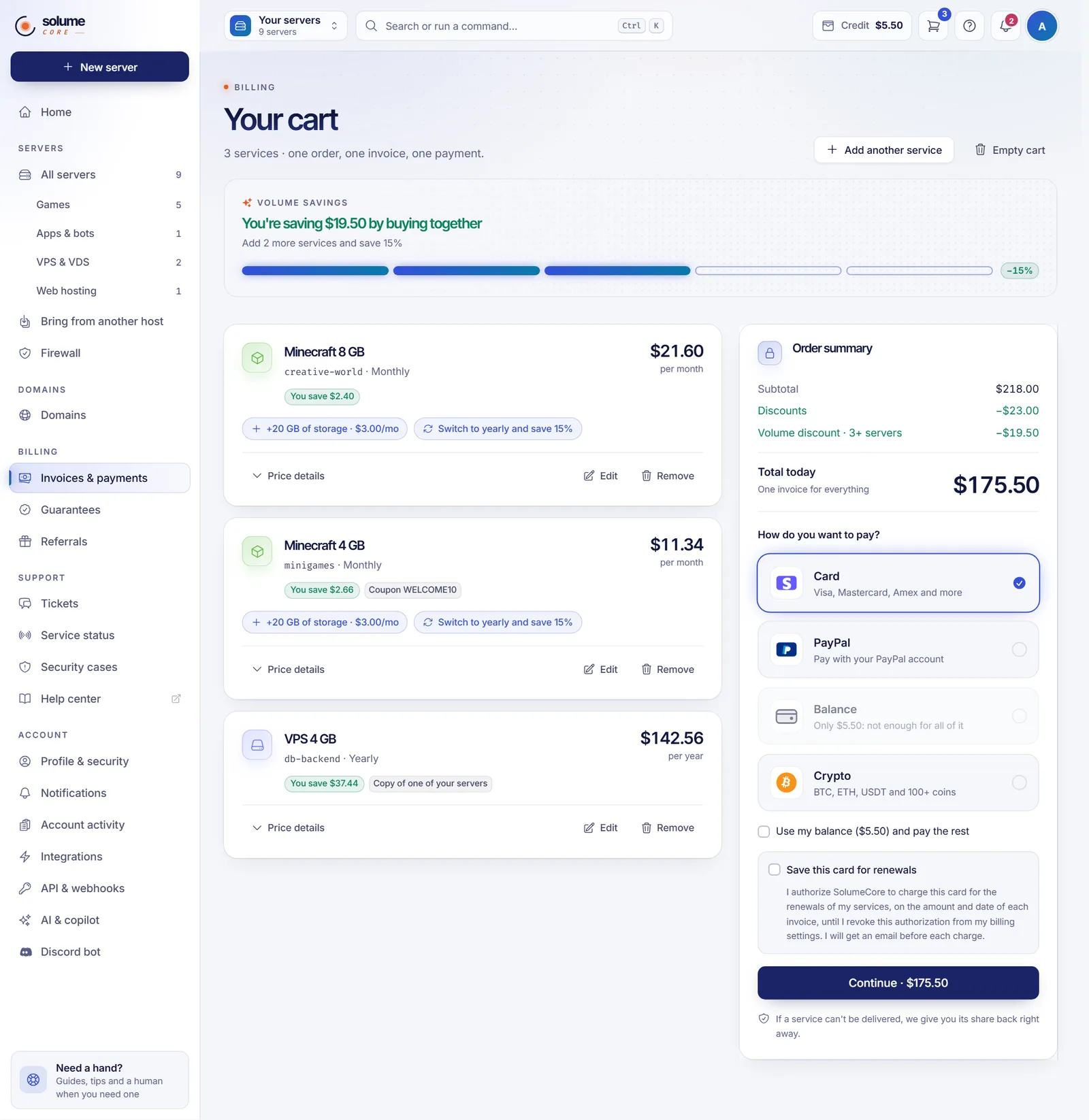
- Open your cart from the site or from the panel (Open cart). You see Your cart with every service, its billing cycle and its price.
- To change a service, click Edit: you can adjust the Billing cycle, Server name, Your domain, Additional IPs, Extra storage and Coupon where they apply. The price updates when you save. Click Remove to take one out.
- Review the Order summary: Subtotal, Discounts, Volume discount and Total today. You get one invoice for everything.
- Choose How do you want to pay?, and click Continue.
If a service in the cart needs a change before you can pay, for example because a plan was removed, a red notice tells you which one.
Pay with a mix of balance and another method
In the cart you can tick Use my balance and pay the rest with a card, PayPal or crypto. The balance is held while you complete the payment (60 minutes by default). If you do not pay in time, the order is cancelled and the balance returns to your account.
If one service cannot be delivered
If a service of the order cannot be delivered, we have not accepted it, so you get its share back right away: by default as account credit, or, depending on how SolumeCore has it set up, back to the card you paid with. The order page shows which services are ready and which were credited or returned.
Cart reminder
If you leave services in the cart without paying, we can send you one reminder email. You can turn it off from the email or from Automatic payments.
Volume discounts
A volume discount rewards you for buying together. SolumeCore defines the rules, which can depend on:
- the number of services in the order (for example, from a certain count);
- the subtotal of the order;
- a specific product type, such as only game servers.
In the cart, the Buy together, pay less meter shows how many services you have and how many more you need for the next step, and then You're saving X by buying together.
How the discount works:
- Only one volume rule applies to an order: the one that saves you the most by default (or the one with the highest priority if SolumeCore chose that strategy).
- It is calculated on what you pay after other discounts, so nothing is discounted twice.
- Some rules do not combine with coupons: services that already use a coupon may not count toward them.
- Rules can have dates and a maximum number of uses.
Pay several invoices at once
When this option is on, you can settle several pending invoices in one payment:
- Open Invoices & payments and the Invoices tab.
- Tick the invoices you want to pay. (Invoices that cannot be paid yet, or are in another currency, are marked.)
- Click Pay selected. The Pay several invoices window lists them with the total.
- Choose how to pay, optionally Use my balance for part of it, and click Pay.
You can select up to 20 invoices by default, all in the same currency. Each invoice gets its own receipt by email, and services that were suspended for non-payment come back on their own. If an invoice groups several services, you can use Split into one invoice per service first.
Fewer invoices with one billing day
If it is available, you can bring all your services to the same day of the month so you receive a single invoice. See automatic renewals and billing cycle.
Troubleshooting
- I don't see "Add to cart". The cart is off for your account. Buy the service directly from checkout.
- My cart is full. Remove a service or complete the order and start another one.
- The volume discount did not apply. Check the meter: your order may not meet the rule yet, the rule may not combine with a coupon, or it may not be valid anymore.
- "Pay selected" does not appear. Paying several invoices at once is not available on your account.
- An invoice cannot be selected. It may be in a different currency, belong to a service that is waiting for capacity, or already be cancelled. Pay it by itself.
FAQ
Do I pay one invoice for the whole cart?
Yes. One order, one invoice and one payment.
Are volume discounts permanent?
They apply to the order where the rule is met. Renewals follow the price and discounts shown on each invoice.
Can I use a coupon in the cart?
Yes, per service, from Edit. Some volume rules exclude services with a coupon. See how to use a coupon or discount code.
Can I pay invoices in different currencies together?
No. Pay them separately.
Related articles
- How to use a coupon or discount code
- How to pay a SolumeCore invoice
- Account balance and credits
- Automatic renewals and billing cycle
Ready to put a few services together? See our plans.