Automatic Renewals and Billing Cycles Explained
When your renewal invoice is created, how it is paid with your card or credit, and how to turn auto-renew on, change it or switch it off.
Each SolumeCore service renews at the end of its billing cycle. A renewal invoice is created ahead of the renewal date (3 days before by default) and, if auto-renew is on, it is paid for you with your saved card or your account credit. You choose how each service renews in Invoices & payments > Renewals.
If you turn auto-renew off, nothing breaks: you simply pay each renewal invoice yourself before it is due.
How the billing cycle works
When you buy a service you choose its billing cycle: monthly, every 3 months, every 6 months or yearly, depending on the plan. The cycle sets how often the service renews and how often an invoice is created. Longer cycles usually cost less per month. Your service always shows its next renewal date, for example Renews on in the plan card of its settings and in the Renewals tab.
For every renewal the system follows the same steps:
- The invoice is created ahead of the renewal date. By default this happens 3 days before, and you get an email.
- The invoice is paid automatically if you set the service to do so, or it waits for you to pay it.
- If the due date passes unpaid, the invoice becomes Overdue and the service can be suspended. See what happens if you don't pay.
Choose how a service renews
- Sign in at dashboard.solumecore.com and open Invoices & payments from the Billing group.
- Open the Renewals tab. Each service shows its next renewal, the amount and an Auto-renew selector.
- Pick one of the four options:
- With my card: the invoice is charged to your default card.
- Credit, then card: your account credit is used first and the card only covers what is missing.
- Credit only: only your account credit pays.
- Off (I'll pay by hand): nothing is charged automatically.
- You see a confirmation, and the change applies to that service.
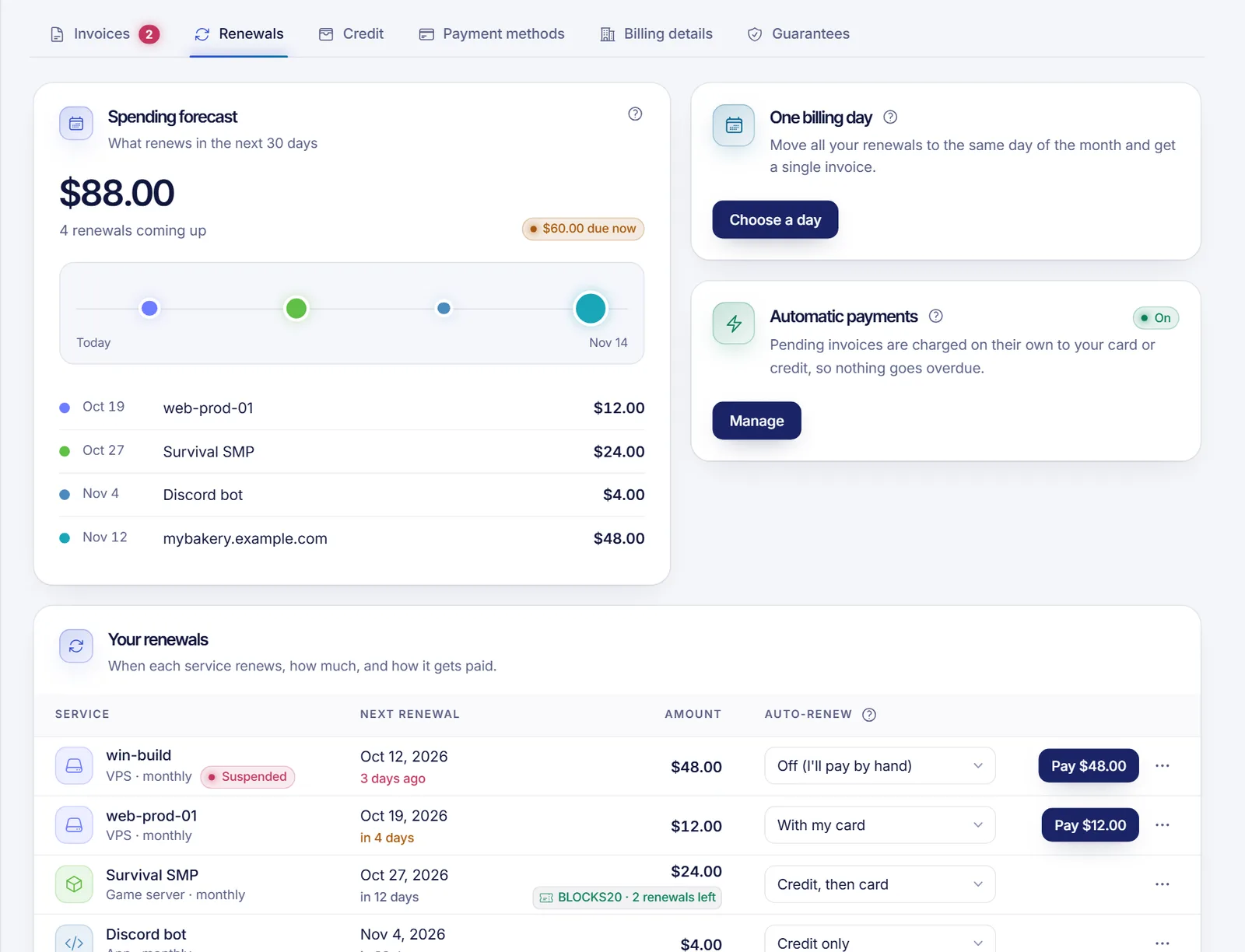
New services start with With my card, which works as soon as you have a default card saved. If you have none, add one first: add or change your payment card.
Change all services at once
Open the Automatic payments card in the Renewals tab (click Turn on or Manage). There you can choose how to renew all your services with Apply to all, and still change any service later in its own row.
What to expect with card charges
- A notice before the charge. By default we email you 2 days before each automatic card charge, with the amount and the card. The charge itself always happens before the due date, never after waiting for the notice.
- Your authorization. Banks require your explicit permission to charge a saved card when you are not there. In the Automatic payments card you can authorize your default card or Revoke that permission. When you revoke it, you pay each invoice yourself.
- Pause automatic charges. The Charge renewals automatically switch lets you pause them without removing your card.
- If the card fails. You get an email and the system tries again. By default it retries after 1 day, 3 days and 7 days. If the bank asks for 3-D Secure, we send you a link to approve the payment. If the card is expired or blocked, we stop retrying that card until you change it.
- Insufficient funds. A charge declined for lack of funds waits at least a few days before the next try.
Automatic charges can also be paused platform-wide by SolumeCore. In that case the card shows a notice and you pay each invoice yourself.
One billing day (when available)
If the option is on for your account, you can move all your services to the same day of the month and get a single invoice. In the Renewals tab click Choose a day under One billing day, pick a day and review the credit or extra charge for the days in between. Nothing is charged right away: the difference shows up on your first invoice on that day.
See what is coming
The Renewals tab shows a forecast of what renews in the next 30 days, using today's prices and your coupons, before taxes. The top of Invoices & payments also shows Next 30 days with the number of renewals.
Stop a service from renewing
Auto-renew Off does not cancel anything: you still owe the renewal invoice. To stop a service for good, cancel it at the end of its period. See how to cancel a service.
FAQ
When exactly am I charged?
If the service uses your card, the charge is made before the due date, after the notice email. If it uses credit, the invoice is paid automatically whenever your credit covers the whole invoice.
Can I renew with PayPal or crypto automatically?
No. PayPal and crypto are chosen each time you pay an invoice. Automatic renewals use a saved card or your account credit.
What price will I pay at renewal?
The invoice shows the amount due, including any coupon or discount that still applies. The Renewals tab shows the amount for each service ahead of time.
What if I forget to pay a manual renewal?
The invoice becomes overdue and the service can be suspended. Paying the invoice brings it back. See what happens if you don't pay.
Can I renew early?
If a renewal invoice already exists you can pay it right away from the Invoices tab, even before its due date.
Related articles
- How to add or change your payment card
- What happens if you don't pay
- Account balance and credits
- How to cancel a service
Want a plan that renews itself? See our hosting plans.