Card Payment Declined or Failed: Causes and Fixes
If your card was declined or an automatic charge failed, here are the common causes, how to confirm 3-D Secure and how to pay another way.
When a card payment fails, it is almost always because the bank declined it, the 3-D Secure confirmation was not completed, or an automatic charge hit a card that is expired or has no funds. The quickest fix is to try again, confirm the bank prompt, use another card or pay the invoice with PayPal, account credit or crypto.
Your unpaid invoice stays open while you sort it out. Pay it before it is due and nothing else happens to your service.
If you were paying an invoice yourself
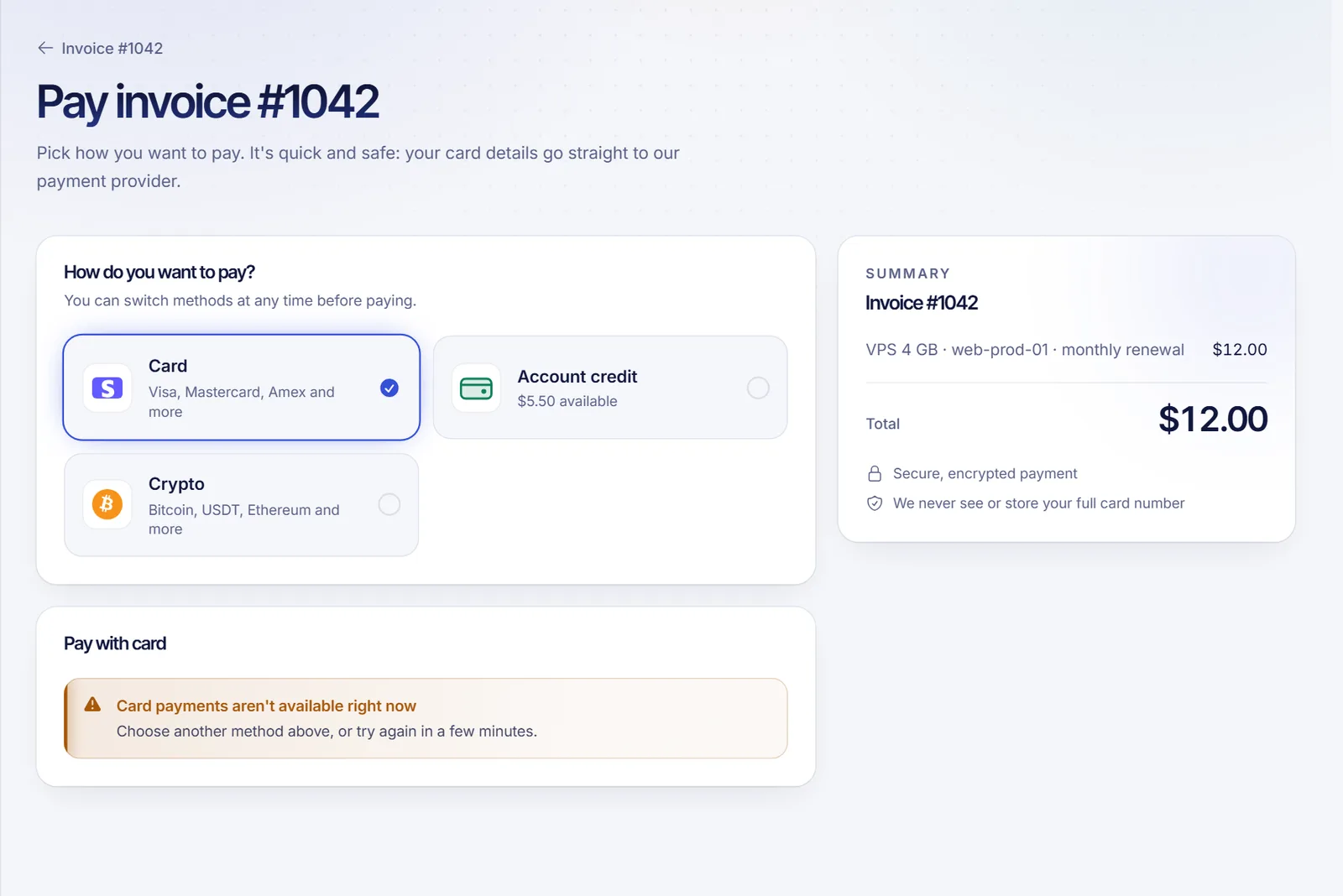
On the payment screen you may see one of these messages:
- "The payment wasn't completed. Try another card or method." The bank declined the payment or the confirmation was not finished.
- "We couldn't process the payment. Try again or use another method." A temporary problem. Try again in a minute.
- "Card payments aren't available right now." Card payments are paused for the moment. Pick another method.
What to check, in this order:
- Card details. Number, expiry date and security code, and the name on the card.
- Funds and limits. Make sure the card has enough available balance and that your online or international payment limit is not exceeded.
- Bank approval. Many banks block online payments or ask to confirm them. Look for a push notification, an SMS or a call from your bank and approve it, then try again.
- 3-D Secure. When the screen says it is checking the payment with your bank, finish the approval in your banking app or with the code they send. If you close that window, the payment is not completed.
- Another card. Try a different card.
- Another method. Go back and choose PayPal, Account credit or Crypto. See how to pay an invoice and how to pay with crypto.
If your bank says it did not decline anything and the payment still fails, wait a few minutes and try again, or open a ticket with the invoice number and the time of the attempt.
If an automatic renewal charge failed
For an automatic charge, SolumeCore tries your default card, emails you and tries again on a schedule (by default after 1 day, then 3 days, then 7 days). The kind of decline decides what happens next:
| Decline | What it means | What happens | What to do |
|---|---|---|---|
| Needs confirmation (3-D Secure) | Your bank wants you to approve the charge. | Automatic retries stop. We email you a link to the invoice. | Open the link and pay the invoice yourself. |
| Card refused (expired, blocked, lost, not allowed) | The card will not work. | We stop trying that card until you change it. | Add a new card and make it the default. |
| Insufficient funds or limit | Not enough balance. | The next attempt waits at least a few days. | Top up the card, or pay manually or with credit. |
| Temporary bank or network error | A hiccup. | It is retried on the normal schedule. | Usually nothing, or pay manually. |
To fix it: add or replace your card in Invoices & payments > Payment methods (see add or change your payment card), or open the invoice and click Pay.
Avoid failures in the future
- Keep a valid default card and update it when your bank issues a new one.
- Keep some account credit and set renewals to Credit, then card so credit covers what the card cannot. See automatic renewals and billing cycle.
- Authorize your default card for automatic charges if the panel asks for it.
- Tell your bank that SolumeCore charges are expected.
What if I can't pay in time
An invoice that stays unpaid past its due date can lead to a suspension. Read what happens if you don't pay. If you need help, open a ticket before the due date.
FAQ
Why was my card declined if it has money?
Banks can block online payments, apply limits or ask for confirmation. Approve the request in your banking app or call the bank, then try again.
Will I be charged twice?
No. If a payment is declined, nothing is charged. If it is processing, the invoice page says We're confirming your payment and updates by itself, so do not pay again.
Does SolumeCore keep trying my card forever?
No. It retries on a short schedule and then stops. Some declines stop the automatic retries earlier.
Can I pay with a different card than the one I saved?
Yes. When paying an invoice you can use any card. The default card is only used for automatic charges.
My service was suspended after a failed charge. What now?
Pay the invoice with any method and the service comes back on its own.
Related articles
- How to pay a SolumeCore invoice
- How to add or change your payment card
- Automatic renewals and billing cycle
- What happens if you don't pay
Once your payment goes through, you can get back to your plans and your servers.