Account Balance and Credits: Add, Use and Track Them
What your account credit is, where it comes from, how to add more when top-ups are available and how to use it to pay invoices and renewals.
Your account balance (also called account credit) is money you hold with SolumeCore. It comes from top-ups, referral commissions and credits we add ourselves, and it pays invoices and, if you choose, renewals automatically. You can see it any time in Invoices & payments > Credit.
Credit is not cash: it is for paying SolumeCore services. Adding credit by yourself (a top-up) is an optional feature, so the Add credit button only shows up when it is available on your account.
Where to see your balance
- Sign in at dashboard.solumecore.com.
- Open Invoices & payments from the Billing group. The Account credit card at the top shows your balance too.
- Open the Credit tab for the full picture: your balance, any credit on hold, and the history.
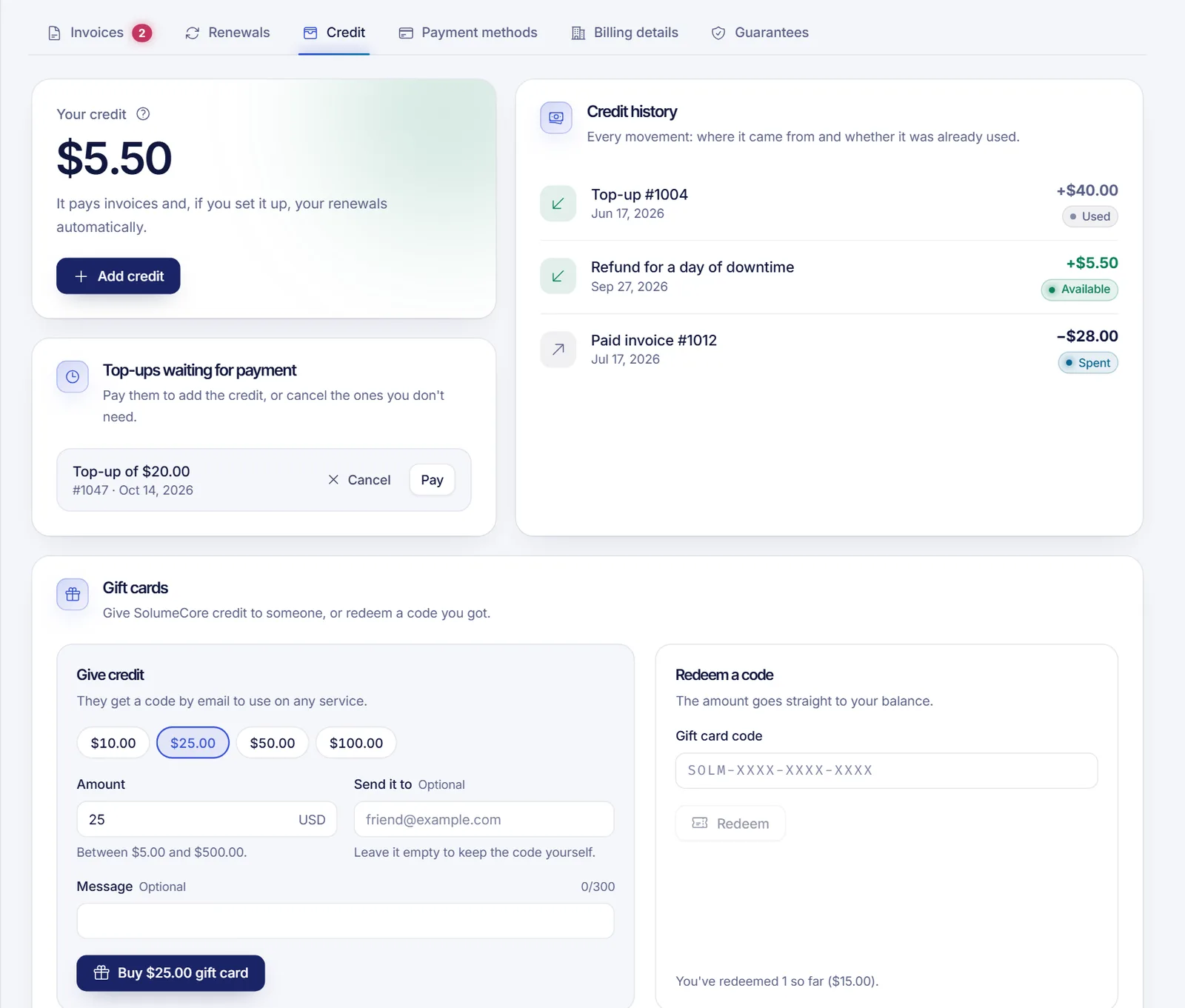
- If you have credit in more than one currency, the main balance appears big and the others appear under Also. Credit stays in the currency it came in and pays invoices in that currency.
- On hold for security means a top-up was just paid and waits a few days before it can be spent. The line tells you the date it becomes available.
See where each credit came from
Scroll to the Credit history section to see every movement: top-ups, credits and referral commissions, with whether each one is Available, Used or Spent.
Credit is for paying SolumeCore services and cannot be withdrawn. Only referral earnings can be withdrawn, when that option is on.
Add credit (when available)
- In the Credit tab, click Add credit.
- Type the amount. The limits are shown right under the field, and you see what your credit will be after the top-up.
- Click Continue. SolumeCore creates a top-up invoice.
- Pay it on the next screen with card, PayPal or crypto, like any other invoice.
- As soon as the payment is confirmed, the amount appears as credit.
Good to know:
- A top-up you have not paid shows up under Top-ups waiting for payment. You can pay it or Cancel it. By default, an unpaid top-up cancels itself after about a week.
- Top-ups are not a debt and never count as an overdue invoice.
- By default, a newly paid top-up is held for a few days for security before you can spend it. The Credit tab shows the release date.
- The minimum and maximum amounts per top-up depend on the platform settings and are displayed when you add credit.
Use your credit
- Pay an invoice: choose Account credit on the payment screen. Credit pays whole invoices only, so the balance has to cover the full amount. See how to pay an invoice.
- Pay part with credit: when you check out from the cart or pay several invoices together, you can tick Use my balance and pay the rest with another method (if those features are available).
- Renewals: set a service to Credit, then card or Credit only in the Renewals tab. Your credit pays the renewal invoice by itself when it is enough. See automatic renewals and billing cycle.
- Automatic top-up (optional): when this feature is available, you can choose a minimum and an amount, and your saved card tops the balance up when it drops below the minimum, at most once a day.
If you see "Paying with credit is paused for now", your credit is still there, it just cannot be spent until the option comes back.
Gift cards and other sources of credit
- Gift cards (when available): a card on the Credit tab lets you give credit to someone by email or redeem a code you received. The amount goes straight to your balance.
- Referral commissions: once they are available they are added as credit. See earn with the affiliate program.
- Credits we add: if we add a credit to your account (for example, for an order that could not be delivered or a billing correction), it shows up in the history with the reason.
Troubleshooting
- I don't see "Add credit". The tab says that adding credit is not available right now, which means top-ups are switched off for your account at the moment.
- My top-up is not in my balance. Check the Credit tab for On hold for security, or look for an unpaid top-up waiting for payment.
- "You need X more" when paying. Credit pays whole invoices. Add credit or pay with another method.
- Credit in the wrong currency. Credit pays only invoices in its own currency. Open a ticket if you need help.
FAQ
Can I withdraw my account credit?
No. Credit is meant for paying SolumeCore services. Only referral earnings can be withdrawn, when that option is on. See the affiliate program article.
Does credit pay renewals automatically?
Only for services whose auto-renew is set to Credit, then card or Credit only, and only when the credit covers the whole invoice.
Can I use my credit on any service?
Yes, on anything in your account, as long as the invoice is in the same currency as the credit.
Why is some of my credit "on hold"?
Newly paid top-ups can be held for a few days as a fraud protection. When the hold ends, the amount becomes available on its own.
Can I get my balance back as money?
No. Balance and top-ups are not refundable and are not converted into money or paid back to your card. They are for spending on SolumeCore services. See cancel a service and section 11 of the terms of service.
Related articles
- How to pay a SolumeCore invoice
- Automatic renewals and billing cycle
- How to pay with crypto
- Earn with the affiliate program
When you are ready to use your credit, pick a server from our plans.