Download Invoices and Set Your Billing Details
Download invoices as PDF, export them as CSV or ZIP, and set the name, address and tax ID that appear on every invoice from your account.
You download an invoice as a PDF from Invoices & payments: find the invoice and click Download PDF. To get many at once, click Export and choose a spreadsheet (CSV) or a ZIP of PDFs. The name, address and tax ID printed on your invoices come from your default billing address, which you set in the Billing details tab.
Set your billing details before you pay if you need a company name or tax ID on the invoice, because a paid invoice keeps the details it had when it was paid.
Download one invoice as a PDF
- Sign in at dashboard.solumecore.com.
- Open Invoices & payments from the Billing group. The Invoices tab lists your invoices.
- Use the search box (by number or service) or the All, To pay and Paid filters to find it.
- Click Download PDF on the invoice row, or open the invoice and click Download PDF at the top.
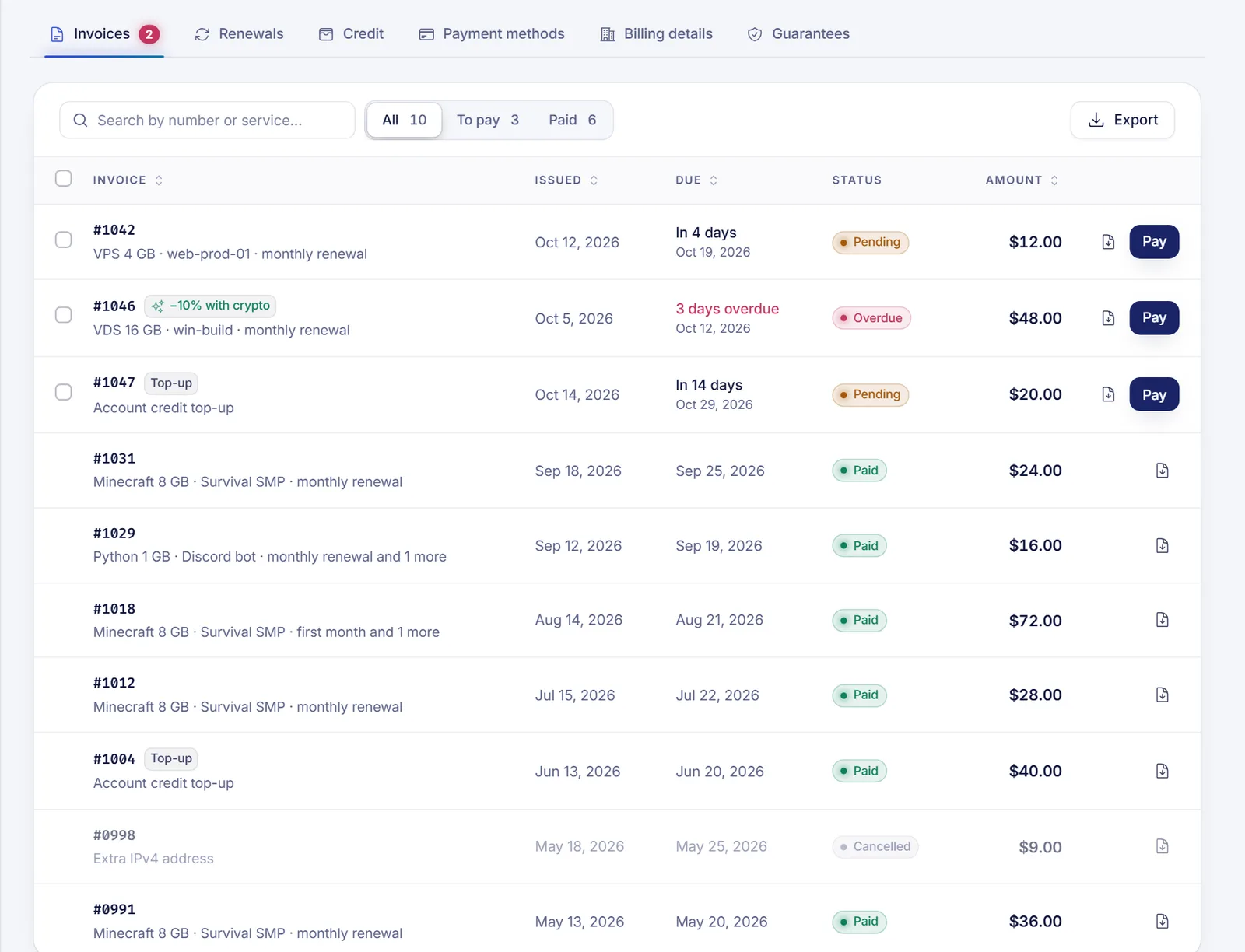
If the PDF does not open, try again or allow pop-ups for the panel in your browser. Older invoices load in pages: click Show older invoices at the bottom of the list.
Export many invoices
Use this for your accountant or your own records.
- In the Invoices tab, click Export.
- Pick a Format:
- Spreadsheet (CSV): one row per invoice, opens in Excel or Google Sheets.
- PDFs (ZIP): each invoice as a PDF, all in one file. A ZIP holds up to 100 PDFs, so narrow the dates if you have more.
- Choose Which invoices: All, Paid or To pay, and optionally a date range with From and To.
- Click Download CSV or Download ZIP.
Set your billing details before you pay: a paid invoice keeps the details it had when it was paid.
Set your billing details
Billing details are the legal name, address and tax ID that appear on your invoices.
- Open Invoices & payments and go to the Billing details tab.
- In Billing addresses, click Add a billing address (or Add address if you already have one).
- Fill in the form as it should appear on your invoices:
- Name or company: your full name or the legal name of your company.
- Address, Apartment, suite, floor, City, State / province, ZIP / postal code and Country.
- Tax ID type and Tax ID, only if your accountant or tax office needs it. The list includes EIN, VAT, RFC, NIF/CIF, CUIT, RUT, RUC, NIT, CPF/CNPJ and others.
- Click Save address.
- If you have several addresses, click Use on invoices on the one you want. It is marked Used on invoices, and your legal name and tax ID on the PDFs come from it.
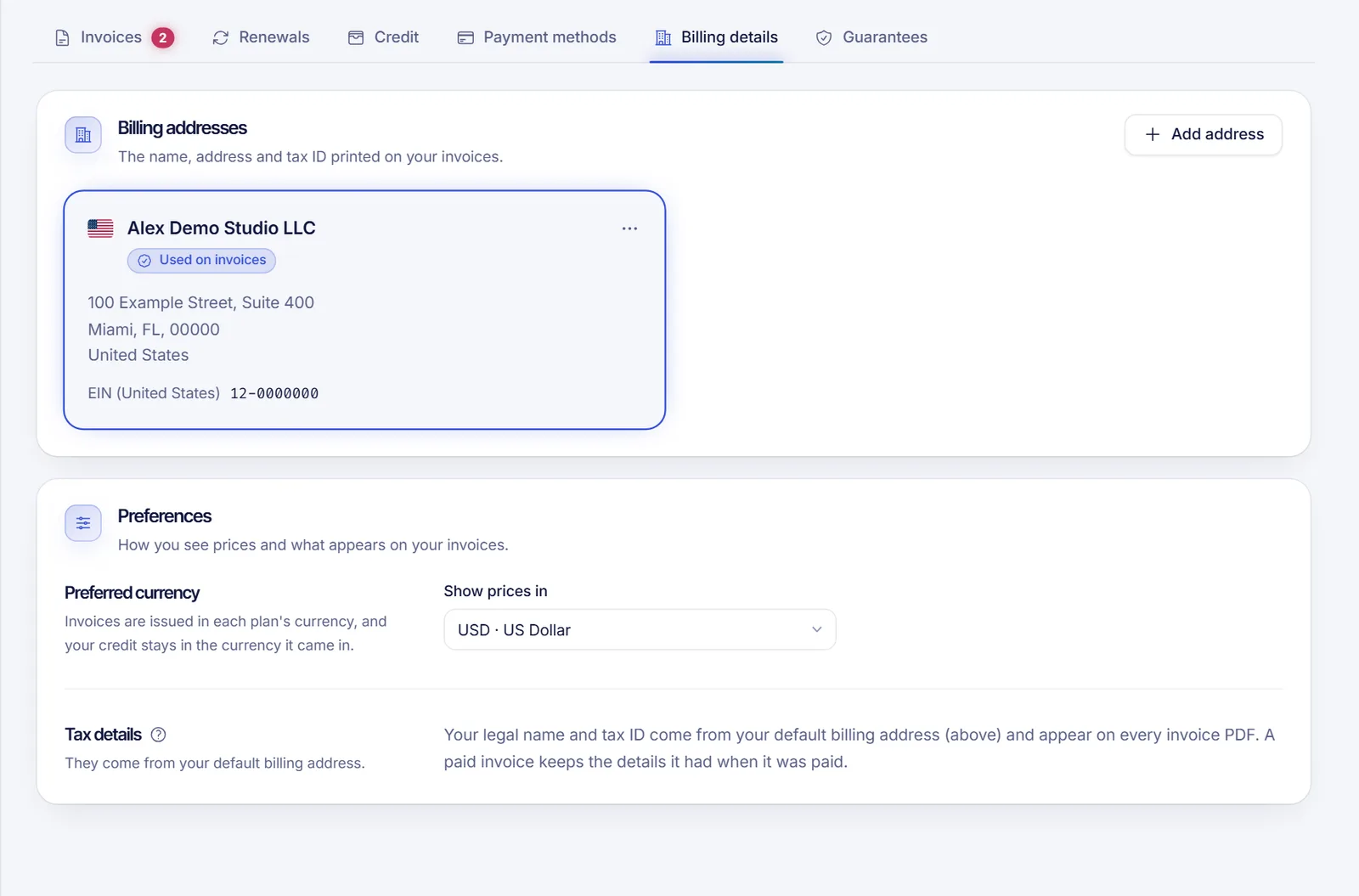
You can edit or delete an address from its options menu. Deleting one means it will no longer appear on new invoices; invoices already issued keep their details.
At checkout, you pick (or add) a billing address before finishing the purchase.
Preferred currency
Under Preferences you can choose the currency in which you see prices. Invoices are still issued in each plan's currency, and your credit stays in the currency it came in.
Fix a mistake on an invoice
- Not paid yet: make the right address your default before you pay. The PDF uses your default billing address until the invoice is paid.
- Already paid: a paid invoice keeps the details it had at payment time. If you need a correction for legal or tax reasons, open a ticket with the invoice number and the corrected details. We cannot promise to reissue it, but we will review it.
Troubleshooting
- "We couldn't open the PDF." Try again, check your pop-up blocker and, if it keeps failing, open a ticket.
- The ZIP has fewer invoices than I expected. A ZIP holds up to 100 PDFs. Narrow the dates and download again.
- My tax ID doesn't appear on an old invoice. A paid invoice keeps the details it had when it was paid, so editing an address does not rewrite it.
- I can't find an invoice. Clear the filters and search again. Cancelled invoices appear with the Cancelled status.
FAQ
Where can I see all my past invoices?
In Invoices & payments > Invoices, with the All filter. Use Show older invoices to load more.
Does the invoice include taxes?
When taxes apply, the invoice detail shows Subtotal, Taxes and Total separately.
Can I add my company VAT or tax number?
Yes. Add it in your billing address with the Tax ID type and Tax ID fields, and it will appear on new invoices.
Can I export only the invoices I have paid?
Yes. In Export, choose Paid under Which invoices, and optionally set a date range.
Are receipts different from invoices?
Each paid invoice is its own receipt: open it to see its payments and download the PDF.
Related articles
- How to pay a SolumeCore invoice
- Automatic renewals and billing cycle
- Account balance and credits
- Open a support ticket
Ready for your next project? See our plans.