Report a Bug in the Panel and How Rewards Work
Report a bug from the SolumeCore panel: what to write, screenshots, optional technical details, how to follow your report and how bug rewards work.
To report a bug in SolumeCore, click Report a bug in the top bar of the panel (the bug icon), describe in one sentence what happens and what you saw, and press Send. The team gets it right away, answers you inside the same report and notifies you when its status changes. If it turns out to be a real bug, there may be a reward on your account balance; it is not guaranteed and the team decides case by case.
Use it for anything that does not work as it should: a button that does nothing, an error message, a page that never finishes loading, something wrong on an invoice. For questions about your plan, help setting something up or an outage of your service, open a support ticket instead, which is the fastest way to get a person on it.
Open the form
- On a computer: the Report a bug button with the bug icon in the top bar, next to your credit.
- On a phone, or from anywhere: your account menu (the circle with your initial) › Report a bug.
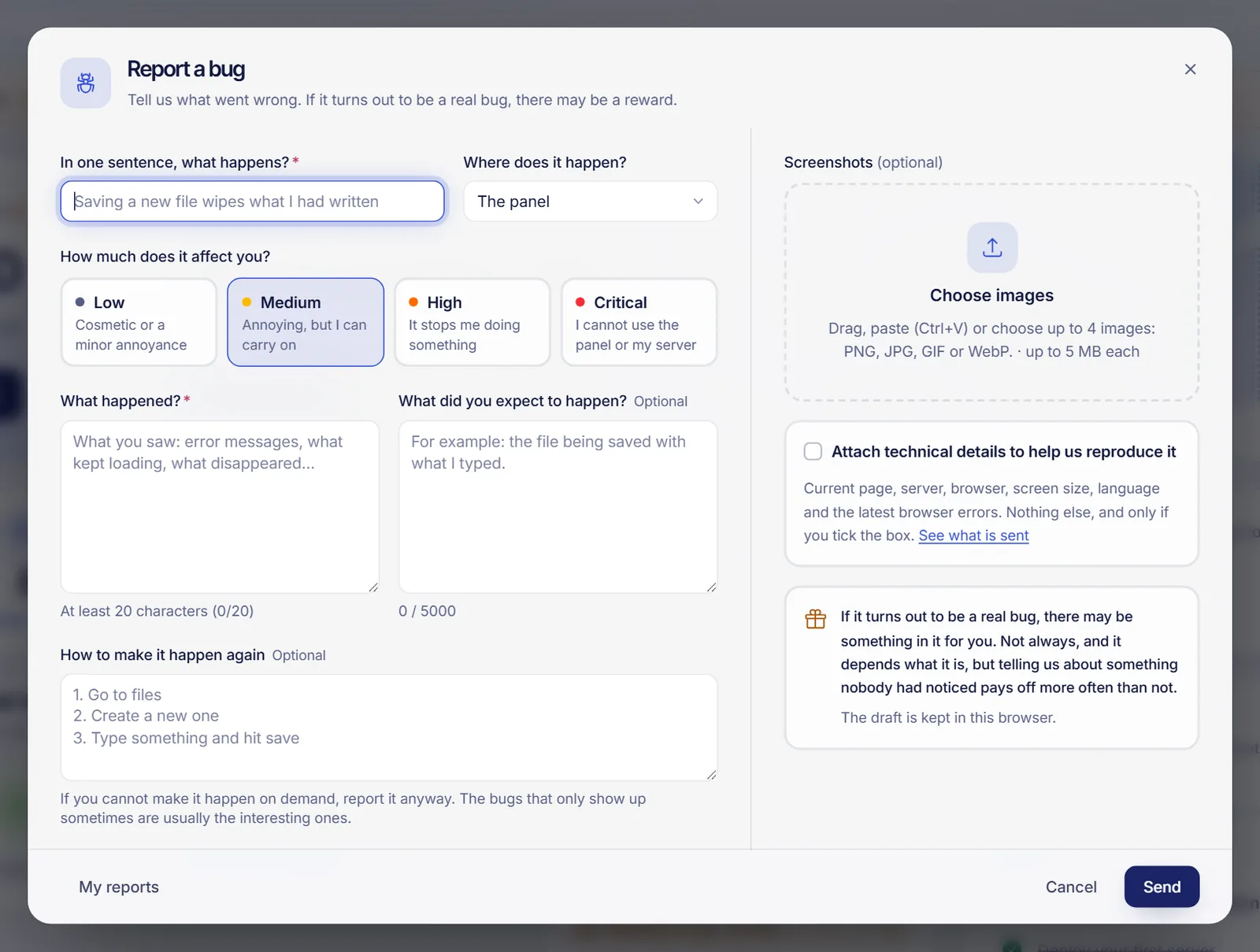
Fill in the report
- In one sentence, what happens? A short summary, at least 5 characters. For example: "Saving a new file wipes what I had written".
- Where does it happen? The panel, a game server, a VPS, web hosting, billing or something else.
- How much does it affect you? Low (cosmetic or a minor annoyance), Medium (annoying, but you can carry on), High (it stops you doing something) or Critical (you cannot use the panel or your server).
- What happened? What you saw: error messages, what kept loading, what disappeared. At least 20 characters.
- Optional: What did you expect to happen? and How to make it happen again, step by step. If you cannot make it happen on demand, report it anyway; bugs that only show up sometimes are often the interesting ones.
- Optional: Screenshots. Drag them in, paste them with
Ctrl+Vor choose them: up to 4 images in PNG, JPG, GIF or WebP, 5 MB each at most. - Press Send. You get a report code and a confirmation.
What you type is kept as a draft in this browser until you send it, so you can close the window and come back. Discard draft clears it.
Technical details, only if you want
The box Attach technical details to help us reproduce it is off by default. If you tick it, the report includes the current page (without the part after ? or #), the server code, your browser, screen size, language, panel theme and the latest browser errors. Nothing else. Press See what is sent to review exactly what goes out before you send it. Tokens, email addresses and IP addresses are removed from the error messages before they leave your browser.
Follow your reports
Open the form and click My reports to see everything you sent, with its status and the number of replies.
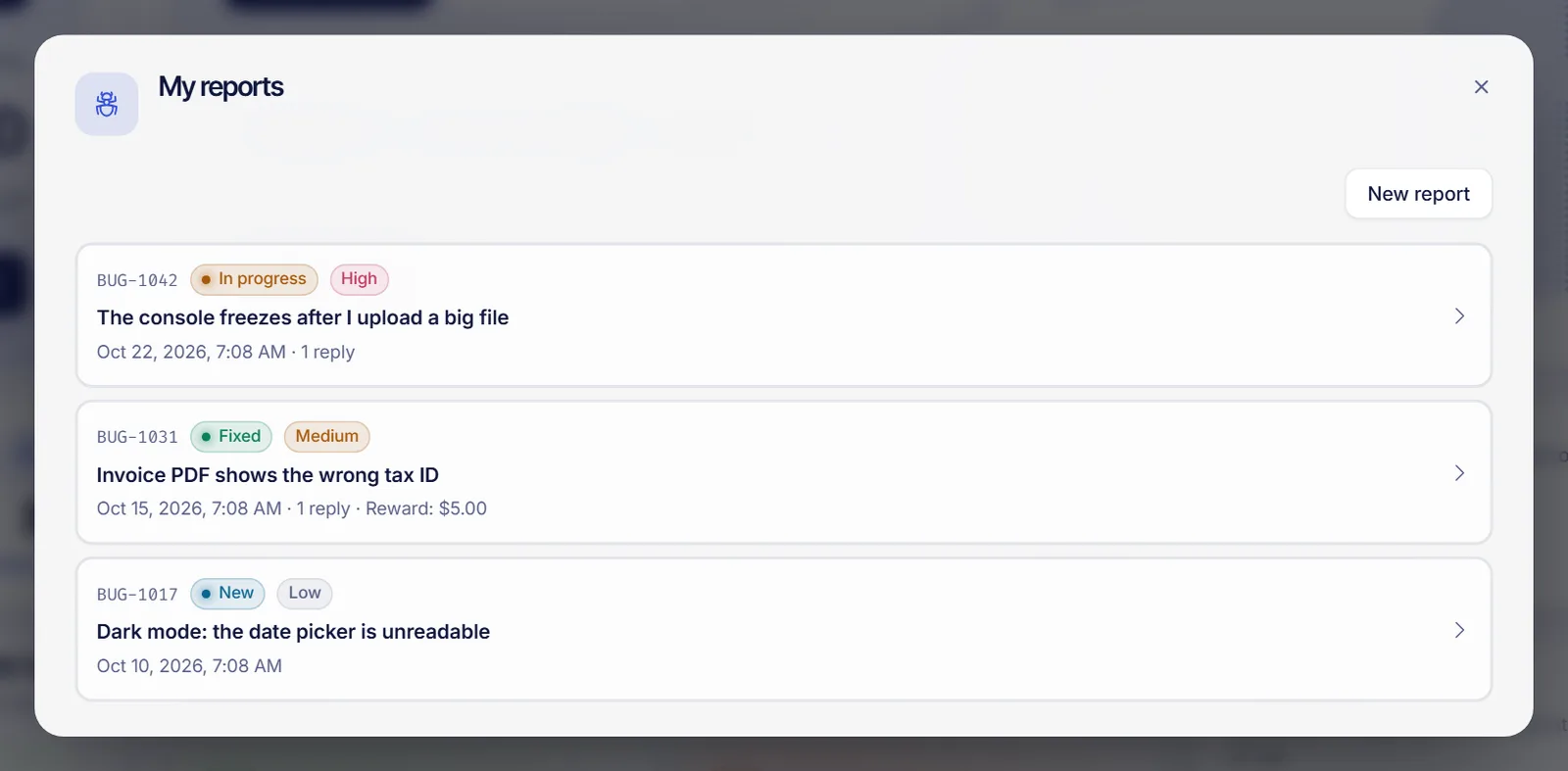
| Status | What it means |
|---|---|
| New | The team has not reviewed it yet |
| Confirmed | The team could reproduce it |
| In progress | Someone is working on the fix |
| Fixed | The fix is out |
| Duplicate | Someone had already reported the same thing |
| Not a bug | It works as designed, or it is not a fault |
Open a report to read the conversation and use Add more information to answer the team or add something you noticed later. When the team replies or the status changes, you get a notification, and clicking it opens that report.
Rewards
If your report turns out to be a real bug, there may be something in it for you. It is not automatic and it is not a fixed amount: the team looks at each report and decides whether there is a reward and how much, depending on what the bug is and how useful the report was. Reports of something nobody had noticed, with clear steps to reproduce it, tend to count the most.
When there is a reward, it is added to your account balance, and the report shows You received a reward of with the amount. You can use that balance to pay invoices and renewals.
Limits
To keep things fair there is a daily limit of reports and of screenshots, and a limit of open reports at the same time. If you reach one, the form tells you; once the team closes some, you can send more.
FAQ
Is a bug report the same as a support ticket?
No. A bug report tells the team that something does not work as it should. A ticket is for help with your services. If your server is down or you need help now, open a ticket.
How much is the reward for a bug?
There is no fixed amount and not every report has one. The team decides case by case and, when there is one, adds it to your account balance.
Can I report a security problem here?
You can report it as a bug with Critical impact, or open a ticket. Do not include passwords or private data in the description.
Why can't I attach my screenshot?
Check that it is a PNG, JPG, GIF or WebP image of 5 MB or less, and that you have not reached 4 images or the daily limit of screenshots.