How to Add a Subdomain or Addon Domain to Your Hosting
Host several sites on the same hosting: create a subdomain like shop.yourdomain.com or add an addon domain with its own folder and SSL. Step by step.
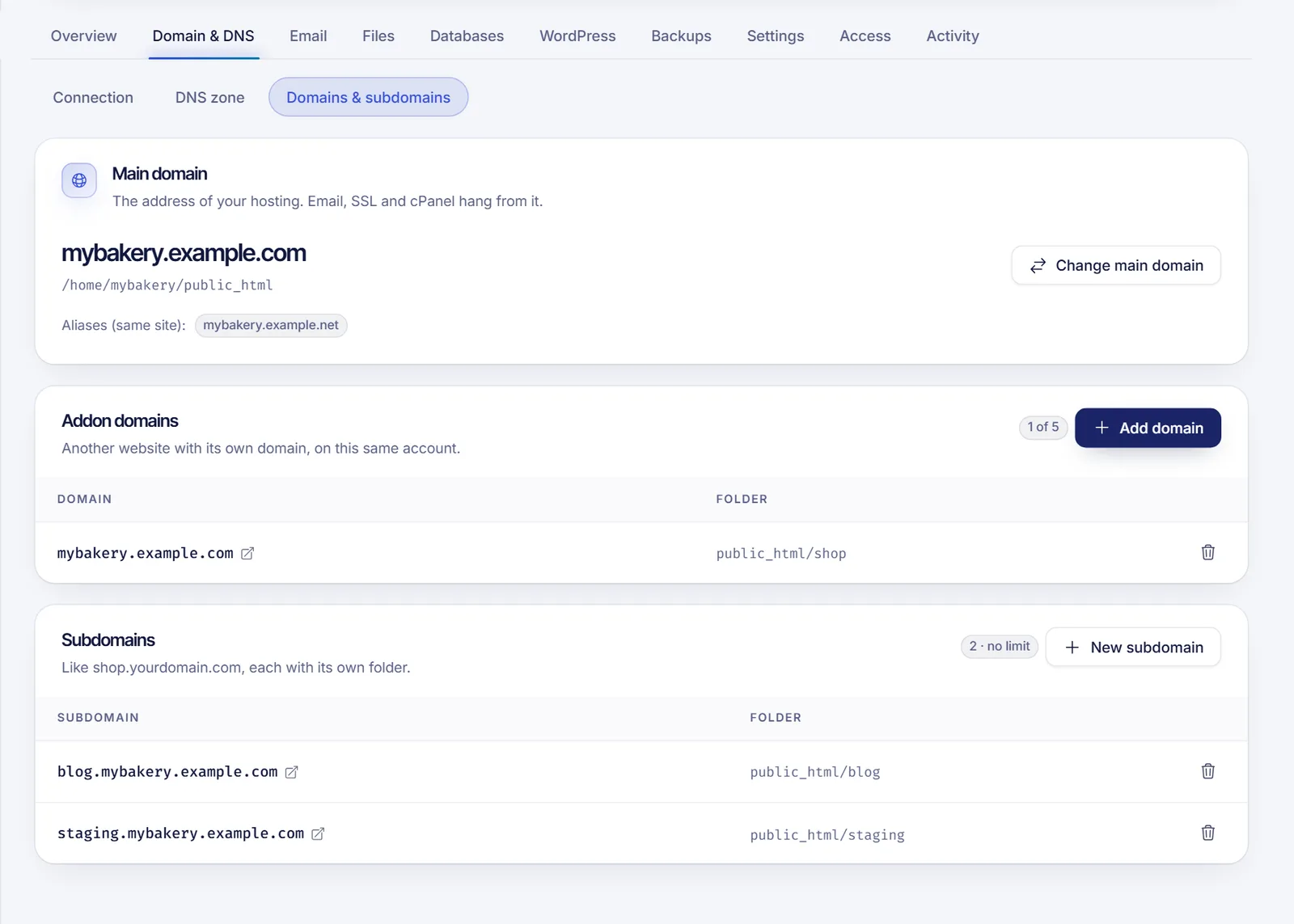
To host more than one site on the same hosting, go to Domain & DNS, then Domains & subdomains, in your SolumeCore dashboard. Use New subdomain for an address like shop.yourdomain.com, or Add domain for a completely different domain such as myshop.com. Each one gets its own folder, and addon domains also get their own SSL certificate.
Subdomain or addon domain?
| Subdomain | Addon domain | |
|---|---|---|
| Example | shop.yourdomain.com |
myshop.com |
| What it is | A separate part of a domain you already have | Another domain, with its own address |
| Folder | Its own folder | Its own folder |
| Counts toward | Your plan's subdomains | Your plan's addon domains |
Both share the disk, databases and other resources of your plan. The Overview tab shows how many of each you are using.
Create a subdomain
- Sign in to the SolumeCore dashboard, open Web hosting (under Servers) and select your hosting.
- Go to Domain & DNS and open Domains & subdomains.
- In the Subdomains card, click New subdomain.
- In Name, type the subdomain, for example
shop. Use lowercase letters, numbers and hyphens, up to 63 characters. Names used by the system, such aswww,mailandcpanel, are not allowed. - In Of the domain, choose which of your domains it belongs to. The preview shows the final address, for example
shop.yourdomain.com. - Optionally, in Site folder, type a folder inside
public_html, such aspublic_html/shop. If you leave it empty, we create one insidepublic_html. - Click New subdomain. A message confirms that it was created.
If your domain uses another DNS provider, create a record for the subdomain there that points to your hosting's IP address, in the same way as the @ and www records. See Point a domain to web hosting. If the domain uses SolumeCore nameservers, check the result in DNS health or in the DNS zone.
Add an addon domain
- Make sure the domain points to your hosting first, using our nameservers or the A record. By default, the dashboard only lets you add a domain that already points to the hosting. This proves that the domain is yours.
- In Domains & subdomains, find the Addon domains card and click Add domain.
- In Domain, type the domain without
https://, for examplemyshop.com. - Optionally, set the Site folder. Leave it empty and a folder is created inside
public_html. The folder must be insidepublic_html, for examplepublic_html/shop. - Click Add domain. A message confirms that the domain was added.
If the dashboard says that the domain does not point to the hosting yet, finish the DNS setup, wait for propagation and try again. You can check the progress with the propagation check.
The Add domain and New subdomain buttons show a counter next to them. When your plan's limit is reached, the button is disabled. Remove one you no longer use, or upgrade your plan.
After adding it
- Upload the site: use the file manager or FTP and put the files in the folder you saw in the Folder column. See Upload your website to web hosting.
- Install WordPress: the WordPress tab lets you choose any of your domains. The domain root must be empty. See Install WordPress on web hosting.
- HTTPS: the certificate is issued automatically once the DNS points to the hosting. Speed it up with Check now in the Overview tab. See Install an SSL certificate on web hosting.
- Email: you can create mailboxes on an addon domain, choosing it in the domain list. See Create an email account in cPanel.
Remove a subdomain or an addon domain
- In the list, click the remove icon (Remove) on the row.
- Confirm. The domain stops answering on this hosting, but the files in its folder stay where they are, so you can still download or delete them.
Troubleshooting
The dashboard says the domain does not point to the hosting yet
Point the domain with our nameservers or the A record, wait for propagation and try again.
The name is rejected
For subdomains, use only lowercase letters, numbers and hyphens, and avoid reserved names such as www, mail and cpanel. For domains, write only the domain, for example myshop.com, without https:// or paths.
The folder is rejected
The folder has to be inside public_html, like public_html/shop.
The new site shows the wrong content
Check that you uploaded the files to the folder shown for that domain, not to the main public_html.
FAQ
How many websites can I host on one plan?
It depends on your plan's limits for addon domains and subdomains. The counters in the dashboard show what you use.
Does an addon domain get its own SSL certificate?
Yes. Each domain gets its own HTTPS certificate automatically once it points to the hosting.
Can I add a domain I just registered?
Yes, as soon as it points to the hosting. A brand-new domain may need some time to propagate first.
What happens to the files if I remove a domain?
Nothing. The files stay in the folder; only the domain stops answering.
Related articles
- Point a domain to web hosting
- Upload your website to web hosting
- Install an SSL certificate on web hosting
- Edit DNS records
Running several projects? See the SolumeCore web hosting plans.