How to Create a MySQL Database on Web Hosting
Create a MySQL database and its user in one step, connect your site using localhost and manage your tables in phpMyAdmin. Step-by-step guide.
To create a MySQL database on your hosting, open the Databases tab of your SolumeCore dashboard, click New database, type a name and keep Also create a user for it turned on. The dashboard creates the database and a user with full access, and shows you the host, name, user and password to copy into your site's configuration.
Before you start
- Most apps keep their content in a MySQL database: WordPress, online shops, forums and many PHP scripts. If you install WordPress from the dashboard, the database is created for you and you can skip this guide.
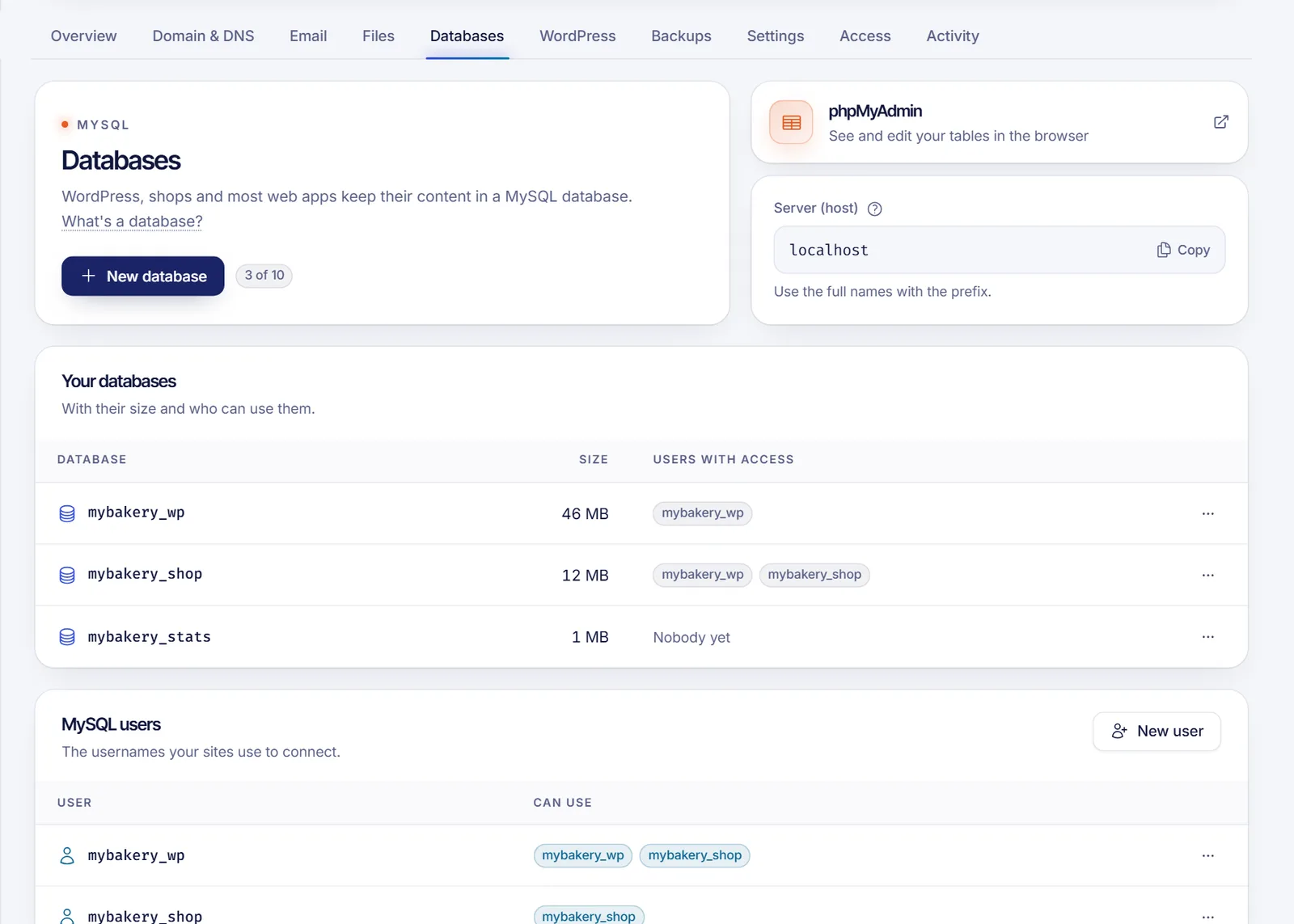
- Your plan sets how many databases you can have. The Databases tab shows a counter such as "2 of 10". If you reached the limit, the New database button is disabled.
Create a database and its user
- Sign in to the SolumeCore dashboard, open Web hosting (under Servers) and select your hosting.
- Open the Databases tab.
- Click New database.
- Type the Database name. Your account prefix is already fixed in front of the field and cannot be deleted. Use lowercase letters, numbers and underscores; the dialog shows the maximum length, prefix included.
- Keep Also create a user for it turned on. This gives the user all permissions, which is what almost every website needs. You can change the username and use the generated password or a different one (at least 12 characters mixing at least three of lowercase, uppercase, numbers and symbols).
- Click Create.
When it finishes, Your database is ready shows these details:
| Field | Value |
|---|---|
| Server (host) | localhost |
| Database | The full name, with the prefix |
| User | The full username, with the prefix |
| Password | The one you set or generated |
Save the password now. It is shown only once and we do not keep it. If you lose it, you can set a new one from the user's menu.
Connect your site to the database
Copy the details into your app's configuration, always with the full names including the prefix. The host from your own hosting is always localhost. For example, in WordPress, edit wp-config.php:
define( 'DB_NAME', 'youraccount_mysite' );
define( 'DB_USER', 'youraccount_mysite' );
define( 'DB_PASSWORD', 'the-password-you-saved' );
define( 'DB_HOST', 'localhost' );
Other apps use similar names in their .env or configuration file.
Manage tables with phpMyAdmin
In the Databases tab, click the phpMyAdmin card. It opens phpMyAdmin in a new tab, already signed in, so you can browse tables, import an .sql file, run queries and export a copy.
Manage users and permissions
The MySQL users section lists the usernames your sites use to connect, and the databases each can use.
- New user: creates a user without access to anything yet.
- Give access: in a user's menu or a database's menu, choose who can use which database. Everything lets it read, write and change tables, which is what a website needs. Choose lets you pick specific permissions.
- Remove access: in a database's menu, remove the access of a user. Both stay; only the permission goes away.
- Change password: also update it in your site's configuration, or it stops connecting.
- Delete: removes the user. Apps connecting with it stop working.
Delete a database
In the actions menu of the database, choose Delete. You have to type the database name to confirm. All its tables are deleted and, if a site uses it, that site stops working. This cannot be undone, so make a backup first. See Back up and restore web hosting.
Troubleshooting
My site says "Error establishing a database connection"
Check that the database name and the username include the prefix, that the host is localhost and that the password is the current one. Also check that the user has access to that database in the Databases list. If you changed the password, update it in the site's configuration.
The name is rejected
Use lowercase letters, numbers and underscores only, and keep it within the length shown, prefix included. Some names are not allowed; try another.
I cannot create more databases
You reached your plan's limit. Delete one you no longer use, or upgrade your plan.
FAQ
What is the MySQL host on my hosting?
localhost, when the site runs on the same hosting. Use the host shown in the Server (host) field.
Do I have to create a user for each database?
A database needs at least one user with access to it for a site to connect. Creating them together is the easiest way, but you can also create the user later and use Give access.
Where do I see my database size?
In the Databases tab: the list shows the size of each database and which users can use it.
Can I import an existing database?
Yes. Create an empty database and a user, then use phpMyAdmin to import your .sql file.
Related articles
- Install WordPress on web hosting
- Upload your website to web hosting
- Change the PHP version on web hosting
- Back up and restore web hosting
Need a database for your next project? See SolumeCore web hosting.