Install a Free SSL Certificate on Web Hosting (AutoSSL)
Your hosting issues and renews a free SSL certificate for every domain on its own. Learn to request a check, force HTTPS and fix the not secure warning.
You do not have to install an SSL certificate by hand on your web hosting: every domain and subdomain gets a free HTTPS certificate automatically (AutoSSL), and it renews itself. All you need is for your domain to point to the hosting. If the padlock does not appear after that, you can ask for a new certificate check with one click.
How SSL works on your hosting
SSL is what turns http into https and shows the padlock in the browser. Without it, browsers warn your visitors that the site is not secure.
On SolumeCore web hosting:
- The certificate is free and automatic for the main domain, addon domains and subdomains.
- It renews by itself, so you do not need to remember an expiry date.
- It is issued after the domain points to the hosting. Before that, there is nothing to certify.
Make sure your domain points to the hosting
- Sign in to the SolumeCore dashboard, open Web hosting (under Servers) and select your hosting.
- Go to Domain & DNS. The DNS health section must show that your domain points to the hosting.
- If it does not, follow Point a domain to web hosting first.
The certificate is issued with the names that resolve at that moment. If you add the cpanel. or webmail. records later, those names are left out of the certificate until the next check, which is why the next section exists.
Ask for a new certificate check
Use this when you have just pointed a domain and the browser still says "not secure", or when you have added a subdomain or an addon domain.
From the Overview tab
- Open the Overview tab of your hosting.
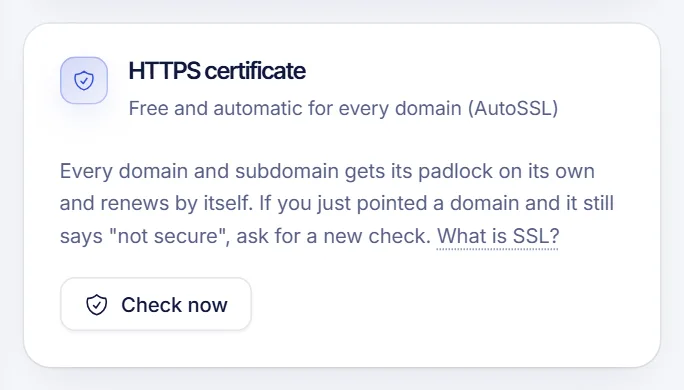
- In the HTTPS certificate card, click Check now.
- A message confirms that the certificate check was requested. If the domain already points to the hosting, the padlock shows up within a few minutes.
From the Settings tab
- Open Settings.
- In Security, next to HTTPS certificates, click Check certificates.
Both buttons do the same thing.
Check the certificate status
In Domain & DNS, the Propagation section includes the state of your HTTPS certificate (valid, not valid, no HTTPS or not checked) with the date it is valid until. After you click Check propagation, you see it next to the DNS results.
You can also open your domain in a browser and click the padlock to see the certificate details.
Force HTTPS on your site
A valid certificate lets visitors use https, but they can still open the http version. To send everyone to HTTPS, add this to the .htaccess file in public_html:
RewriteEngine On
RewriteCond %{HTTPS} off
RewriteRule ^(.*)$ https://%{HTTP_HOST}%{REQUEST_URI} [L,R=301]
If you use WordPress installed from the dashboard, it already starts on HTTPS. If the file does not exist, create it from the cPanel file manager; hidden files are shown under Settings in that tool. Add the lines at the top and keep any existing rules below.
Do not add the redirect before the certificate is valid, or visitors will see an error instead of your site. Check first that https://yourdomain.com opens without warnings.
Troubleshooting
The browser still says "not secure"
Check three things: the domain points to the hosting (DNS health is green), a few minutes have passed since you pointed it, and you clicked Check now. DNS changes can take up to 24 hours, and the certificate cannot be issued before that.
The warning only appears on cpanel. or webmail.
Those names were added to your DNS after the certificate was issued. Click Check now again so they are included.
I use Cloudflare
If the orange cloud (proxy) is on for your records, switch them to DNS only (grey cloud) so the certificate can be issued. Email and SSL do not work with the proxy on for these records.
The page loads but some parts look broken
That is usually mixed content: your pages load images or scripts through http://. Change those addresses to https://, or use relative paths.
I want to use a certificate from another provider
You can manage certificates from the SSL/TLS shortcut in Your cPanel tools, on the Overview tab. For most sites the automatic certificate is enough.
FAQ
Is the SSL certificate really free?
Yes. The HTTPS certificate is issued and renewed automatically for the domains of your hosting at no extra charge.
How long does it take to get the padlock?
Usually a few minutes after the domain points to the hosting, and after you request a check if needed. If the DNS is still propagating, it takes as long as the DNS does.
Do I have to renew the certificate?
No. It renews by itself. You only need to click Check now if you add a new domain or the warning does not go away.
Does every subdomain get its own certificate?
Subdomains and addon domains are covered by the same automatic process. After creating one, click Check now to speed it up.
Related articles
- Point a domain to web hosting
- Upload your website to web hosting
- Install WordPress on web hosting
- Log in to cPanel
Looking for hosting that includes free HTTPS? See SolumeCore web hosting.