How to Delete Your SolumeCore Account
Delete your SolumeCore account from Profile & security or by ticket. What is erased, what to cancel first and how to change your mind in the grace period.
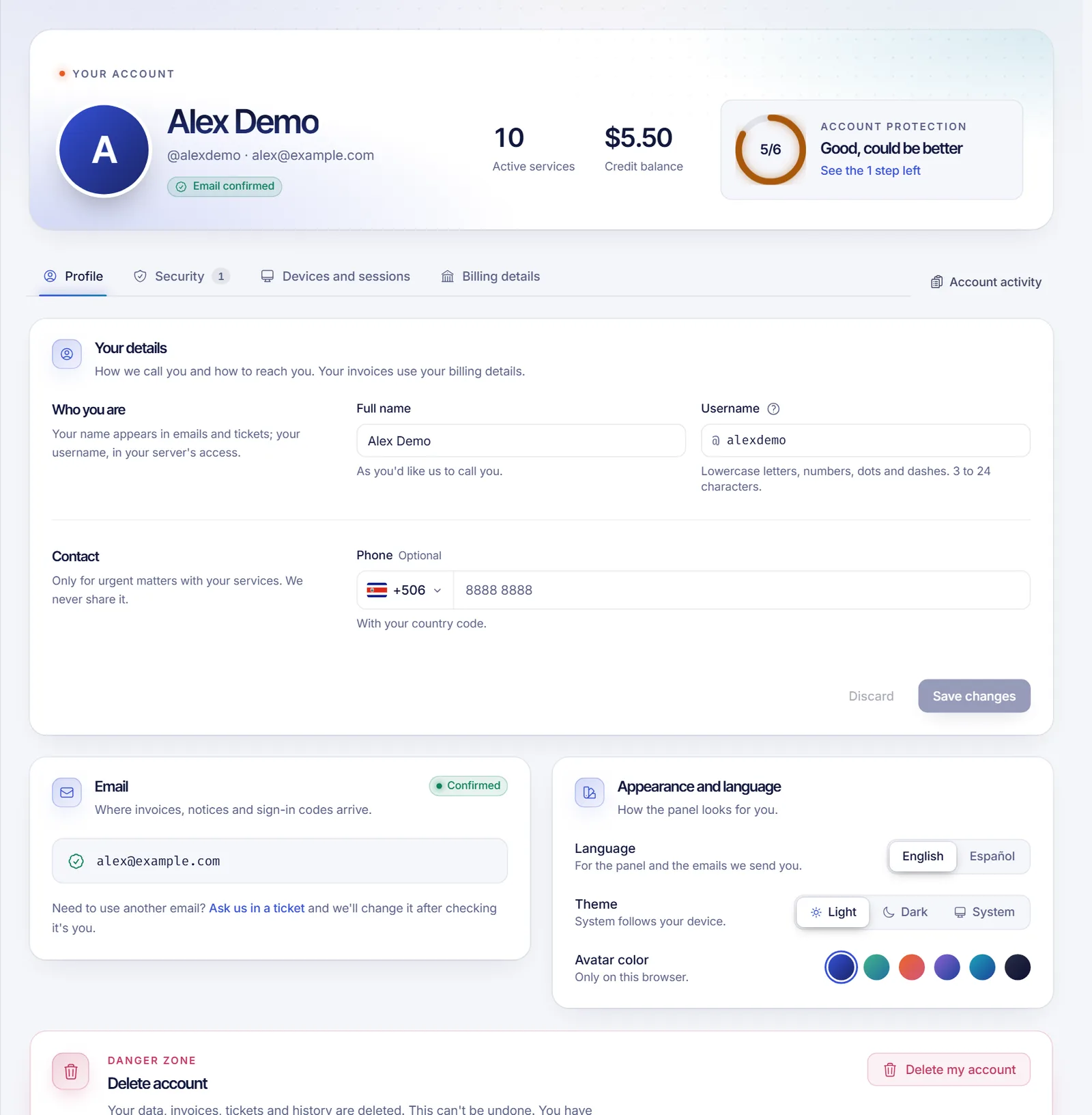
To delete your SolumeCore account, cancel your services and settle your open invoices, then open Profile & security, scroll to the Danger zone at the bottom of the Profile tab and click Delete my account. If that button is turned off in your account, the card tells you to open a ticket and our team will delete the account for you. Deletion is permanent.
Before you delete anything
Deleting removes your profile, invoices, tickets and activity history for good, and you won't be able to log in or recover anything afterwards. Also your referral link stops working. Prepare first:
- Download what you need. Save your invoices, see how to download invoices and set billing details. Download backups and files from your servers too, because their data goes away with the account.
- Use your credit. Any account balance or credit is deleted with the account, see account balance and credits.
- Cancel every service. Servers, VPS, hosting and apps must be cancelled first, see how to cancel a service.
- Pay or settle open invoices. Pending, overdue and disputed invoices block the deletion, see how to pay an invoice.
This can't be undone after the grace period ends. Once your account is purged, we can't restore your services, files, invoices or history.
Delete your account from the panel
Self-service deletion is not turned on for every account. If your Danger zone card shows the Delete my account button, follow these steps. If it says deleting from the panel is turned off, jump to the ticket route further down.
- Log in at dashboard.solumecore.com.
- In the menu, under Account, open Profile & security. You land on the Profile tab.
- Scroll to the bottom, to the Danger zone card titled Delete account.
- If the card lists things to resolve under Before deleting your account, resolve this, do each one. Every line links to the service or the invoice. The Delete my account button stays disabled until the list is empty.
- Click Delete my account. A window Delete your account explains what will be erased.
- Type your username to confirm. It is shown in the window.
- Confirm it is you with your password, a 2FA code, your passkey or an email code.
- Click Delete my account.
What happens next: the grace period
Requesting deletion doesn't erase anything yet. We email you the date and how to cancel, and the card shows Your account will be deleted on that date. By default you have 14 days, and your account keeps working as usual in the meantime.
- To change your mind, open the same card and click Keep my account, then confirm. Everything stays as it was.
- If you buy a service or get an open invoice during the grace period, the deletion is cancelled automatically when the date arrives and we notify you with the message "We didn't delete your account". Cancel or settle those and request it again.
- If you have an open dispute, or a game server is still being cleared from our systems, the deletion waits until that is finished.
When the date passes and nothing blocks it, the account and its data are deleted permanently.
If the panel says deleting is turned off
Some accounts can't use the self-service option. The Danger zone card then says "Deleting from the panel is turned off" with a link to open a ticket.
- Click Open a ticket in that card, or go to Tickets in the menu. See how to open a support ticket.
- Say you want to delete your account. Do not include your password or any codes.
- Our team handles the request. Expect to be asked to cancel your services and settle open invoices first.
Troubleshooting
The Delete my account button is disabled
You have a service that is not cancelled or an invoice that is pending, overdue or in dispute. The list above the button shows each one with a link.
I can't confirm the request
The window asks for your exact username (capital letters don't matter) and a confirmation of your identity. If your account has no password or 2FA, we email you a code. Too many wrong attempts lock the check for a while.
I don't see the Danger zone card
It is at the bottom of the Profile tab, not in Security. Scroll down.
I'd rather just stop receiving emails
You don't need to delete your account for that. Go to Notifications > What and where and choose what you want to receive. Security notices and invoices should stay on.
FAQ
Can I recover my account after deleting it?
Not after the grace period. Until then you can cancel the request with Keep my account.
What data is deleted?
Your profile, invoices and payments, tickets, activity history, account credit, referral data and your services' records, along with the sessions of your account.
Will deleting my account cancel my services and stop billing?
No. You have to cancel your services first. The panel doesn't allow the request while any service is active.
Can I create a new account with the same email later?
After the deletion is complete, you can register again, but it will be a brand-new account with no history.
Related articles
- How to cancel a service
- How to download invoices and set billing details
- Account balance and credits
- How to open a support ticket
If you only want to switch plans or pause something, explore our plans before you leave.