Change Your Account Password or Email on SolumeCore
Change your password from Profile & security in a minute and learn how to request an account email change. Plus what happens to your sessions and SFTP.
You change your password yourself: open Profile & security, go to the Security tab, enter your current password and a new one in the Password card, and click Change password. The account email can't be edited in the panel: you request the change in a support ticket and our team makes it after checking that it is you.
Change your password
- Log in at dashboard.solumecore.com.
- In the menu, under Account, open Profile & security and select the Security tab.
- In the Password card, type your Current password.
- Type the New password and then Repeat the new password. It needs at least 10 characters, and the strength meter shows how strong it is.
- Click Change password.
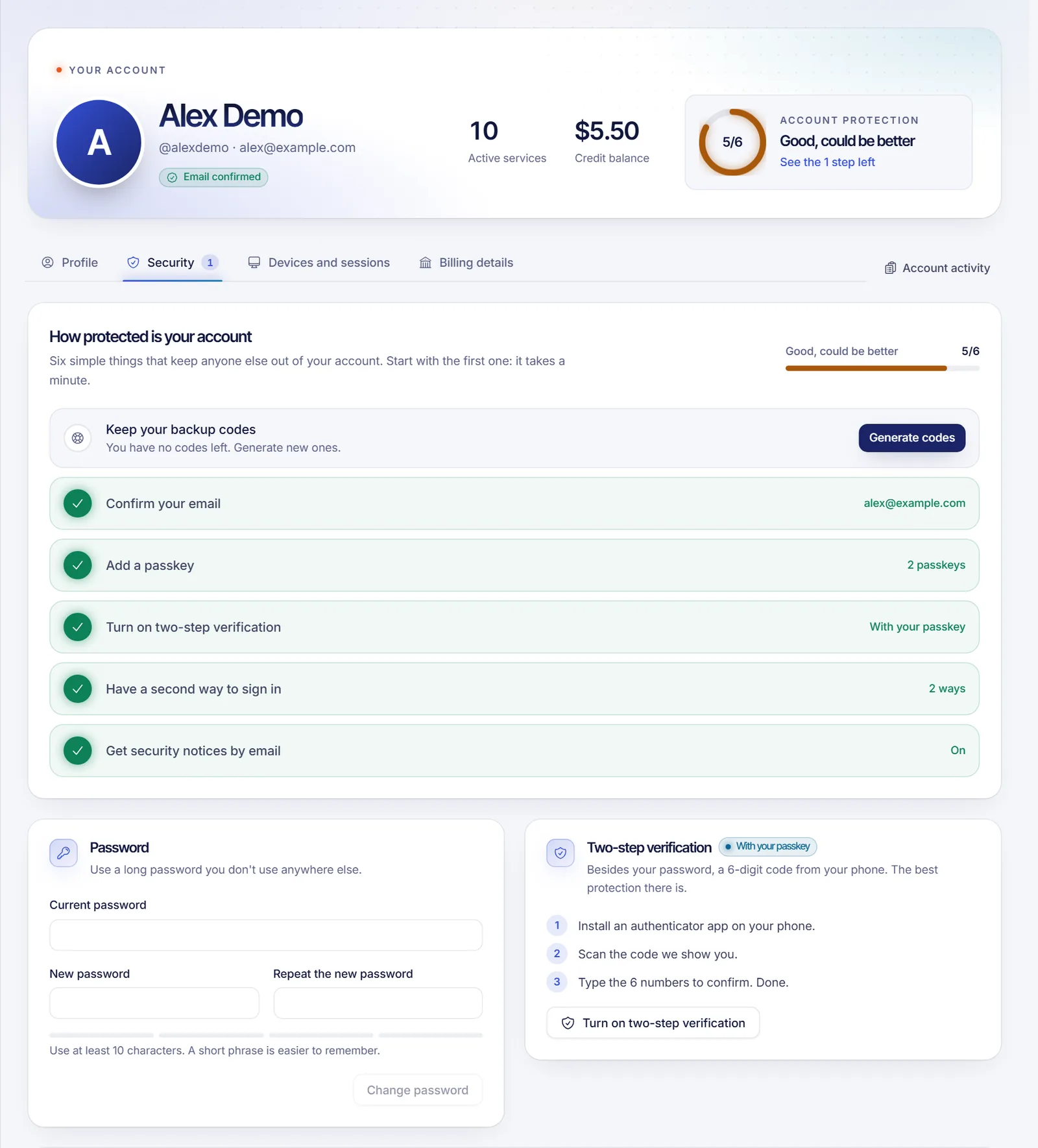
Pick a long password you don't use anywhere else, ideally generated and stored by a password manager. Don't share it with anyone, not even with people who say they work at SolumeCore.
What happens after you change it
- Your other sessions are signed out. The browser you used keeps working, and every other device has to log in again.
- Custom SFTP access to your game servers is removed: the SFTP passwords and SSH keys you had set up. Create them again when you need them, see how to connect to your game server with SFTP.
- Your API keys keep working. A password change doesn't revoke them, but a reset through the email link does. If you suspect someone else had access, revoke and recreate them as explained in how to create and use an API key.
If you don't remember the current password, you can't use this form. Use the reset link instead: how to reset a forgotten password.
Create a password if you log in with Discord or Google
Accounts created with Continue with Discord or Continue with Google have no password at first. In the Security tab, the Ways to sign in card shows Email and password with the button Create password.
- Click Create password.
- Enter and repeat the new password (10 characters minimum).
- Confirm it is you. As there is no password or 2FA yet, we email you a code to enter.
You can then also log in with your email and password and use SFTP, which uses this same password.
Change your account email
The email of your account receives invoices, notices and security codes, so it isn't editable from the panel. To change it:
- Open Profile & security and stay on the Profile tab. The Email card shows your current address and whether it is confirmed.
- Click the link Ask us in a ticket. It opens a new ticket with the subject "Change my account email".
- Write the new address you want to use and send the ticket. Our team may ask you a few questions to check that you own the account. Never include your password or any codes in the ticket.
- Once it is done, check that you receive messages at the new address.
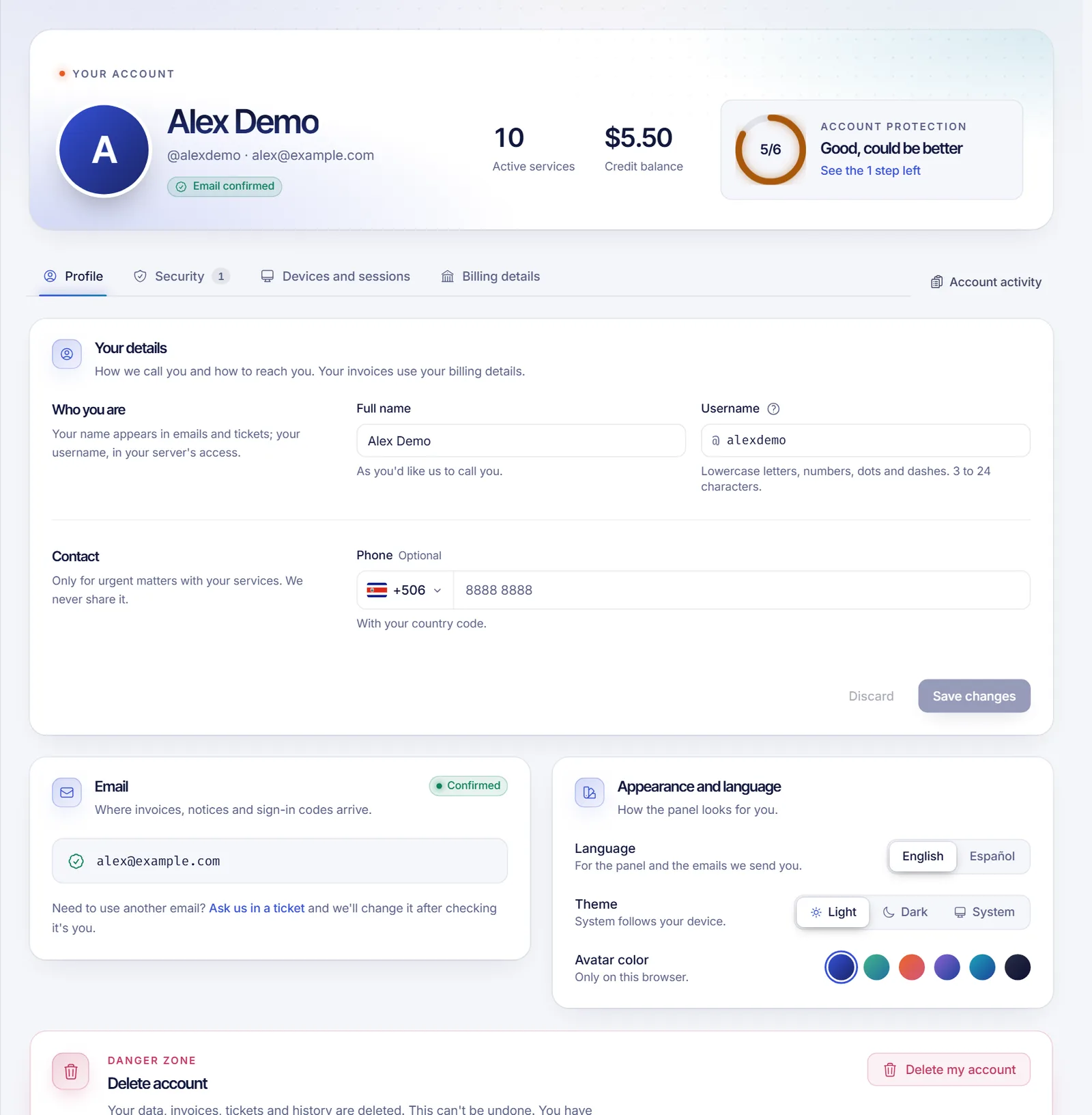
If you can't log in to the panel at all, use the contact page from the address you want to use and explain what you need.
If your current email is Not confirmed, click Resend email in the same card to get a new confirmation link. Links last 24 hours by default.
Change your name, username or phone
In the Profile tab, edit Full name, Username or Phone and click Save changes. The username can have lowercase letters, numbers and underscores, from 3 to 24 characters. It is part of your SFTP user (username.server), so after changing it you connect to your files with the new one.
Troubleshooting
"Wrong password" when changing it
Check you are typing the current password and not the new one. Several wrong attempts lock the check for a while (15 minutes by default), the same way the login does.
The new password is rejected
It must have at least 10 characters, and both fields must match.
My programs can't reach my files after changing the password
The SFTP credentials were removed on purpose. Create new ones and update the program.
FAQ
Can I change my email without opening a ticket?
Not from the panel. The email is the main way to recover your account, so we change it by hand after verifying who is asking.
Does changing my password log me out?
Not on the device where you do it. Your other sessions are closed.
Do I need to enter my current password?
Yes. It stops someone with access to an open browser from taking over your account. If you don't remember it, reset it by email.
How often should I change my password?
There is no required schedule. Change it when you suspect it was exposed or reused on another site, and turn on two-factor authentication for better protection.
Related articles
- How to reset a forgotten password
- How to turn on two-factor authentication
- How to open a support ticket
- How to manage sessions and devices
Ready to run something new? See our plans.