Game Server IP, Ports and Subdomains Explained
How players reach your game server: IP and ports, the free sv-solumecore.com name with A and SRV records, extra ports, your own domain and DDoS protection.
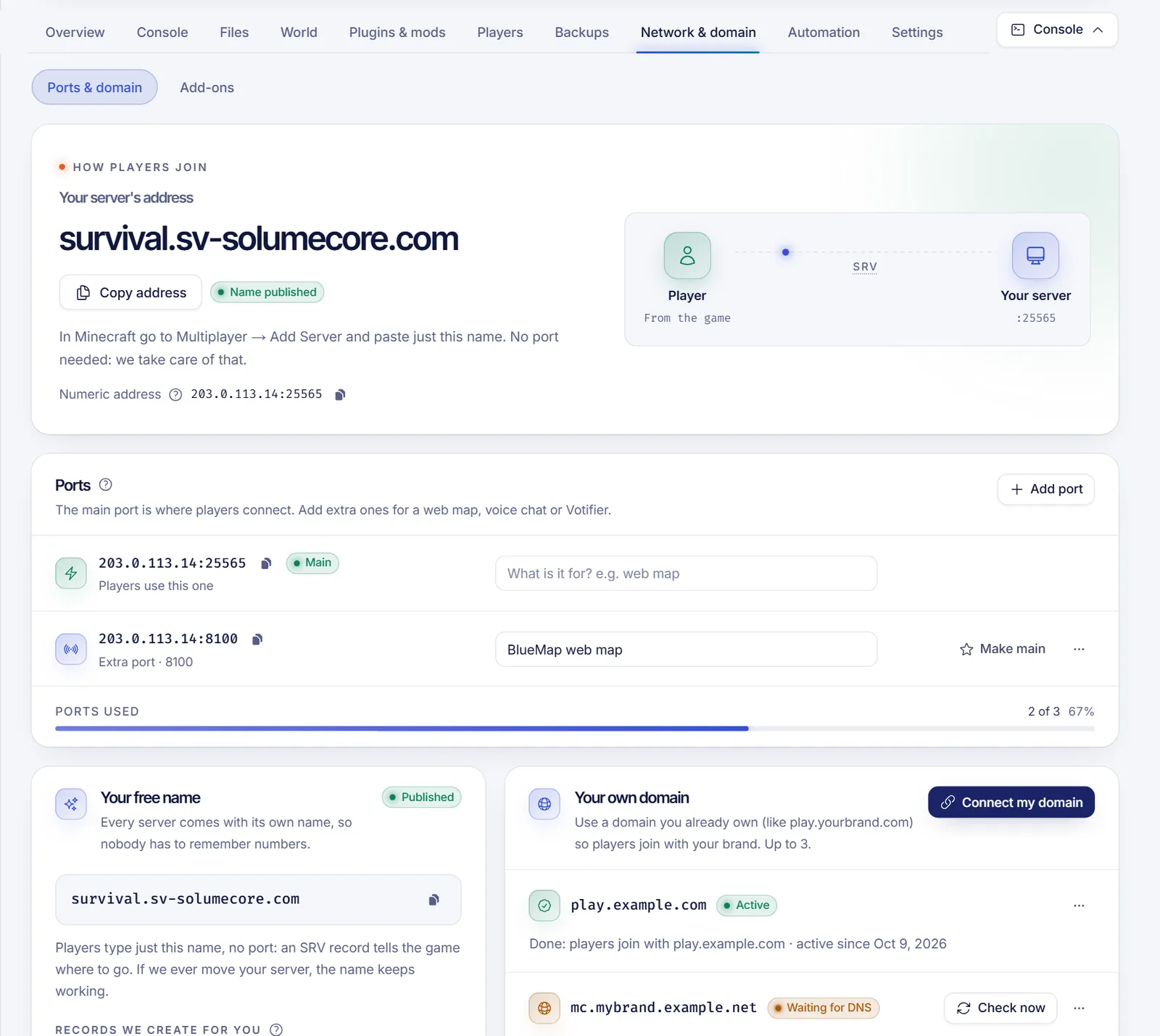
A game server on SolumeCore is reached through an address: a host (a name or an IP) plus a port. The panel shows it on the server page, ready to copy, and builds it for you. If your service has a free game name, players type just that name; otherwise they type IP:port. You can also add extra ports for plugins and connect your own domain such as play.yourbrand.com.
This page explains how the address is formed, how ports work, how the free name and its DNS records (A and SRV) behave, how to point your own domain at the server, and what protection sits in front of it.
What your players type
The panel always picks the best address available and shows one canonical address everywhere, so the Overview, the console and the Network tab never disagree. The order of preference is:
- your own domain, if you connected one and it is active;
- the free game name (subdomain), if it is published;
- the host and port of the server (
host:port).
What players actually type depends on the game:
| Situation | Address players type |
|---|---|
| Minecraft Java with a name | Only the name, for example mycraft.sv-solumecore.com. The port travels in an SRV record. |
| Minecraft Java without a name | host:port. |
| Minecraft Bedrock (phones, consoles) | The name and the port, typed separately in the Bedrock server form. Bedrock does not read SRV records. |
| Any other game | name:port, or host:port without a name. |
The panel also shows a numeric address (IP:port) as a fallback. Use it if a name ever fails to resolve, or with tools that do not understand names.
IP and ports
Several game servers share the same machine, so what identifies yours is the pair IP and port. Under Network & domain → Ports & domain you manage the ports of your server.
- Main port. The one players use to join. It is marked "Main" (or "Primary").
- Extra ports. Many games and plugins need a second door: a web map, voice chat, Votifier, a Steam query port or an RCON port. How many your plan allows appears as "x of y ports".
- Notes. Write what each extra port is for so you remember later.
Add, change and remove ports
- Add port takes a free port from the machine's pool and attaches it to your server. You cannot choose the number: the platform gives you the lowest free one on the same IP as your main port when possible. The panel warns when your plan has no room for more.
- Make main turns another port into the main one. It takes effect on the next restart. Players who join with your Java name do not change anything, because the SRV record is updated. Otherwise they need the new address.
- Remove port frees the port for other servers. Whatever was listening on it, such as a map or voice chat, stops being reachable. If you add a port again later it may get a different number.
You need the matching permissions (see Game server permissions): allocation.read to see, allocation.create to add, allocation.update to edit notes and the main port, allocation.delete to remove.
Games that need extra ports
Some games need more than one port to be playable: a query port so the server appears in lists, RCON for remote administration, a companion-app port, or a second reliable channel. For the games the catalog knows, the Network tab shows How players connect with each role, marks what is required to play and what is optional, and offers Set up ports. That button takes free ports from the machine, writes them into the server's variables and then asks you to restart. Ports that are required to play can be taken even beyond what your plan includes, up to a fixed ceiling; optional ones are only taken if your plan has room.
The free game name (subdomain)
Important: the free game name is an optional platform feature that depends on how DNS is configured for the platform. When it is not available for your server, the panel keeps showing
IP:portand the Your free name card does not appear. If you do see it, everything below applies.
When it is available, every game server gets a name of the form <label>.sv-solumecore.com. By default the label is the service code plus -play, for example game-1001-play.sv-solumecore.com. The platform creates and keeps two DNS records for you; you never touch them:
| Record | Name | Purpose |
|---|---|---|
| A | <label>.sv-solumecore.com |
Turns the name into the public IP of the machine that hosts your server. |
| SRV | _minecraft._tcp.<label>.sv-solumecore.com |
Tells the Minecraft Java client which port to use, so players do not type it. Only created for Minecraft Java. |
The records are published DNS-only, with no web proxy in front, because game traffic is not HTTP. A status badge shows Published, Publishing or Not published. A new name usually works everywhere within a minute; if publishing fails, the platform retries on its own and meanwhile you can use the numeric address. If we ever move your server to another machine, the name keeps working.
Change the name
Press Change name and pick your own label. Rules: lowercase letters, numbers and single hyphens, 3 to 40 characters, not starting or ending with a hyphen. Some words are reserved, including common service names and brand names, and names that look like the automatic ones are not available.
- By default you can change the name 3 times per day; the card shows how many changes are left today.
- Back to the original returns to the automatic name and counts as one change.
- A name you release stays reserved for a while (90 days by default) so nobody else can take a name that outside CNAME records may still point to. You can always get your own back.
- Changing the name sends your custom domains back to "Waiting for DNS": update their record to the new name.
Connect your own domain
Use a domain you already own, such as play.yourbrand.com, so players join with your brand. You need the free name published first. By default you can connect up to 3 domains per server, and a domain can only be active on one server at a time. Names inside the platform's own domain cannot be used as your own domain.
Press Connect my domain and follow the three steps (Your domain, DNS records, Done). Type a subdomain such as play.yourbrand.com rather than the bare yourbrand.com: your website keeps working and players get a name that says what it is.
The panel then shows the exact records to create at your DNS provider. For Minecraft Java the important one is a CNAME on the SRV name:
Type    Name                                  Points to
CNAME   _minecraft._tcp.play.yourbrand.com    _minecraft._tcp.mycraft.sv-solumecore.com   (required)
CNAME   play.yourbrand.com                    mycraft.sv-solumecore.com                   (optional)
Why that one? A CNAME on the bare name lets the game find the IP but not the port, because Minecraft Java looks for the SRV record under _minecraft._tcp.<name>. With the SRV CNAME, your domain follows ours, so if the server changes IP or port you do nothing. The plain CNAME is optional for Java, but it helps Bedrock players and anyone typing play.yourbrand.com:port.
For Bedrock and every other game, the plain CNAME is the required record, and players type the domain together with the port.
Tips for creating them:
- If your DNS provider has a proxy switch (Cloudflare's orange cloud), keep it off: grey cloud, DNS only.
- Some providers want the name relative to your zone (
_minecraft._tcp.play) instead of the full name. Follow the format your provider uses. - If your provider supports automatic setup, a button offers to create the records for you and you only accept.
The panel checks your DNS on its own every few minutes, and Check now forces it. The domain goes from "Waiting for DNS" to "Active" when the records resolve to your server; DNS changes can take a few minutes, sometimes an hour. Once Active, the domain becomes the address shown everywhere. Remove domain stops it from leading to the server; the records at your provider stay, so delete them yourself.
Add-ons that use ports
On Minecraft, Network & domain → Add-ons installs tools that open an extra port. The panel tells you the address and port to use:
- Live map (BlueMap or squaremap): opens at the server's host and an extra port over plain HTTP. If a secure address is available it opens inside the panel, otherwise in a new tab.
- Phones and consoles (Geyser and Floodgate): Bedrock players use
Play → Servers → Add serverwith the shown address and port. - Voice chat: players do not configure anything; the mod connects to its port.
- Votifier: enter the shown IP, port and public key in the server list that sends votes.
Installing add-ons needs the Minecraft add-ons permission.
Protection
Game servers are protected automatically by the platform's DDoS mitigation at the network edge. Read DDoS protection and firewall for what it covers and its limits, and the public firewall page. Remember that a game address has to be resolvable by anyone who wants to play, so a public name is not a way to hide your server's IP.
Common problems
| Problem | What to check |
|---|---|
| The name does not resolve | The badge says "Publishing" or "Not published": wait a minute, or use the numeric address meanwhile. |
| Java works with the name but Bedrock does not | Bedrock needs the name and the port typed separately. |
| Players land on port 25565 or cannot connect after you set a domain | The SRV CNAME is missing or wrong. Check the first record. |
| The domain stays at "Waiting for DNS" | The record name or target has a typo, the proxy is on, or DNS has not propagated yet. |
| The old domain stopped working | You renamed the free name. Update the CNAME target. |
| "No ports left" | Your plan's ports are all in use. Remove one or upgrade the plan. |
FAQ
What is my Minecraft server address?
It is shown on your server page under Address. With a published name it is just that name; otherwise it is IP:port.
Why do players not need to type the port?
Because of the SRV record, which tells the Minecraft Java client the port. Bedrock and most other games ignore SRV, so they need the port.
How do I use my own domain for my Minecraft server?
Connect my domain in Network & domain, then create the CNAME on _minecraft._tcp.<yourname> that the panel shows. Keep any proxy off.
Can I choose my port number?
No. Ports come from the machine's pool. You can make any of your ports the main one.
Does changing the name break my players?
Yes, the old name stops working once the new one replaces it. Tell your players, and update the records of any custom domain.