App and Bot Hosting: Git Deploy, Variables and Databases
How app and bot hosting works: supported runtimes, Git or SFTP deploys, environment variables, PostgreSQL, Redis, MongoDB, logs and zero-downtime releases.
SolumeCore app and bot hosting runs your own code, such as a Discord or Telegram bot, an API, a worker or a small website, as a process that stays up around the clock. There are no cold starts: your process does not sleep when there is no traffic. You bring the code from a Git repository or upload it over SFTP, add your secrets as environment variables, press Deploy and watch it start in the live console.
Each plan is built for one language, with the memory, CPU and disk the plan states. Everything is managed from the client panel (dashboard.solumecore.com): deploys, variables, dependencies, logs and health checks, databases, domains, scheduled tasks and backups. This guide explains each piece and what depends on your plan.
Important: this product is for running your code. If you want a PHP site with WordPress, mailboxes and automatic SSL, use cPanel web hosting. If you need root access and your own stack, choose a VPS or VDS.
Supported runtimes
You choose the language when you buy. A different language is a different plan, because it is a different base image. These are the runtimes in the catalog:
| Runtime | Typical use | Default main file |
|---|---|---|
| Python | Bots, APIs, scripts; installs requirements.txt on start |
app.py |
| Node.js | Bots, APIs, workers; runs npm install when there is a package.json; TypeScript through ts-node |
index.js |
| Bun | JavaScript and TypeScript runtime, compatible with most Node code | index.ts |
| Deno | TypeScript with explicit permissions by default | main.ts |
| Go | Compiles and runs a Go program | main.go |
| Java | Any .jar, with the Java version you choose (not a Minecraft server) |
app.jar |
| Rust | Builds with cargo and runs the binary (the language, not the game) | src/main.rs |
Each runtime offers several language versions. You can pick the version under Code → Packages → Language version; it applies on the next restart.
Getting your code online
The first screen of a new app, "Put your app online in 3 steps", offers three ways to bring code.
Deploy from Git
Under Code → Deploy, choose Connect a Git repository. The wizard has three short steps:
- Your code. Paste the repository URL and the branch (usually
main).- A public repository uses the HTTPS link, for example
https://github.com/you/my-bot. Nothing else is needed. - A private repository connects over SSH with the
git@host:you/repo.gitlink and a read-only deploy key that the panel generates. You add that key to the repository's deploy keys (GitHub: Settings → Deploy keys, leaving write access unchecked; GitLab: Settings → Repository → Deploy keys). URLs that embed a user or token are rejected on purpose.
- A public repository uses the HTTPS link, for example
- Access. Add the deploy key if the repo is private.
- Commands. Set the build command (runs after every deploy, before the app starts, for example
npm install) and the start command (one line, for examplenpm start,node index.jsorpython main.py). Empty means the default for your language.
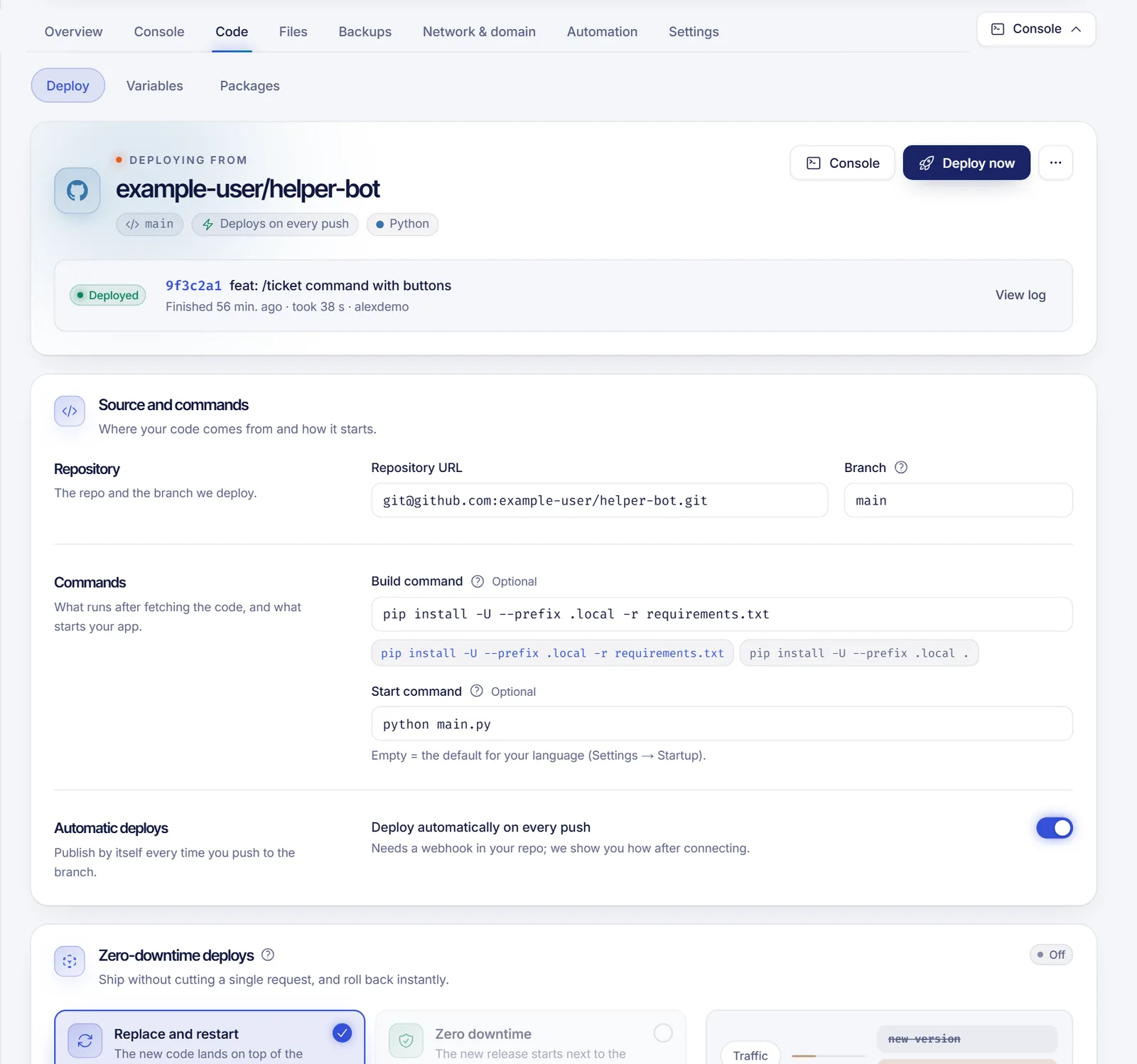
Press Deploy now. A deploy goes through Queued, Fetching code, Building and Deployed (or Failed with its log). The Deploy history lists every version with its log, how long it took and what triggered it (manual, push, rollback, template), and lets you roll back to one that worked. Reinstall from scratch deletes every file on the server and clones the repo again, so take a backup first if something matters.
Deploy on every push. Turn on "Deploy automatically on every push", generate a webhook secret and add the webhook URL to your repository (GitHub: Settings → Webhooks, content type application/json, push events only; GitLab: Settings → Webhooks, push events). Each push to the chosen branch then publishes your app.
Start from a template
Quick start installs a working project in one click, then you make it yours from your own repository. Templates are filtered by your runtime and include Discord bots (discord.js, discord.py), Telegram bots (Node.js, Python), Express, Fastify and FastAPI APIs, a Flask site, a static site and Next.js standalone. Using a template replaces the files on the server. The Discord bot assistant walks you through creating the bot in Discord's developer portal, validates your token, stores it encrypted and gives you the invite link with a permission preset (basic, moderation, music or administrator).
Upload files or use SFTP
If you do not use Git, drag your project into the Files tab or connect over SFTP with your own SolumeCore account; see the SFTP connection reference.
Environment variables
Code → Variables is where tokens, API keys and settings live, instead of your code. Values are stored encrypted and stay hidden until you press the eye.
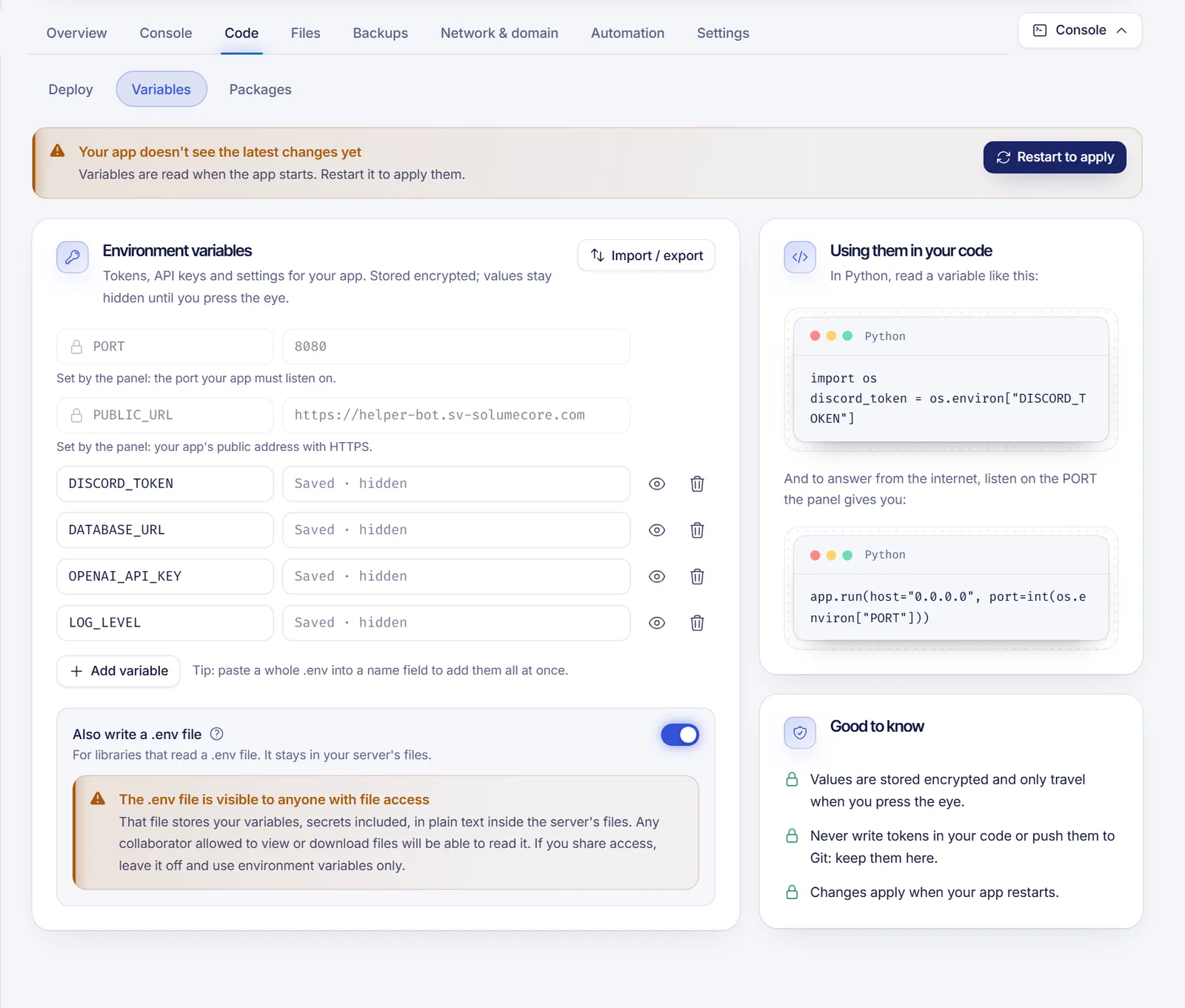
- You can import or export a
.envfile (comments, quotes and multi-line values are supported). Do not commit the exported file to Git. - An app can have up to 100 variables, with names up to 100 characters and values up to 8,192 characters.
PORTandPUBLIC_URLare set by the panel.PORTis the port your app must listen on, on0.0.0.0;PUBLIC_URLis your public HTTPS address once you connect a domain. Names such asHOME,PATH,TZand anything starting withSERVER_orSTARTUPare reserved.- Variables are read when the app starts, so changes need Restart to apply. With zero-downtime deploys on, use Apply without downtime instead.
- You can also ask the panel to write a
.envfile next to your code. Anyone allowed to view or download files can read it, so leave it off if you share access.
Dependencies and language version
Code → Packages shows your dependency file (package.json or requirements.txt), lists what is outdated, adds, updates and removes packages without editing files, and offers the safe updates in one click. Major updates warn you first. It is not available for every language; for those, manage dependencies from your repository or the Files tab. If the app deploys from Git, the next deploy overwrites changes made here, so change the manifest in your repo as well.
Zero-downtime deploys
By default a deploy replaces the code and restarts the app, which causes a short outage. Under Deploy → Deploys without downtime you can switch an app to zero downtime: each deploy becomes a separate release that is built and health-checked while the current version keeps serving. Traffic only moves when the new version answers, the old one finishes its open requests, and if the new one fails nothing changes. Going back to a recent release is instant; older ones are fetched and built again.
It requires:
- A Git repository connected.
- Your own start command, relative to the app folder (for example
npm start). - An app that answers HTTP. Bots are excluded: Discord does not allow two gateway connections with the same token, so bots keep the regular deploy.
- Optionally a health check route; without one, any HTTP answer from
/counts. - A server that supports it. The option is only offered where it is available.
Things to know: the first zero-downtime deploy restarts the app once; keep files that must survive deploys in /home/container/data (the DATA_DIR folder), because each release is a new folder; and removing a variable still needs a restart.
Managed databases
If your plan includes them, the Databases section creates PostgreSQL, Redis and MongoDB databases next to your app, on the same server and in a private network that only your app can reach. Credentials are generated for you, and creation usually takes under a minute.
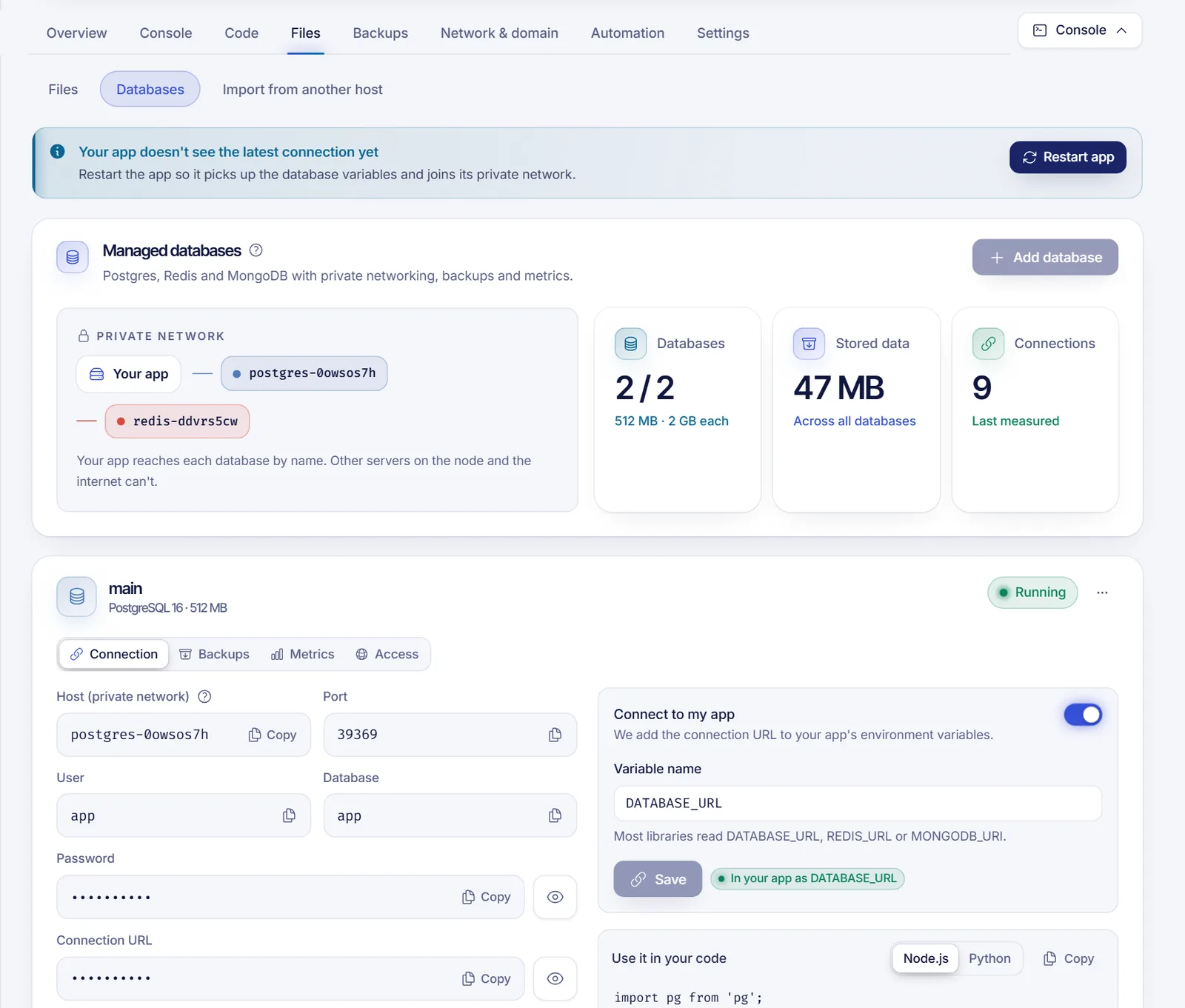
- Plan limits. How many databases and which engines you can add depends on your plan. If it does not include them, the panel says so.
- Connection. Each database has a host name that only resolves inside the private network. Press Connect to my app to add the connection URL as a variable such as
DATABASE_URL,REDIS_URLorMONGODB_URI, then restart or apply without downtime. - Backups. Schedule them (never, every 6 hours, daily or weekly), keep up to the number the platform allows, make one on demand and restore any of them. They are made with each engine's own tool and stored on the database's own disk. Restoring keeps a copy of the current state first.
- Metrics. CPU, memory, disk, data size and connections, plus tables, keys or collections.
- Outside access. The database is private by default. You can allow connections from specific IP addresses to use a desktop client; opening it to the whole internet is not allowed.
Logs and health checks
Logs & health keeps everything your app prints for a number of days (7 by default) and lets you search, filter by level, pick a time range, follow live and download. The health check requests a page (HTTP) or tests a port (TCP) at the interval you choose, and after a number of failures in a row can restart the app and notify you. Test now checks whether your app accepts connections from the internet; if it does not, make sure it listens on 0.0.0.0 and the given PORT.
Domains with HTTPS
Under Network & domain → Ports & domain you can give an app an HTTPS address with either a free subdomain or your own domain. For your own domain you create two records at your DNS provider (one that points visitors to the app and a TXT that proves the domain is yours), and certificates are issued and renewed for you. You can force HTTPS, add security headers, redirect www, enable compression, set an upload limit or require a password. How many domains an app can have is set by the platform, and the feature is only available on servers that have the HTTPS proxy. Details in domains and DNS.
Automation, backups and access
- Automation → Scheduled tasks runs restarts, backups or a command on a timer, in your time zone.
- Backups are manual or scheduled copies of the app's files; deleted files go to a trash you can restore from for a week.
- Sharing. Apps use the same permission system as game servers, so you can give a teammate the console without giving files. See game server permissions.
- Upgrading. In the panel choose Upgrade plan, pay only the difference for the days left in the cycle and your process gets the new memory without reinstalling.
Related documents
- cPanel web hosting
- SFTP connection reference
- Domains and DNS
- Game server permissions
- Limits and quotas by product
FAQ
Which languages can I use for a bot or app?
Python, Node.js, Bun, Deno, Go, Java and Rust, each with several versions. You pick the language at purchase; another language means another plan.
How do I deploy a private GitHub repository?
Use the repository's SSH link ([email protected]:you/repo.git), then add the read-only deploy key shown in the panel to the repository's Deploy keys. Tokens in the URL are not accepted.
Does my app sleep when nobody visits it?
No. The process keeps running, so there is no cold start and no slow first request. If you turn on the health check with automatic restart, the panel can bring it back after a crash.
Can I deploy without downtime?
Yes for apps that answer HTTP, with a connected Git repository and your own start command. Discord and other bots cannot overlap two versions, so they keep the regular deploy with a short restart.
Which databases can I use?
Managed PostgreSQL, Redis and MongoDB, if your plan includes them. They run next to your app in a private network, with backups and metrics.
How do I keep secrets out of my code?
Put them in Code → Variables. They are stored encrypted and passed to your app as environment variables when it starts.