Domains and DNS: Connect a Domain and Edit Records
What the SolumeCore domains center does: connect your domain to hosting, apps or game servers, nameservers or records, the DNS zone editor and propagation.
The Domains page in the client panel (dashboard.solumecore.com) lists every domain and subdomain tied to your account in one place: where it points, whether it has HTTPS and whether the rest of the world already sees it. It covers your web hosting, your game servers, your apps and bots, and the web maps of Minecraft servers. Each entry has a Manage link that takes you to the server where that domain is actually configured.
It is important to know what the page is and is not. It is a live overview and a guided way to connect domains you already own. It does not register, renew or transfer domains: you buy a domain at any registrar and then connect it to SolumeCore. Nothing is changed from the overview itself; each domain is managed in the tab of its own server.
What the Domains page shows
The summary at the top counts your domains, how many are active, how many have HTTPS and how many need attention. The table has these columns: domain, where it points, state, HTTPS and DNS. You can search by domain or server name and filter by Web hosting, Games, Apps or Maps.
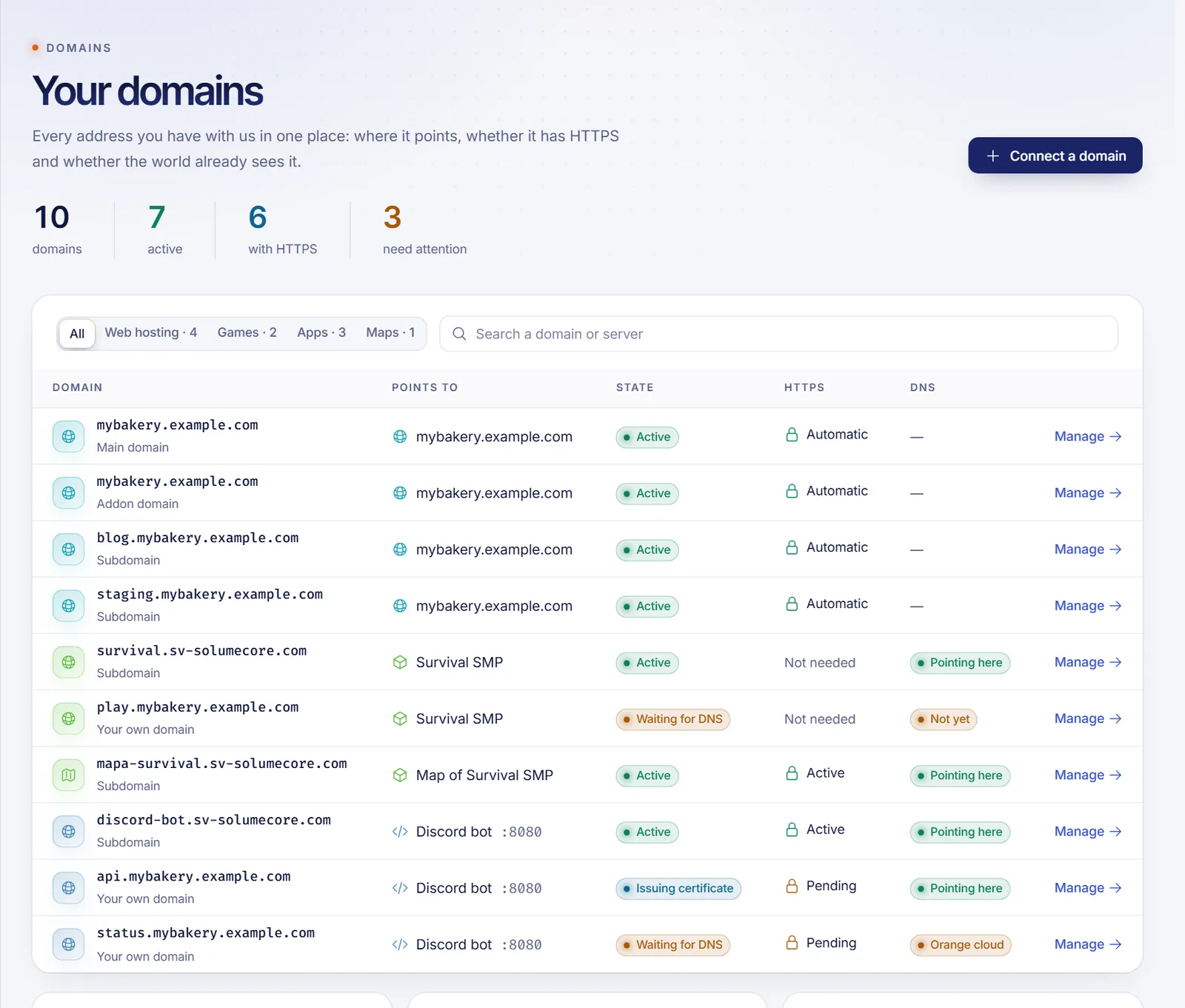
Each domain has one of these states:
| State | Meaning |
|---|---|
| Active | The domain points where it should and answers. |
| Waiting for DNS | We are waiting for the DNS records to point here. Open its server to see exactly which ones. |
| Issuing certificate | The DNS is right and the HTTPS certificate is being issued, which usually takes about a minute. |
| Paused | Its server is not active, or the port was released. |
| Error | Something failed when publishing it. Open its server to retry or contact support. |
| Pending | It is being published; this normally takes a few seconds. |
The origin of each entry is also shown: main domain, temporary address, addon domain, subdomain, alias or your own domain. For any domain you can run a propagation and certificate check: it asks four well-known public DNS resolvers what they see and tests the HTTPS certificate. If a domain is behind Cloudflare's orange cloud, the page tells you to switch it to "DNS only" so the certificate can be issued.
The Connect a domain button asks where you want to use the domain (players join with it, your app on it, or your website and email on it) and takes you to the right place.
Three ways to point a domain
Which method you use depends on what you are connecting.
- Our nameservers (web hosting). You change the nameservers at your registrar to the two shown in the connection wizard. SolumeCore then manages the whole DNS zone for the domain, including website, email and SSL. This is the recommended way for hosting.
- Records at your own DNS provider. You keep your DNS where it is (Cloudflare, your registrar's DNS, etc.) and create the records the wizard lists. This works for hosting, apps and game servers and is the only way if you want to keep other services on the same domain.
- Domain Connect (automatic). If your DNS provider supports it, a button such as "Set up with ..." or "Let ... do it for you" opens your provider with every record ready to approve. See below.
Important: DNS changes are not instant. They usually appear within an hour, but can take up to 24 hours depending on the TTL and on each resolver. Use the propagation check before assuming something is wrong.
Web hosting: connect a domain and edit the zone
For a hosting account you have:
- Domain & DNS → Connection, the wizard that connects your own domain (nameservers or records, plus a downloadable zone file for providers that can import one).
- Domain & DNS → DNS zone, an editor for the records of the domain when it uses our nameservers. It supports A, AAAA, CNAME, MX, TXT, SRV and CAA records, TTL values from 60 seconds to one week, and quick templates for Google Workspace, Zoho Mail and Vercel that show what they add and remove before you apply them.
- Domain & DNS → Domains & subdomains, to add addon domains, create subdomains and change the main domain.
Safeguards you may notice: an addon domain can only be added once it already points to the hosting, and there is a waiting period (24 hours by default) between main-domain changes. If a domain uses other nameservers, the editor warns you that edits there will not be seen until you switch. The full walkthrough, including email records (MX, SPF, DKIM, DMARC), is in cPanel web hosting.
Typical records for a hosting domain are an A record for the domain and for www, A records for cpanel and webmail, an A record for mail, an MX record, an SPF record and optionally DKIM and DMARC. The wizard shows the exact values for your server.
Game servers
Game servers can have a free name of their own, so players do not type an IP and a port. For Minecraft Java, an A record turns the name into the server's address and an SRV record tells the game which port to use; both are created and updated for you, so you do not have to touch anything. Bedrock and some other games do not read SRV records, so players type the name and the port separately.
You can also connect a domain you own, such as play.yourbrand.com. The panel shows the records to create (a CNAME on _minecraft._tcp for Java, plus a CNAME on the name itself for Bedrock and plain connections), checks them every few minutes by itself and marks the domain Active. A subdomain is better than the bare domain, because your website keeps working. If you use Cloudflare, keep the cloud grey (DNS only). How many own domains you can connect to a server is limited, and the free name and the own-domain option depend on how your server is set up. Everything is explained in game server networking and subdomains.
Apps and bots
For an app, go to Network & domain → Ports & domain and press Connect domain. You can choose a free subdomain or your own domain, and the port of your app that should answer. For your own domain you create two records at your DNS provider:
- A record that sends visitors to your app: a CNAME for a subdomain such as
api.yourdomain.com, or an A record for the bare domain. - A TXT record that proves the domain is yours. Without it nothing is published.
An optional record makes www work too. Certificates are issued and renewed for you, on the first HTTPS visit. Per domain you can also force HTTPS, add security headers, redirect www, turn on compression, set an upload limit or ask visitors for a password. This feature needs the HTTPS proxy on your app's server, so it is not available everywhere, and the number of domains per app is limited. See app and bot hosting.
Domain Connect
Domain Connect is an open standard that lets a service ask your DNS provider to create a set of records for you. In the panel it appears as a button in the wizards for apps, Minecraft servers with your own domain and web hosting. You approve on your provider's page and the records are created. The button is only shown when your DNS provider supports the SolumeCore template; otherwise it does not appear at all and you follow the manual guide. Which providers are supported can change over time, so if you do not see the button, create the records by hand, which always works.
Reverse DNS for VPS and VDS
On a VPS or VDS, the Network & domain tab can send a request for a reverse DNS (PTR) name for an IP. The name must already point back to that IP with an A record, and it is mostly useful for sending email. This request is not available on every service. See VPS vs VDS.
Troubleshooting
- The domain says "Waiting for DNS". Open the server and compare the records with the ones requested; a missing TXT or a wrong target is the usual cause.
- The browser shows "not secure". The certificate is issued after the DNS points correctly. On hosting, press Check now; on apps, visit the domain once over HTTPS.
- Email or HTTPS does not work behind Cloudflare. Set every record to "DNS only".
- A CNAME is refused on the bare domain. A CNAME cannot sit on the domain itself; use an A record or a subdomain.
- Changes do not show up. Wait for the TTL to expire and run the propagation check.
Related documents
FAQ
Can I register or transfer a domain with SolumeCore?
No. The Domains page connects and monitors domains you already own; it does not register, renew or transfer them. Buy the domain at any registrar and connect it from the panel.
Do I need to change my nameservers?
Only for web hosting if you want us to manage the DNS. For apps and game servers you keep your DNS provider and add the listed records.
How long does DNS propagation take?
Usually less than an hour, up to 24 hours in some cases. Use the propagation check on the Domains page to see how many public resolvers already see the change.
What is Domain Connect and why do I not see the button?
It lets your DNS provider create the records automatically. The button only appears when your provider supports our template. If it does not, use the manual records.
Can I use a subdomain of my domain instead of the bare domain?
Yes, and it is usually the better choice, especially for game servers (play.yourbrand.com) and apps (api.yourdomain.com), because your main website is not affected.
Why does Cloudflare break my certificate or email?
Cloudflare's orange cloud proxies the traffic, so we cannot issue the certificate and mail records stop working. Set the records to "DNS only" (grey cloud).