Payment Methods: Card, PayPal, Credit and Crypto
What you can pay with at SolumeCore: card, PayPal, account credit and crypto. How each one works, saved cards, method discounts and payment security.
SolumeCore can take payment by card, PayPal, account credit and cryptocurrency. Which of these you actually see depends on how SolumeCore has configured the platform: card, PayPal and account credit are enabled by default, while cryptocurrency and credit top-ups are off by default and only appear when switched on. This guide explains each method, what happens to your data, and how methods interact with discounts, saved cards and renewals.
You choose the method at checkout for a new order, or later on the page for any pending invoice. The same options appear in both places, and you can switch method as many times as you like before you pay.
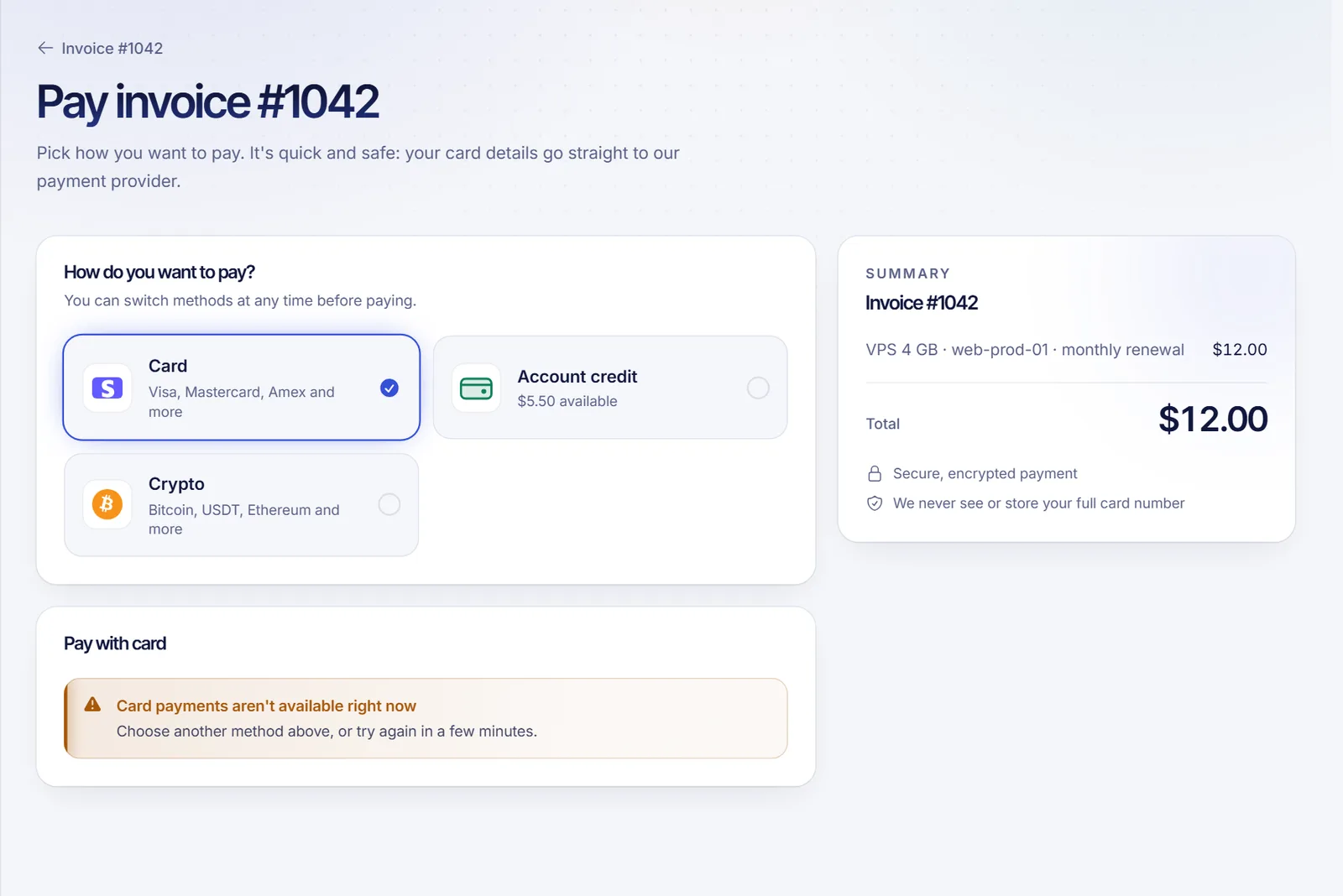
The methods
| Method | How it works | Good to know |
|---|---|---|
| Card | Visa, Mastercard, Amex and more, processed by Stripe through a secure card form | Can be saved for automatic renewals; your bank may ask you to confirm it is you |
| PayPal | A PayPal window opens, you confirm, and you come back to the invoice already paid | Chosen when you pay; nothing to save |
| Account credit | Your credit balance pays the invoice instantly | Pays whole invoices only; a short balance can be topped up or combined, see below |
| Crypto | Bitcoin, USDT, Ethereum and other coins offered by the payment gateway | Off by default; see paying with cryptocurrency |
If no method is available for an invoice, the page says so and asks you to open a ticket. Sometimes an invoice cannot be paid yet, for example when the order is waiting for capacity or the invoice is cancelled or under review; the page explains which case it is.
Paying by card
Choose Card, enter your details in the secure form and confirm. Card details go straight to the payment provider: SolumeCore never sees or stores your full card number, only the brand and the last four digits. If your bank requires extra authentication, you are asked to confirm the payment before it completes.
Saved cards
In Billing → Payment methods you can save cards for renewals. Adding a card does not charge anything. The default card is the one charged on the renewal day for services set to renew "With my card". If you remove your default card, those renewals have to be paid by hand until you choose another. Choose how each service renews in the Renewals tab; see account credit and automatic billing and invoice lifecycle and renewals.
Paying with PayPal
Choosing PayPal opens a PayPal window. You confirm the payment there and return to the panel with the invoice paid. PayPal is picked each time you pay an invoice; there is nothing to save in the Payment methods tab. If the PayPal button does not load, check your connection or pick another method.
Paying with account credit
Account credit is a balance on your SolumeCore account. The pay page shows how much you have, the invoice total and what would be left afterwards. Credit pays whole invoices only: if you are short, the page shows how much is missing and offers Add credit (when top-ups are enabled) or another method.
When the shopping cart is enabled (it is off by default), SolumeCore can also split a payment between credit and a card or PayPal; the credit portion is set aside when the order is created and released if the rest is not paid in time. Crypto cannot be combined with credit. Details on credit, top-ups and the "Credit, then card" renewal mode are in account credit and automatic billing.
Paying with crypto
When enabled, you choose a coin, receive an address and an exact amount, and the invoice is marked paid once the network confirms it. Because the details matter, read paying with cryptocurrency before your first payment.
Discounts that depend on the method
Some discounts apply only when you pay with a specific method (card, PayPal, account credit, crypto or any method). When one is available, the pay page tells you, for example "Pay with PayPal and save X%", and applies it as soon as you choose that method. With any other method the invoice is charged in full. Coupons are a separate mechanism; see coupons and discounts.
Paying several invoices at once
When SolumeCore has enabled it (off by default), you can select several pending invoices and pay them together in one payment. Each invoice is applied individually, and if one of them was paid elsewhere in the meantime, its part is kept as credit rather than lost.
Currency, taxes and invoices
Each invoice shows its currency, taxes (when they apply) and total; the pay page repeats the summary so the amount never changes at the last step. Every payment generates a receipt you can see in the invoice, and you can download the invoice as a PDF. Billing details (name, address and tax data) are managed in the Billing details tab and are used on future invoices.
Security of your payments
- Card data is handled by Stripe, a payment provider, and PayPal handles its own checkout; SolumeCore only keeps references such as card brand and last four digits.
- Sensitive actions on your billing, such as accepting automatic billing, removing a card or cancelling a service immediately, ask you to confirm your identity first. See account security.
- The pay page is the only place where payment details are requested. SolumeCore staff never ask for your full card number or a verification code.
Troubleshooting
- "Card payments aren't available right now": the card option is temporarily disabled. Pick another method or try again in a few minutes.
- The payment was not completed: try another card or method. Your bank can decline a payment without SolumeCore seeing why.
- No methods are shown: open a ticket and support will help you pay.
- Paid with the wrong method: payments are final and cannot be moved to another method or refunded, so check the method before you pay. If you think a charge is wrong, open a ticket; see the no refunds policy.
Related documents
- Create an account and place your first order
- Invoice lifecycle and renewals
- Service suspension for non-payment
- Common errors and troubleshooting
- See plans
FAQ
Which payment methods does SolumeCore accept?
Card, PayPal and account credit are enabled by default. Cryptocurrency is available only when SolumeCore has turned it on, and credit top-ups are optional too. The pay page shows the methods available for your invoice.
Does SolumeCore store my card number?
No. Cards are stored by Stripe; SolumeCore only sees the brand and the last four digits.
Can I use two methods for one invoice?
When the cart is enabled, account credit can be combined with a card or PayPal for a new order, but credit on its own only pays whole invoices from the pay page. Crypto cannot be combined with credit.
Can I change the method after choosing it?
Yes, until you pay. If you change your mind, pick another option on the same page.
Are renewals charged automatically?
Only for services whose renewal mode uses your saved card or your credit; you choose the mode per service in the Renewals tab. Otherwise you receive an invoice and pay it yourself. See account credit and automatic billing.