Account credit and automatic billing: how they work
How to add and use your account credit, turn on automatic card charges, what the authorization means and what happens when an automatic payment fails.
Account credit is money you hold with SolumeCore. It comes from top-ups, referral commissions and amounts we add ourselves, and it pays invoices and, if you choose, renewals. Automatic billing is the other half: it lets a saved card, your credit, or both pay each renewal for you so a service never reaches its due date unpaid.
This guide explains how credit works, how to add it, how automatic billing is configured per service, what the card authorization means, and what happens when an automatic payment fails.
Important: some of these features are switched on or off by SolumeCore, so you might not see all of them. In particular, adding credit and automatic top-ups can be unavailable, and paying with credit can be paused. When that happens, the panel says so, and your existing credit stays in your account.
Account credit
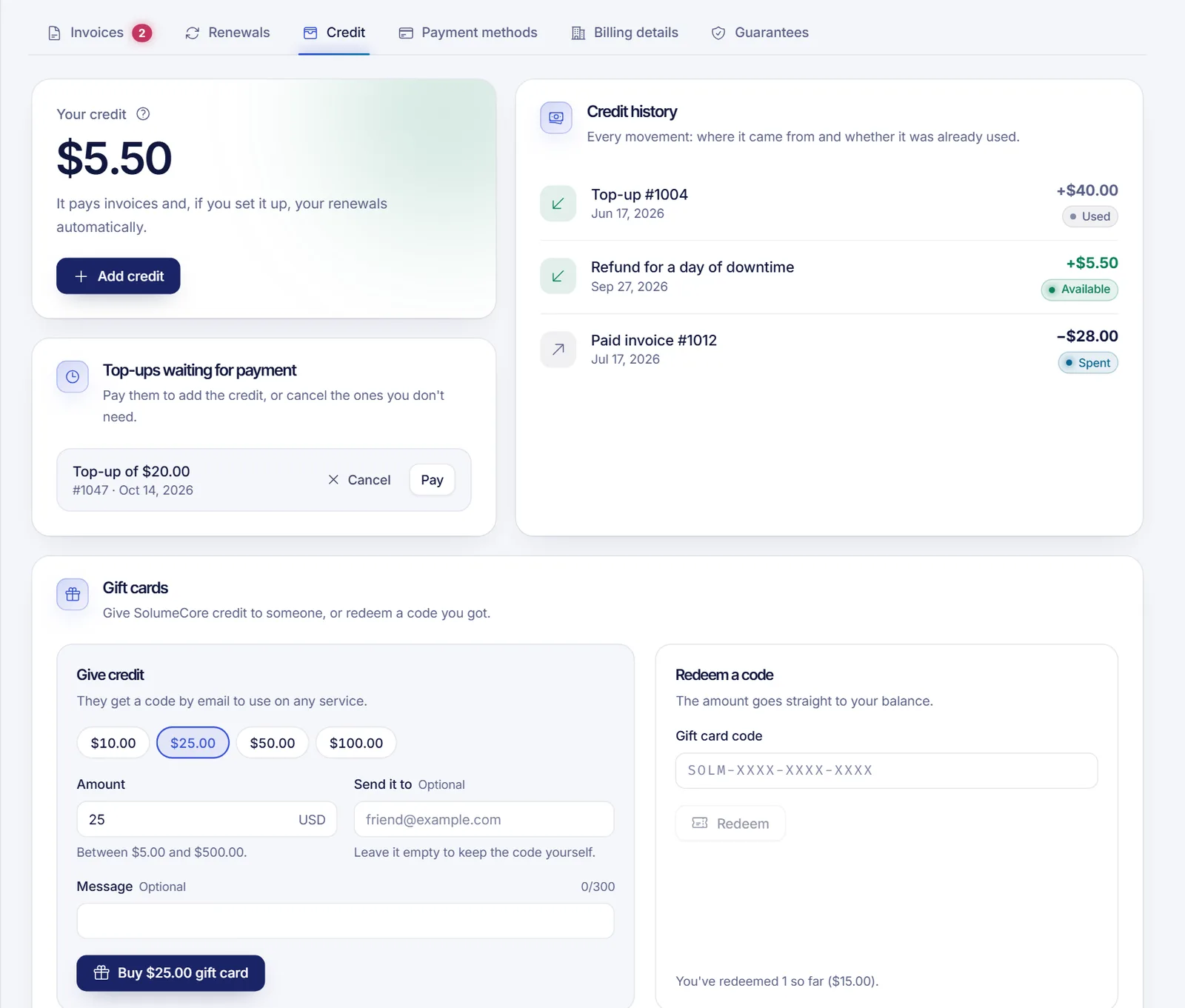
You will find your credit in Billing → Invoices & payments, in the Credit tab. The Overview shows it as Account credit, and the checkout calls it Balance.
Where credit comes from
- Top-ups you pay for.
- Referral commissions, once they are released.
- Credits added by our team, for example when an order could not be delivered or a billing error is corrected.
The Credit history lists every movement, where it came from and whether it is still available or already used.
What you can pay with credit
- A whole invoice. On the pay screen, Account credit shows how much you have, how much is left after paying and, if you are short, how much is missing. Credit pays whole invoices only: it cannot be combined with another method on an existing invoice.
- A new order in the cart, where you can tick Use my balance and pay the rest to cover part of the total with credit and the remainder with another method.
- Renewals, automatically, if you set a service to Credit only or Credit, then card (see below).
Credit is kept per currency. Credit in one currency pays invoices in that same currency.
Does credit expire or can it be withdrawn?
The system does not set an expiry date on account credit. It is meant to be spent on SolumeCore services: credit and top-ups are not refundable and are never converted back into cash. See the no refunds policy. Gift cards, if SolumeCore offers them, are different and have their own validity.
Add credit
If the option is available, click Add credit in the Credit tab:
- Enter an amount within the limits shown on screen.
- Continue: SolumeCore creates a top-up invoice.
- Pay it with card, PayPal or crypto if enabled. See payment methods.
- As soon as the payment is confirmed, the amount shows up as credit.
Some details:
- A top-up invoice that nobody pays is cancelled by itself after a few days (7 by default). It never counts as a debt, and you can cancel it earlier under Top-ups waiting for payment.
- For security, a recent top-up can be held for a few days before you can spend it (3 days by default). The panel shows "on hold for security, available from" and a date. If a chargeback arrives during that time, the credit never reaches your account.
- If Add credit is not available, the panel says "Adding credit isn't available right now".
Automatic billing
Automatic billing decides who pays each renewal invoice without you doing anything. The setting lives on every service, in the Renewals tab (and in the service settings):
| Option | What it does |
|---|---|
| With my card | The renewal is charged to your default saved card. This is the default for new services. |
| Credit, then card | If your credit covers the whole invoice, credit pays it. If it does not, the card is charged for the whole invoice. |
| Credit only | Only credit is used. If it is not enough, nothing is charged and you pay the invoice by hand. |
| Off (I'll pay by hand) | Nothing is charged automatically. |
To apply one mode to all your services at once, open Automatic payments in the Renewals tab, choose a mode under Renew all my services with and click Apply to all.
Save a card
- Open Billing → Invoices & payments → Payment methods.
- Click Add a card. Nothing is charged, but your bank may ask you to confirm it is you.
- Mark the card you want as Default: renewals set to use a card are charged to it.
The card details are stored by our payment provider, Stripe. SolumeCore sees only the brand and the last four digits. PayPal and crypto are chosen when you pay an invoice: they are not charged automatically, so there is nothing to save for them.
Authorization to charge your card
Banks require your explicit permission before charging a saved card when you are not there. In Automatic payments you can Authorize my default card. The text you accept says that SolumeCore may charge that card automatically for your renewals and, if you turn it on, automatic top-ups, for the amount of each invoice, until you turn it off from your panel. SolumeCore records when you accepted it and which version of the text.
By default, authorizing your card or turning on automatic top-ups asks you to confirm your identity again with your password, 2FA, a passkey or an email code.
Important: to be sure card charges stop, switch off Charge renewals automatically in Automatic payments, or set your services to Off (I'll pay by hand). Revoking the authorization is a record of your choice, but depending on how SolumeCore configures automatic payments, charges to a saved card can still apply.
What you are told before a charge
If a saved card pays your renewal, you receive an email before each automatic charge with the amount, the date and the card. By default the charge is scheduled a couple of days after that notice and never later than one day before the invoice is due. Credit payments are applied without a notice, since the money is already in your account.
Automatic top-up
If SolumeCore has this option on, Automatic top-up charges your card to add credit when your balance drops below a minimum you choose. It happens at most once a day. You choose the minimum and the amount, and you can turn it off at any time. It is off unless you set it up.
When an automatic payment fails
If your card is declined, you receive an email ("We couldn't charge invoice…") and the invoice shows as Overdue. What happens next depends on why the card failed:
| Reason | What happens |
|---|---|
| Temporary error | The charge is retried after 24 hours, then 72 hours, then 168 hours, by default. |
| Not enough funds | The same retries, but each wait is at least 72 hours. |
| The bank asks you to confirm (3-D Secure) | The system does not retry on its own. You get an email with a link to confirm and pay the invoice. |
| Card expired, lost, invalid or blocked | The system stops trying that card until you choose another default card. |
You can pay the invoice by hand at any time with another method. If nothing is paid, the service is suspended on the due date and cancelled later. See how service suspension for non-payment works.
Turn automatic billing on or off
- To turn it on: save a card, set it as default and choose With my card (or Credit, then card) on each service.
- To pause all card charges: open Automatic payments and switch off Charge renewals automatically.
- To stop renewing a service: set it to Off (I'll pay by hand), or cancel it from its settings.
Related documents
- Invoice lifecycle and renewals
- Payment methods
- Coupons and discounts
- Crypto payments
- How service suspension for non-payment works
FAQ
Does my account credit expire?
The system does not apply an expiry date to account credit. Gift cards are different and can have their own validity. Credit is kept in the currency it came in.
Can I withdraw my credit or get it refunded to my card?
No. Credit is meant to be spent on services: it is not refundable and it is not paid out to your card or converted into money. If you think a charge or an amount is wrong, open a ticket under Billing & payments. The rules are in the no refunds policy.
Why can't I use credit to pay only part of an invoice?
Credit pays whole invoices from the invoice screen. If you are short, add credit or choose another method. In the cart, the Use my balance and pay the rest option does split a new order between credit and another method.
Can PayPal or crypto renew my services automatically?
No. Automatic charges use a saved card or your credit. With PayPal or crypto you pay each invoice yourself when it is issued.
How do I stop automatic charges?
Open Billing → Invoices & payments → Renewals → Automatic payments and switch off Charge renewals automatically, or set each service to Off (I'll pay by hand). You can also remove the card in the Payment methods tab.
I was charged and I didn't expect it. What do I do?
Check the invoice in the Invoices tab and the notice email you got before the charge. If you think it is a mistake, open a ticket under Billing & payments with the invoice number.