Pay with Crypto: How Cryptocurrency Payments Work
How to pay a SolumeCore invoice with crypto: choose a coin and network, send the exact amount, confirmations, partial, expired and late payments.
You can pay a SolumeCore invoice with cryptocurrency when the option is switched on for the platform. You pick a coin, the panel shows an address and the exact amount to send, and as soon as the payment gateway confirms it on the network, the invoice is marked as paid and your service is delivered or renewed. If you send less than requested, the part that arrived is added to your account as credit, so nothing is lost.
Crypto payments are processed through NOWPayments, an external payment gateway. The option is off by default: if you do not see "Crypto" on the pay page, SolumeCore has not enabled it. The list of coins also comes from the gateway, so it can change over time.
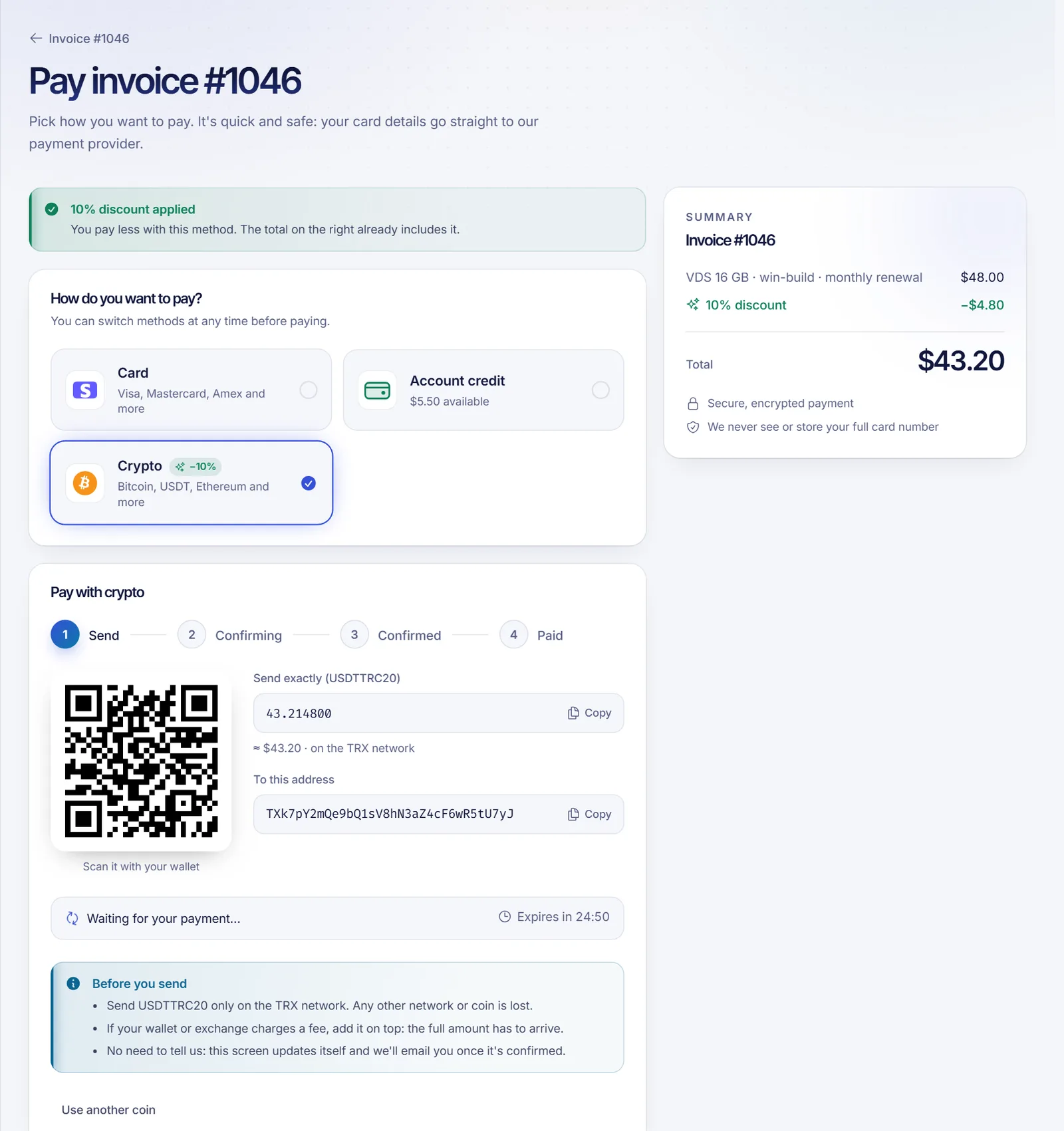
How to pay step by step
- Open the invoice from Billing (or finish a new order at checkout) and choose Crypto.
- Choose the coin you will pay with. You can search by coin or network, or show the full list.
- The panel creates the payment and shows a QR code, the address, the exact amount in that coin and the network, plus a countdown ("Expires in…").
- Send the payment from your wallet or exchange. The screen follows the progress by itself: Send → Confirming → Confirmed → Paid.
- When it is paid, the invoice closes automatically and you are taken back to it. You also get an email once it is confirmed. You do not need to tell us you paid.
If you reopen the pay page while a payment for the same coin and amount is still waiting, the panel shows that same payment instead of creating a new address.
Rules that avoid losing money
- Use the right network. The same coin can travel on different networks (for example USDT on TRON or on Ethereum). Send only on the network shown. Funds sent on another network or in another coin are lost.
- Send the exact amount. If your wallet or exchange charges a withdrawal fee, add it on top: the full amount has to arrive, so network and exchange fees are paid by you.
- Memo or tag. Some coins show a "Memo / tag (required)" field. Without it we cannot tell the payment is yours.
- Pay before it expires. The countdown shows the validity of that address. Do not send to an expired payment.
- Minimum amounts. Each coin has a minimum payment. If your invoice is below it, the panel asks you to choose another coin.
Payment states
| State on screen | What it means |
|---|---|
| Waiting for your payment | Nothing received yet |
| Payment detected, confirming | The transaction was seen; waiting for network confirmations |
| Confirmed | Enough confirmations; the gateway is finishing it |
| Paid | The invoice is paid and applied |
| Expired | No funds arrived in time; pick a coin to create a new payment |
| Failed | The network or gateway rejected it; create a new payment and, if you sent funds, contact us |
The panel never trusts a notice from outside: the status of every payment is always checked directly with the gateway before anything is applied, and a periodic check also picks up payments if a notice is missed.
Partial payments
If less arrives than was requested, you will see "We've received X so far: the rest is missing". The payment is then closed and the value that arrived is credited to your balance in proportion to what was received (rounded down to the cent). For example, if 0.002 BTC was requested for an invoice of 50 units of your billing currency and 0.001 BTC arrived, 25 units are credited. You can then finish the invoice with that credit plus another method, or create a new crypto payment for the rest. You are notified in the panel when it happens.
Late, expired and duplicate payments
- Expired with nothing received: the payment is simply closed. Choose a coin to start again.
- Paid late: the gateway keeps accepting a payment to an address for a number of days. If funds arrive after the screen expired, the payment is still picked up and applied, provided it is still valid.
- Invoice already paid another way, or cancelled: if the crypto arrives after the invoice was paid with another method, or the invoice is no longer payable, the amount is added to your account as credit and you are notified.
- Invoice total changed while you were paying: the amount is also credited as balance and staff review it, rather than applying it blindly.
- Sent more than requested: contact support with the transaction ID so staff can review the difference.
In every one of these cases, staff are alerted so they can review. Crypto payments are not refunded: a transfer cannot be reversed, and the amounts we credit as balance cannot be converted back into money.
New orders and renewals
- For a new order, the invoice is created at checkout and the service is delivered once the payment is confirmed. If there is no capacity at that moment, the service waits for capacity as with any other method.
- For a renewal, the invoice is paid and the service stays active. Crypto cannot be saved for automatic renewals: you choose it each time you pay. See invoice lifecycle and renewals.
- Where paying several invoices together is enabled (off by default), they can be paid in a single crypto payment; a partial payment also becomes credit in that case.
- Crypto cannot be combined with account credit in the same split payment.
- A discount that applies to crypto payments, when present, is shown on the pay page and included in the amount.
What to do if something goes wrong
- Do not send a second payment. Reopen the invoice: the screen shows the status of the first one.
- If the screen says "Expired" or "Failed" and you sent funds, open a ticket with the invoice number, the coin, the amount and the transaction ID.
- If the money is not confirmed after the network normally confirms, check the transaction on a block explorer and include the link in the ticket.
Related documents
- Payment methods
- Account credit and automatic billing
- No refunds, chargebacks and billing errors
- Invoice lifecycle and renewals
- See plans
FAQ
Which cryptocurrencies can I use?
The pay page lists the coins currently enabled on the gateway, for example Bitcoin, USDT and Ethereum, and lets you search by coin or network. The list can change.
Is crypto available for everyone?
Only if SolumeCore has enabled it. It is off by default, so the "Crypto" option may be missing.
I sent less than the requested amount. Will I lose the money?
No. The part that arrived is credited to your balance, proportionally. You can use it toward the invoice together with another method.
Who pays the network fee?
You do. The full requested amount must arrive, so add any wallet or exchange withdrawal fee on top.
Can I get a crypto payment refunded?
No. Crypto transfers are irreversible and SolumeCore does not refund them, like every other payment. Check the address, the coin, the network and the amount before you send. If something went wrong, open a ticket so staff can review it, but we cannot promise to recover the funds. See the no refunds policy.
Does a crypto payment renew my service automatically?
No. You pay each invoice yourself when you choose crypto. For automatic renewals, use a saved card or your credit.