Backups and Retention: What Each Product Does
How backups work for SolumeCore game servers, VPS, web hosting and app databases, what they do not guarantee and how long they are kept.
Every SolumeCore product has some way to take and restore copies of your data, but they work differently and none of them replaces a backup you control. This document explains what each product offers, how retention and limits work, what is deliberately not guaranteed, and how backups relate to cancellation and deletion.
The rule that applies everywhere: your data is your responsibility. The Terms of Service recommend that you keep your own backups, and a copy that lives on the same infrastructure as the original cannot protect you from every failure. Download important backups and store them somewhere else.
Backups by product
| Product | What you get | Where you manage it |
|---|---|---|
| Game servers and app servers | Compressed copies of the server's files, limit per plan, scheduled and retention options | Server panel, Backups tab |
| VPS and VDS | Full disk backups, snapshots and optional automatic backups, when enabled | Server page, Backups and Snapshots |
| Web hosting (cPanel) | Full account backups you can download, plus restore points when enabled | Hosting panel, Backups |
| App databases (PostgreSQL, Redis, MongoDB) | Scheduled and on-demand backups of each database | Database page, Backups tab |
Availability of some of these features is controlled by SolumeCore and may differ between locations and plans. If a tab or button described here is missing in your panel, the feature is not enabled for your service.
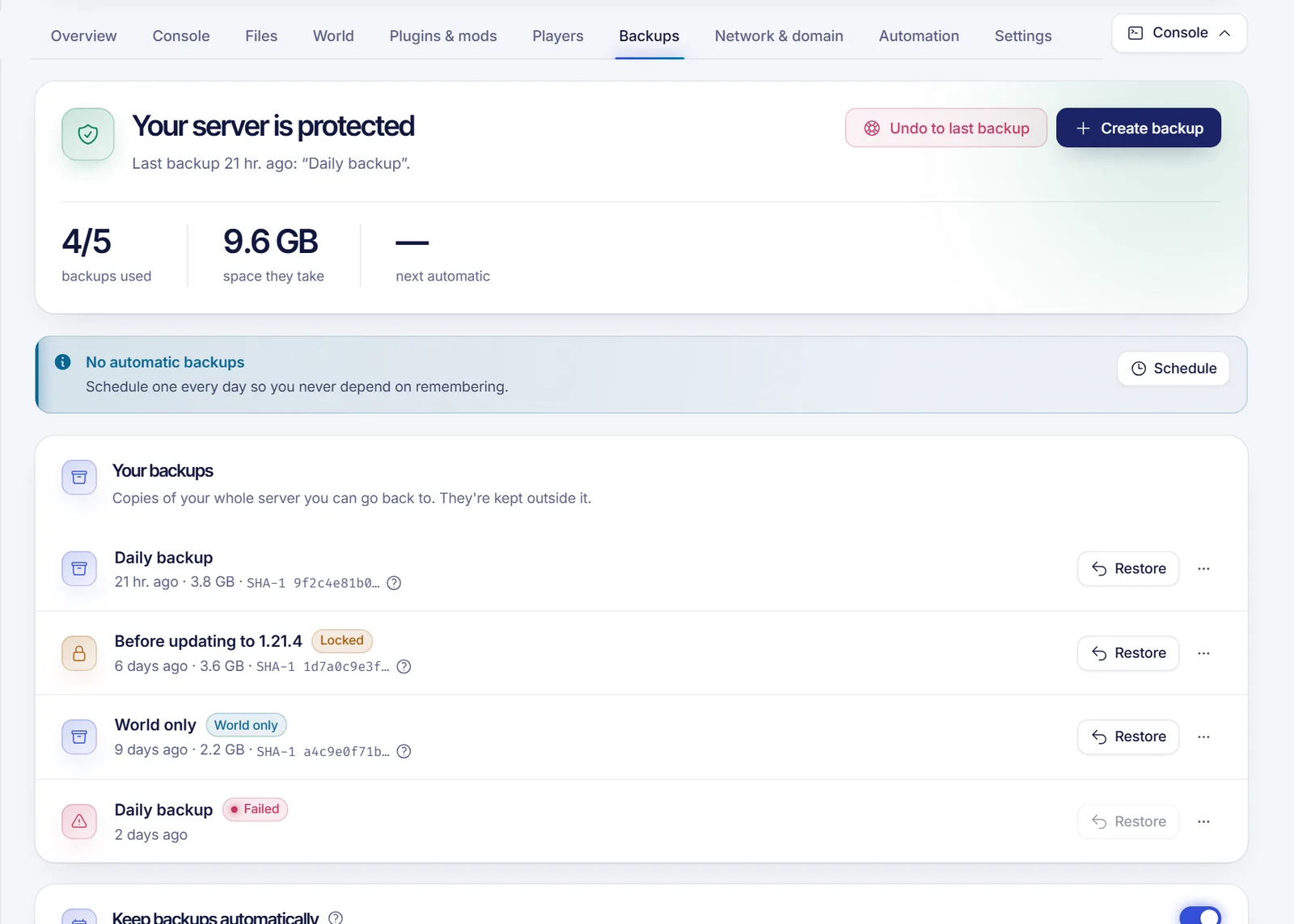
Game servers and app servers
In the Backups tab you can:
- Create a backup: a compressed copy of all the server's files. You can give it a name and list files or folders to exclude (one pattern per line, with shortcuts for logs, cache, temp files and other backups). It takes a few minutes while it shows "In progress".
- See usage: "X of Y backups used". When you reach the limit, you must delete one before creating another. The limit depends on your plan, and some plans include no backups at all.
- Lock a backup so it cannot be deleted by accident or when automatic backups rotate.
- Download, rename, restore or delete a backup.
Restoring replaces the current files with those in the backup and stops the server while it runs. By default the current files are deleted first, which is recommended; unchecking that option keeps files that are not in the backup, so the result will not match the backup exactly. A backup that contains only the world is restored on top without touching the rest of the server. Restoring cannot be undone.
Automatic backups, rotation and retention
Scheduled backups are created from the Tasks tab. By default SolumeCore enables two helpers for them:
- Rotation: when a scheduled backup would exceed your limit, the oldest unlocked backup is removed so the schedule keeps working. It never removes a locked backup, one in progress or your last good backup.
- Retention policy: you choose how many daily, weekly and monthly backups to keep (the suggested starting point is 7 daily and 4 weekly; the maximums are 31 daily, 52 weekly and 24 monthly), and an hourly job deletes the rest. The same protections apply, and a failed backup is removed after 24 hours so it does not count against your limit forever.
Other optional features, such as restoring individual files from a backup, restoring only a zone of the world, a "go back to the last good backup" panic button and world-only backups, depend on SolumeCore having them switched on.
Important: game server backups are stored on the node that hosts the server, not off-site. Off-site storage is not available yet. A backup protects you against mistakes (a bad plugin, a deleted world, griefing), not against the loss of the machine. Download backups you cannot afford to lose.
VPS and VDS
Where enabled, a VPS or VDS page shows Backups and Snapshots:
- Backups are full copies of your disk that you can go back to at any time. They are stored apart from your server and survive a reinstall. The number you can keep has a limit, shown as "X of Y". Restoring shuts the server down, restores it and starts it again, which can take several minutes.
- Snapshots are instant restore points, useful before a risky change. They also have a limit and require suitable storage on the host.
- Automatic backups, if enabled for your service, run daily or weekly with a maximum number of retained copies. SolumeCore may offer them as an optional add-on.
All of these are switched on by SolumeCore per environment, so a new location may not have them yet. A reinstall of the operating system wipes the disk; the panel keeps a "Before reinstall" backup entry when that option is available, but you should not rely on it.
Web hosting (cPanel)
In the hosting panel, Backups lets you make a full backup of your files, databases and email, and download it from cPanel. The full backup is saved inside your account and uses your plan's disk space, so download it and delete it when you no longer need it. If you have a large site, the backup takes a while and you are emailed when it is ready.
When enabled, the panel also lists automatic server backups by day and lets you restore your account to a previous day. Restoring replaces files, databases and email with that day's copy, so anything you created or changed after that day is lost. Make a fresh full backup first if you might need the current state.
App databases
Managed databases next to your app (PostgreSQL, Redis and MongoDB) can be backed up on a schedule or on demand with Back up now. They are produced with each database's own tool and stored on the database's disk. You choose the frequency and how many copies to keep, up to a maximum set by the platform (14 per database by default). Deleting a database also deletes its data and its backups.
What is not guaranteed
- No promise of recovery. Backups can fail, and the panel shows failed ones in red. Check that a backup finished before relying on it.
- No off-site copy for game servers, as noted above.
- No point-in-time recovery for your own data unless you build it yourself.
- No backups of things outside your service, such as external databases or third-party services.
Backups, cancellation and deletion
When a service is cancelled, its data is not kept forever. Servers suspended for non-payment are cancelled after a grace period and then purged after a short retention window; the exact defaults are listed in default timelines and explained in service suspension for non-payment. During a suspension you may only be able to see the list of backups, not download them, because a suspension for non-payment is treated the same as one for abuse by default. So download what you need before a payment fails.
SolumeCore's optional "Trust" module can offer a final downloadable backup when you cancel a service from the panel. That commitment is off unless SolumeCore has published it on its promise page. When a service is cancelled because of abuse, a final backup is not offered by default.
Good practice
- Download a full backup before updates, reinstalls or mass changes.
- Lock the backup you cannot afford to lose.
- Keep at least one copy off the platform.
- Test restores on a spare server from time to time.
- Do not store secrets in plain text inside archives you share.
Related documents
FAQ
Are my game server backups stored off-site?
No. They are stored on the node that hosts your server. Download any backup you cannot afford to lose.
Why can't I create another backup?
You reached the limit for your plan. Delete an unlocked backup or, if scheduling is the problem, check your retention policy. Locked backups are never deleted automatically.
Does restoring a backup delete my current files?
By default yes: the current files are deleted before restoring, which gives you an exact copy of the backup. You can untick that option, but then files that are not in the backup survive.
Can I download backups after my server is suspended?
By default, no. A suspended game server only lets you see the list of backups. Pay the pending invoice to regain access, and download what you need in advance.
How long are backups kept after I cancel?
They go with the service: once a cancelled service is purged, its backups are deleted too. See default timelines for the current windows.