Minecraft Admin Commands: op, Whitelist and Ban
The Minecraft server admin commands that matter: give op, use the whitelist, ban and kick players, set gamerules and do it all from a panel without typing.
The commands you will use most as a Minecraft server admin are /op <player> to give operator rights, /whitelist add <player> to allow someone in, /ban <player> and /kick <player> to remove troublemakers, and /gamerule to change world rules. Type them in the server console without the slash, or in game with it. This page lists the essentials, explains the permission levels and shows the panel shortcuts.
Console or in-game?
You can run commands in two places:
- The server console: no slash and no operator rights needed. The console is trusted by definition.
- In game: type
/then the command. You must be an operator.
On a managed host, the live console in the panel is the console above. Commands there also work when nobody is online.
Operators: /op and /deop
op Steve
deop Steve
An operator can run commands, including ones that change the world or other players. Be careful: an op can wipe a world. Only give it to people you trust with the whole server.
Permission levels
Operator status has levels from 1 to 4, stored in ops.json:
| Level | What it allows |
|---|---|
| 1 | Bypass spawn protection |
| 2 | Most gameplay commands (/gamemode, /give, /tp) |
| 3 | Player management (/ban, /kick, /op) |
| 4 | All commands, including /stop |
The default level for a new op is set by op-permission-level in server.properties. For finer control (a moderator who can kick but not give items), use a permissions plugin on a Paper server; see plugins vs mods.
Whitelist: private servers
whitelist on
whitelist add Steve
whitelist remove Steve
whitelist list
whitelist off
With the whitelist on, only listed players can join. It is the simplest protection for a private server. After editing it by hand, run whitelist reload. Bedrock players who join through Geyser need the name that Floodgate gives them; see Java and Bedrock crossplay.
Banning and kicking
kick Steve Please stop spamming
ban Steve Griefing the spawn
ban-ip 203.0.113.7
pardon Steve
pardon-ip 203.0.113.7
banlist players
A ban stops a player account from joining. A ban by IP stops an address, but be careful: several people can share one IP (a family, a school, a mobile carrier), so use it sparingly.
Moving and managing players
| Command | What it does |
|---|---|
/tp <player> <target> |
Teleport a player to another or to coordinates |
/gamemode <mode> <player> |
Set survival, creative, adventure or spectator |
/give <player> <item> [count] |
Give an item |
/clear <player> |
Empty an inventory |
/list |
Show who is online |
/msg <player> <text> |
Private message |
/say <text> |
Announce to everyone |
World and server commands
| Command | What it does |
|---|---|
/time set day |
Set the time of day |
/weather clear |
Clear the weather |
/difficulty hard |
Change the difficulty |
/setworldspawn |
Set the world spawn where you stand |
/gamerule keepInventory true |
Players keep their items after dying |
/gamerule doMobGriefing false |
Stop mobs from destroying blocks |
/gamerule playersSleepingPercentage 50 |
Share of players who must sleep to skip the night |
save-all |
Force a world save |
stop |
Save and shut down cleanly |
Tip: always use stop (or the panel's Stop button) rather than killing the process. A clean shutdown writes the world properly.
Do it from a panel instead
Typing commands from memory is how typos become bans. SolumeCore's Minecraft panel has a Players tab that shows who is online right now and lets you op, kick, ban, unban and manage the whitelist with a button. It also keeps a history of who played and when.
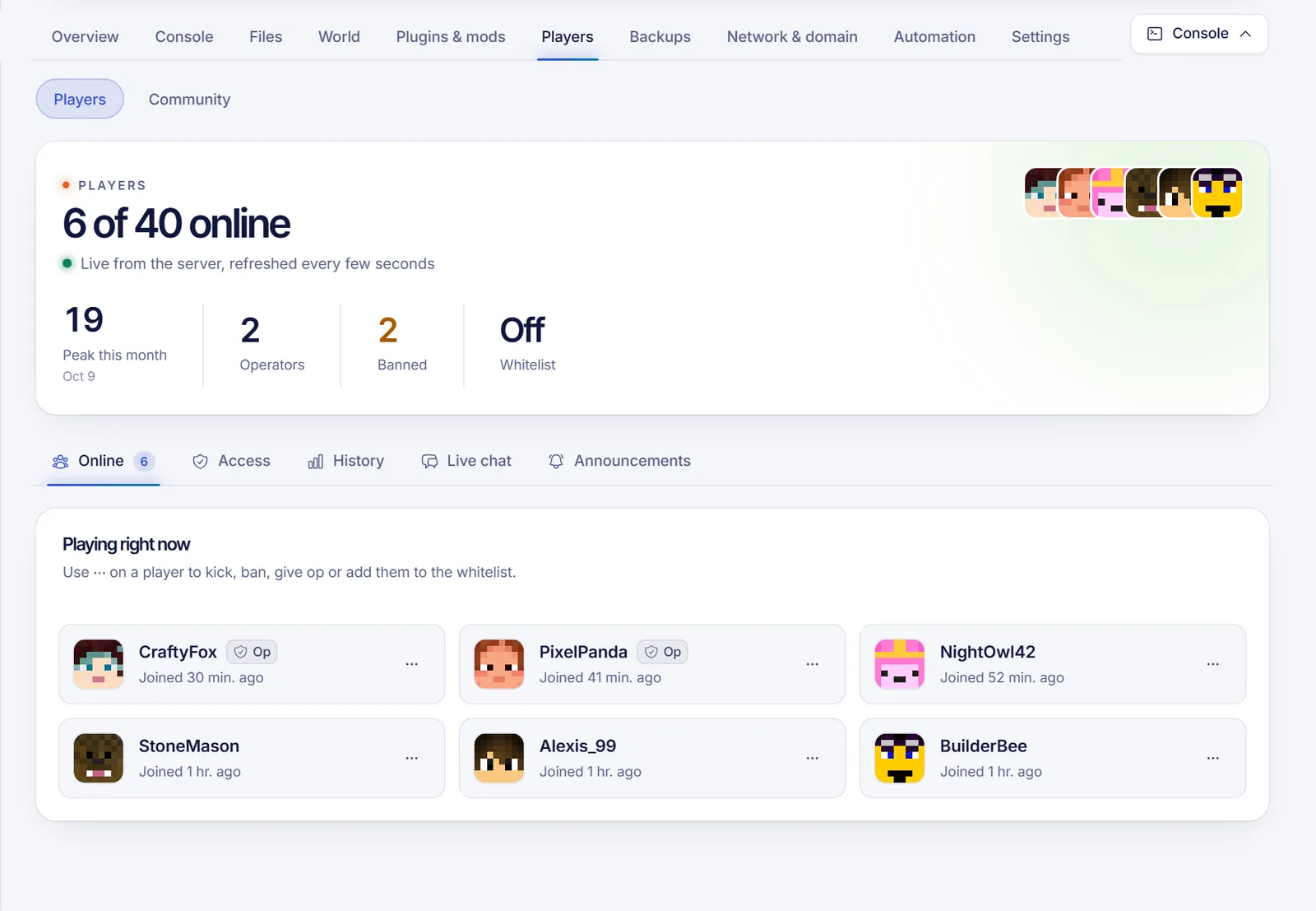
For the online list to work, the server's query feature must be enabled. It ships off, and the panel turns it on for you with one restart.
Mistakes that cost admins hours
- Typing a command in public chat. If you forget the slash, everyone reads it. Worse, pasting
opplus a name in chat gives away what you were doing. - Using
/opon the wrong name. Names must be exact, and Bedrock players carry a prefix. Check the player list first. - Editing
ops.jsonwhile the server runs. The server can overwrite your change on exit. Use the commands, or stop the server first. - Forgetting to reload after hand edits. Run
whitelist reloadafter changing the whitelist file.
Safety rules for admins
- Give op to as few people as possible.
- Keep a backup before commands that rewrite things at scale. See backup strategy.
- Turn the whitelist on while you are setting up.
- Write down bans and reasons somewhere so moderators stay consistent.
FAQ
How do I give myself op on my own server?
Run op YourName in the server console, or use the Players tab in your panel.
What is the difference between /ban and /ban-ip?
/ban blocks the account, /ban-ip blocks the address. The first is safer; the second can lock out innocents who share the connection.
Why does the whitelist not work?
Check that white-list is enabled in server.properties (or run whitelist on), then whitelist reload. Names are case-insensitive but must be exact.
Can I give someone only some commands?
Vanilla only has the four levels. For per-command permissions, use a permissions plugin on Paper.
Where are the ban and op lists stored?
In banned-players.json, banned-ips.json and ops.json in the server folder.
Build your server the easy way
New to all this? Start with how to make a Minecraft server, or try Minecraft hosting with a ready-made Players tab.