Minecraft Plugins vs Mods: Differences and Which to Use
What separates Minecraft plugins, mods and datapacks, what your players must install, and how to choose based on the kind of server you want to run.
Plugins run only on the server and work with the normal Minecraft game, so your players install nothing. Mods change the game itself, so the server and every player usually need the same mods. Choose plugins for survival, economy, minigames and public servers; choose mods when you want new blocks, machines, dimensions or a full modpack. Datapacks are a third, lighter option that sits in between.
The short comparison
| Plugins | Mods | Datapacks | |
|---|---|---|---|
| Where they run | Server only | Server and players' game | Server (inside the world) |
| Players must install | Nothing | Usually the same mods | Nothing |
| Can add new blocks or items | Mostly no (they reuse existing ones) | Yes | Limited (recipes, structures, mobs behavior) |
| Server software | Paper, Spigot, Purpur | Fabric, Forge, NeoForge, Quilt | Any |
| Typical use | Commands, economy, claims, minigames | Tech, magic, new worlds, modpacks | Small gameplay tweaks |
| Where files go | plugins/ folder |
mods/ folder |
World's datapacks/ folder |
What plugins do well
A plugin extends the server using the Bukkit API. Because the client is untouched, anyone with a regular copy of Minecraft can join, including players who just downloaded the game.
Typical plugin jobs:
- Permissions and ranks, so your moderators can do what players cannot.
- Land protection and anti-grief logging.
- Economy and shops, warps, homes, chat formatting.
- Minigames and lobbies.
- Bridges, such as letting Bedrock players join with Geyser.
Plugins are also easy to maintain. Updating means replacing a .jar file, and a misbehaving one can be removed without touching the world.
What mods do well
A mod changes the game code itself. That is how you get new ores, machines, creatures, whole dimensions and entire gameplay overhauls. The price is that players must run a compatible setup on their own computer, and the server must load the exact same mods and versions.
Mods fit best when:
- You are running a modpack (a curated bundle of dozens or hundreds of mods).
- Your community is built around a particular mod or theme.
- You accept that joining takes more effort than just typing an address.
If you go this way, read how to set up a modded Minecraft server and pick a loader with the help of Paper vs Spigot vs Forge vs Fabric.
Datapacks: the in-between option
A datapack is a folder of data that changes things inside the world, like recipes, advancements, structures or simple custom behaviors, with no mod loader involved. Each world keeps its own, and players do not install anything. They are limited compared with a plugin or a mod, but they are enough for many small tweaks.
Can you use both?
Not on the same standard server. Plugin servers do not load mods, and mod loaders do not load plugins. Hybrid servers try to bridge the two, though you are then relying on a combination that few projects test thoroughly. A better plan is usually to choose the family that provides the features you care about most and find the closest equivalents in the other.
Which one should you choose?
Ask yourself three questions:
- Do my players have to install something? If you want "type the IP and play", use plugins.
- Do I need new content, not just new rules? If yes, mods.
- How much performance headroom do I have? Big modpacks need much more memory; see how much RAM a Minecraft server needs.
Installing them without the hassle
Both plugins and mods come from catalogs such as Modrinth and CurseForge. The mistakes that cost people the most time are downloading a file for the wrong version or the wrong loader, or forgetting a dependency the mod needs.
On SolumeCore's Minecraft panel, the content tab searches Modrinth and shows only what works with your installed software and version, then places the file in the correct folder. It also flags dependencies and likely conflicts. If you want something that is not in the catalog, you can upload it through the file manager or SFTP.
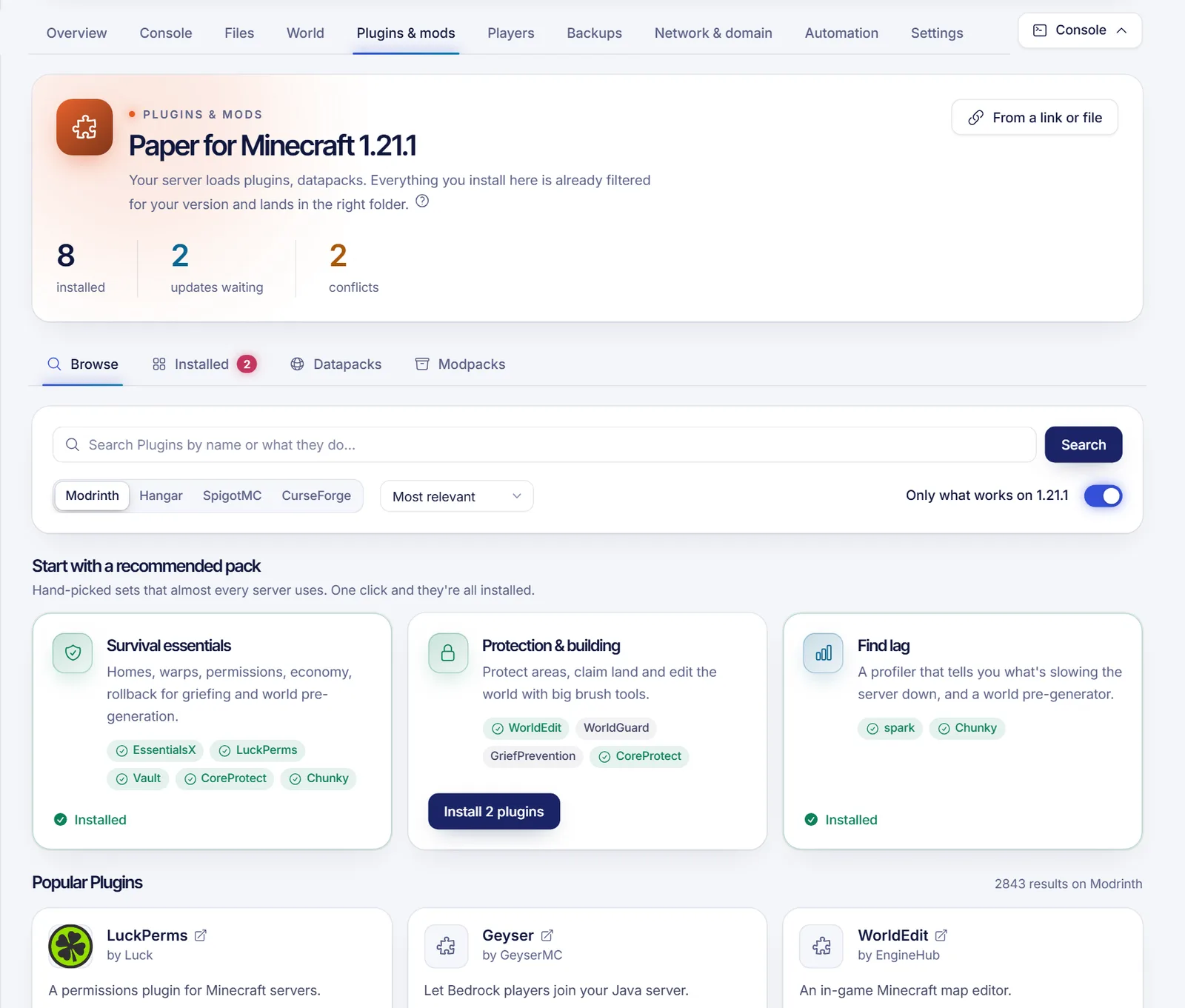
Tip: install one thing at a time and restart. If the server stops loading, you know who the culprit is.
FAQ
Are plugins safer than mods?
Neither is inherently safe. Download from reputable catalogs, read the page and reviews, and keep backups. Avoid random files from unknown sites.
Do plugins need the same Minecraft version as the server?
Yes, a plugin targets a range of versions. Check the version listed on its page before installing it.
Can Bedrock players use mods?
Not Java mods. Bedrock has its own add-on system. Through Geyser they can join a Java server that runs plugins.
Do mods make the server lag more?
They can, particularly large modpacks, because they add content that the server has to compute. The cure is usually a bigger plan and some tuning; see how to fix server lag.
Can I switch from plugins to mods later?
You can change the server software from the installer tab, but plugins will not load on a mod loader. Plan which one you want before you build a community around it.
Start with the right foundation
Not sure yet? Spin up a Paper server and add plugins; it is the lowest-friction way to learn. When you are ready, Minecraft hosting lets you change the installer without leaving the panel.