Zero-Downtime Deploys for Your App: How They Work
Ship new versions of your web app or API without dropping requests, and roll back to a previous release in seconds with SolumeCore zero-downtime deploys.
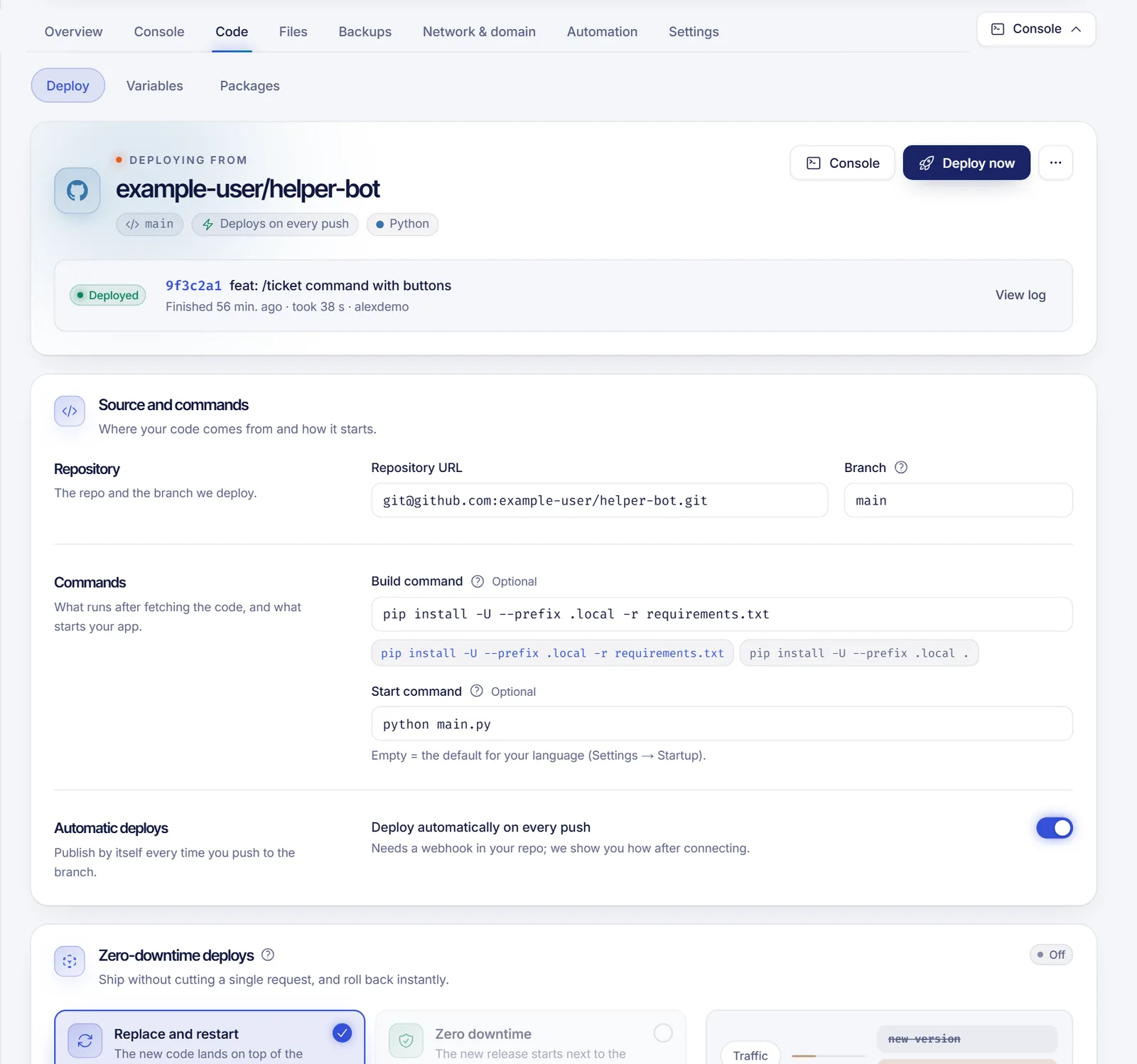
A zero-downtime deploy builds the new version of your app next to the one that is running, waits until it answers, and only then moves traffic over, so visitors never hit a stopped app. In SolumeCore you turn it on under Code > Deploy for web apps and APIs deployed from Git, and it also gives you instant rollbacks to recent versions.
Zero-downtime deploys are available for apps that answer HTTP and run on a machine that supports them. If the option shows as unavailable, the card tells you why. Discord bots can't use it; see the section about bots below.
How a zero-downtime deploy works
With the regular mode, called Replace and restart, the new code lands on top of the current one and the app restarts. It is simple, but requests fail for a few seconds on every deploy.
With Zero downtime:
- The code is fetched into its own folder, a release, while the current version keeps serving.
- The new release is built and started on an internal port.
- We check that it is healthy. If it fails, nothing changes and the current version keeps serving.
- Once it answers, traffic moves to it request by request.
- The old version finishes the requests it was handling and then stops.
Because releases stay on disk, going back to a recent one is also quick: the release starts without building and takes over when it answers.
Requirements
The card lists what your app needs, each marked as done or not:
- A Git repository connected, because releases are built from your repository. See Deploy an app from GitHub or GitLab.
- Your own start command, set in the Source and commands card under Code > Deploy. Each release starts from its own folder, so the command has to be relative, such as
npm startornode index.js. Press Set it if it is missing. - An app that answers HTTP (not a bot).
- Server node ready, meaning the machine of your app supports it.
- Health check route (optional). If you set a web health check, new versions must answer that path with a 2xx status before they take traffic. Without one, any HTTP answer from
/counts as healthy. Press Configure to set it up; see Restart your app and set up auto-restart.
Turn it on
- Open your app in the panel and go to Code > Deploy.
- Find the Zero-downtime deploys card and, under How deploys go live, choose Zero downtime.
- Read the confirmation and press Turn on.
Two things to know before you confirm:
- The first deploy restarts the app once. Your app is still running the regular way, so the first zero-downtime deploy restarts it to start under the release runner. Every deploy after that switches with no outage.
- Your app starts from a
releases/folder. Files that must survive between deploys, such as uploads or a SQLite database, belong inDATA_DIR(/home/container/data), not next to your code.
To go back, choose Replace and restart and confirm Go back. Releases already on disk stay there until you delete them.
Releases and instant rollback
The card lists your recent releases with the commit, who made it and when, and these columns:
- Switch: how long it took from the request until traffic moved to that release, including its start-up and health check. A release that needed no build is marked no build.
- Rollback: Instant if the release is still on disk, or Rebuilds if it was removed and must be fetched and built again.
- A badge shows which release is Serving and which is the Previous one.
To switch to a release, press Activate on its row and confirm. If it is still on disk, it starts without building and takes over once it answers. Otherwise its commit is fetched and built again, and then it takes over with no downtime. The Deploy history also tags these deploys as zero downtime or instant.
SolumeCore keeps the last few releases on disk besides the active and the previous one (3 by default). After traffic moves, the old version has up to 30 seconds by default to finish what it was doing, and a new version has 120 seconds by default to pass the health check before the deploy is declared failed. These are platform defaults and may change.
Change variables or connect a database without downtime
When you save new variables or connect a database, your app only sees them on its next start. In zero-downtime mode, the card shows There are variables your app doesn't see yet with Apply without downtime: the current release starts again next to the running one and takes over like a deploy. See Set environment variables for your app or bot and Add a database to your app.
Why bots can't use it
Discord allows only one gateway connection per bot token, so two versions of a bot can't run side by side. A bot always has a short cut while it reconnects, and the panel shows Bots can't overlap. Bots keep the regular deploy.
Troubleshooting
- The option is unavailable for my API: check the requirements list. A connected repository and an HTTP app are mandatory.
- My HTTP app is treated as a bot: the panel treats an app as a bot when it came from a Discord template or has a variable named
DISCORD_TOKEN,BOT_TOKENorTOKEN_DISCORD. If your API only uses one of those names for another purpose, rename the variable. - The deploy failed in the health check: the new version didn't answer in time. Check that it listens on the
PORTvariable on0.0.0.0, that your health route returns 2xx and read the deploy log. The current version keeps serving. - Data disappeared after switching: you stored it next to the code. From now on use
DATA_DIR.
FAQ
What is a zero-downtime deploy?
It's a deploy where the new version is started and checked before it receives traffic, so there is no moment when your app is stopped. If the new version fails, the old one keeps serving.
Does zero downtime work for Discord bots?
No. A bot token allows one connection at a time, so a short reconnect cut is unavoidable. Bots use the regular deploy.
Can I roll back instantly?
Yes, for releases still on disk. Press Activate on a previous release and it takes over in seconds, without building.
What happens if the new version fails?
Nothing changes for your visitors. The deploy is marked as failed, and the current version keeps serving while you read the deploy log and fix the problem.
Related articles
- Deploy an app from GitHub or GitLab
- Restart your app and set up auto-restart
- Add a database to your app
- Set environment variables for your app or bot
Running a web app or API that must stay up while you ship? See the app plans.