How to Host a Discord Bot 24/7 (Node.js and Python)
Learn how to keep a Discord bot online around the clock with Node.js or Python: a safe token, dependencies, restarts and hosting built for bots.
To keep a Discord bot online 24/7, run it on a machine that never sleeps: a bot-friendly hosting plan, a VPS, or at least a process manager on an always-on computer. The bot only needs an outbound connection to Discord, so it does not need open ports, a domain or a web server. What it does need is a stable runtime, a safely stored token and a way to restart if it crashes.
Why your own computer is not a good host
A bot that runs on your laptop goes offline when you close the lid, lose Wi-Fi or restart for updates. Servers that depend on it get a bot that is "usually there". Hosting it somewhere always on solves three problems at once: uptime, a stable connection and a place to keep logs.
Your options
| Option | Good for | Trade-off |
|---|---|---|
| Your own PC | Development and testing | Offline whenever the PC is |
| Free tiers of app platforms | Experiments | Many sleep when idle, which a bot cannot do |
| Bot or programming hosting | Most bots | A monthly plan, but console, restarts and Git are included |
| A VPS | Several bots, custom setup | You manage the system and its security |
A bot holds a persistent connection to Discord, so avoid platforms that put idle processes to sleep. If you are choosing between a plan and a VPS, VPS vs VDS vs shared hosting vs game server helps.
Step 1: Create the bot and keep the token secret
- Open the Discord Developer Portal, create an application and add a Bot.
- Copy the token once. It is the bot's password.
- Enable only the intents you need. Reading message content is a privileged intent and must be switched on in the portal.
- Generate an invite link with the
botandapplications.commandsscopes and add the bot to your server.
Never commit the token to Git, paste it in a public message or hard-code it. If it leaks, regenerate it immediately in the portal. Keep it in an environment variable or an .env file that is listed in .gitignore.
Step 2: A minimal bot
Node.js (discord.js)
import { Client, GatewayIntentBits } from 'discord.js';

const client = new Client({ intents: [GatewayIntentBits.Guilds] });

client.once('ready', () => console.log(`Online as ${client.user.tag}`));
client.login(process.env.DISCORD_TOKEN);
Dependencies live in package.json; the host runs npm install.
Python (discord.py)
import os
import discord

client = discord.Client(intents=discord.Intents.default())

@client.event
async def on_ready():
    print(f"Online as {client.user}")

client.run(os.environ["DISCORD_TOKEN"])
Dependencies live in requirements.txt; the host installs them on start.
Step 3: Pick a host and deploy
On a programming plan such as SolumeCore's, you choose the runtime (Python, Node.js, Bun, Deno, Go, Java or Rust) when you buy, and then bring your code in one of three ways:
- Paste your Git repository URL and it is cloned on install.
- Upload files with the file manager.
- Use SFTP with your panel account.
Dependencies are installed automatically when the app starts if you have a package.json or requirements.txt. Then set your secrets (like DISCORD_TOKEN) as environment variables, set the start command and press Deploy.
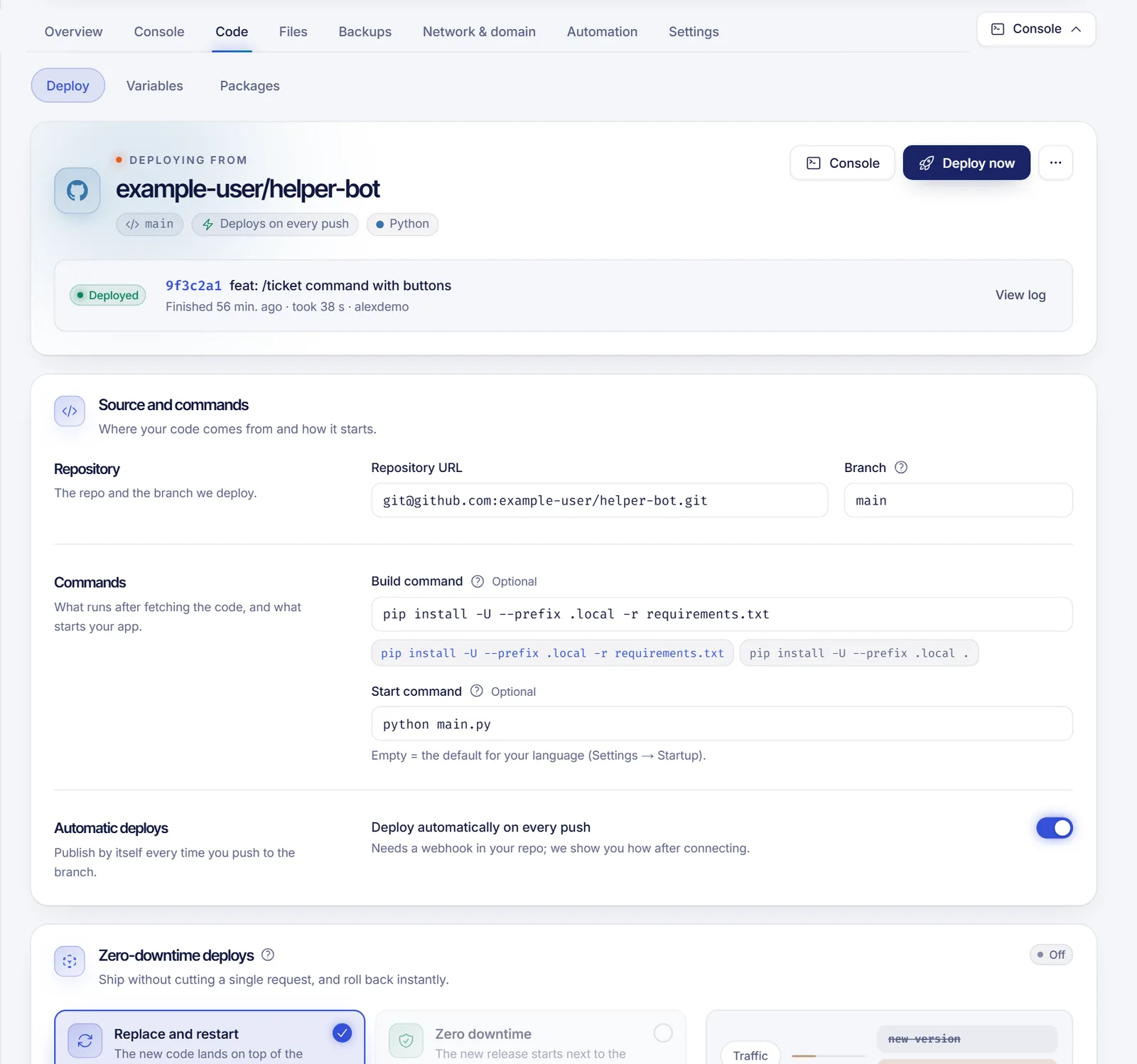
More on Git-based deploys in how to deploy a Node.js or Python app with Git.
Step 4: Keep it running
A host built for bots already keeps your process alive: it does not sleep when there is no traffic, there are no cold starts and a crashed process can be brought back automatically. If you run your own server instead, use a process manager:
- systemd unit with
Restart=always(generate one with the systemd and cron tool). - pm2 for Node.js.
- Docker with a restart policy.
Schedule a nightly restart if you want a clean slate; a cron entry in the panel does it.
Step 5: Read the logs
The live console shows your program's output as it happens, which is the first place to look when the bot is offline. Log connection errors and unhandled exceptions explicitly:
Invalid token: the token is wrong or was regenerated.Disallowed intents: enable the intent in the portal.Missing AccessorMissing Permissions: the bot's role in your server lacks a permission.
Step 6: Plan for growth
Discord requires larger bots to shard, splitting the work across several connections, once they reach a very large number of servers. A small bot will not need it for a long time, but pick a library that supports it and avoid keeping state in memory that you cannot lose. Use a database for anything that matters; programming plans can create MySQL databases from the panel.
Security checklist
- Token in an environment variable, never in code.
.envin.gitignore.- Least-privilege bot permissions, not Administrator by default.
- Validate input from commands before running anything with it.
- Update dependencies regularly.
FAQ
Can I host a Discord bot for free?
You can experiment on free tiers, but most go to sleep when idle, so a bot drops offline. For a bot people rely on, a paid always-on plan is more reliable.
Do I need to open a port?
No. Bots connect out to Discord. You only need ports for a web dashboard or webhooks.
Node.js or Python?
Use what you know. Both have mature libraries (discord.js and discord.py). Node.js is common for bots that share code with a web dashboard; Python is popular for data-heavy bots.
How much RAM does a bot need?
Small bots run comfortably in a few hundred megabytes. Bots that cache many servers or process media need more; watch usage in the panel.
Why does my bot disconnect randomly?
Check the logs first. Frequent causes are an unhandled exception, memory pressure or rate-limit errors.
Put your bot online
If you want a console, restarts, Git deploys and databases ready, see programming hosting, with dedicated pages for Node.js and Python. Need more control? Look at a VPS. The docs cover the panel in detail.